 Owner’s manual
 Error Codes




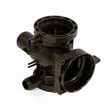
Do LG washers have a filter that needs to be cleaned?
Yes. The LG WM3270CW front-load washer has a cleanable drain pump filter behind the small access cover at the lower front of the cabinet; cleaning it periodically helps prevent slow draining, odors, and drain-related error codes. See the steps in the WM3270CW manual.
Where the filter is on WM3270CW
On this model, the filter is part of the drain pump assembly area:
- Open the small access cover at the bottom front of the washer
- Inside, you’ll find a short drain hose (for emergency draining) and the drain pump filter cap
- The filter traps lint, coins, hair pins, and other debris before it reaches the drain pump
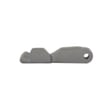
If the access cover is missing or damaged, the replacement is washer drain pump filter access cover MBL62818307.
How to clean the drain pump filter (safe, quick routine)
- Turn the washer off and unplug it.
- Place a shallow pan and towels under the access area.
- Pull out the small drain hose and remove the plug to drain remaining water.
- Twist the filter cap counterclockwise and remove it.
- Rinse the filter and clean the housing opening; remove debris.
- Reinstall the filter cap firmly, reinstall the drain hose plug, and close the cover.
Suggested cleaning frequency
| Usage pattern | Recommended filter check/cleaning |
|---|---|
| Heavy use (daily loads, pets) | About once a month |
| Typical household use | Every 2 to 3 months |
| After a “won’t drain” event | Clean immediately |
When a “filter cleaning” turns into a parts issue
A clogged filter is common, but if the washer still won’t drain after cleaning, these model-compatible parts are often involved:
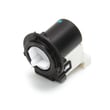
- Drain pump not running or noisy: drain pump motor (4681EA2001T) - washer part by LG electronics 4681EA2001T
- Drain hose kinked, leaking, or restricted: washer drain hose 5215ER2002G
- Plug won’t seal or is damaged (leaks at the drain hose): washer drain pump filter drain hose plug 5006EN3015A
Why it matters
On the WM3270CW, the drain pump filter is the first place we check for “won’t drain,” slow drain, and musty smell complaints. Keeping it clear reduces strain on the drain pump and helps the washer finish cycles normally.
Last updated: January 2026
How many years does a LG washing machine last?
We can’t confirm an exact “expected lifespan” in years for the LG WM3270CW from model-specific documentation; LG’s owner information focuses on safe use, maintenance, and warranty terms rather than a guaranteed service-life estimate. In practice, how long it lasts depends heavily on use, installation, and upkeep.
What we can confirm for WM3270CW
The model documentation provides warranty coverage details and maintenance guidance, but it does not state a typical lifespan.
| Item | What it tells you | What it does not tell you |
|---|---|---|
| Warranty terms | Which components are covered and for how long | How many total years the washer will last |
| Maintenance schedule | How to reduce wear and prevent common problems | A guaranteed “replace at X years” timeline |
For the exact maintenance and operating guidance for this washer, use the WM3270CW owner’s manual.
Biggest factors that shorten washer life
- Overloading the drum or consistently washing very heavy items
- Using non-HE detergent or using too much detergent (excess suds and residue)
- Skipping routine cleaning (tub, door seal, dispenser drawer)
- Poor leveling or installation issues that cause repeated vibration
- Hard-water mineral buildup and clogged inlet screens
Maintenance habits that typically extend life
These steps are specifically called out in the WM3270CW care sections and help reduce strain on the motor, pump, and seals:
- Run the Tub Clean cycle monthly
- Wipe the door seal area and leave the door slightly ajar between loads
- Clean the detergent dispenser drawer periodically
- Clean the water inlet filters if filling slows
- Clean the drain pump filter if draining slows or you see drain-related symptoms
When repairs start to make more sense than “waiting it out”
If you’re seeing repeated draining or leaking symptoms, addressing them early can prevent secondary damage. For example, a weak or noisy drain system may point to the drain pump motor 4681EA2001T.
Why it matters
Washers usually fail sooner from preventable stress (suds buildup, vibration, restricted draining) than from simple age. Following the WM3270CW maintenance steps helps keep performance steady and reduces the chance of major repairs.
Last updated: January 2026
What are common problems with the WM-3270CW?
On the LG WM3270CW washer, the most common issues we see are draining problems, leaks, filling problems, door lock or door-closing problems, and “won’t start” symptoms. Many of these trace back to installation (hoses, drain height), routine maintenance (filters), or a few key components.
Most common symptoms (and what they usually point to)
- Won’t drain / drains slowly: clogged drain pump filter, kinked drain hose, or a failing drain pump motor
- Leaking: loose inlet hose connections, drain hose issues, or door boot (gasket) sealing problems
- Won’t fill / fills slowly: clogged inlet screens, low water pressure, or a failing water inlet valve
- Door won’t lock / won’t start: door lock or strike alignment, or a door lock failure
- Detergent or softener not dispensing well: buildup in the dispenser path or a dispenser hose restriction
For model-specific operating and maintenance steps (including cleaning the drain pump filter and inlet filters), use the WM3270CW owner’s manual.
Quick checks you can do first (no parts needed)
- Confirm the washer is level and not rocking; vibration can trigger drain and spin issues.
- Check the drain hose height and routing; a pinched hose can mimic a pump failure.
- Clean the drain pump filter and remove coins, lint, and debris.
- Clean the water inlet filters at the back of the washer if filling is slow.
- Use HE detergent only and avoid overdosing; excess suds can cause long cycles and drain complaints.
Parts that commonly solve these problems
If troubleshooting points to a failed component, these are common replacements for this model:
| Symptom | Likely part | What it does |
|---|---|---|
| Won’t drain / loud buzzing while draining | Drain pump motor (4681EA2001T) - washer part by LG electronics 4681EA2001T | Pumps water out during drain and spin |
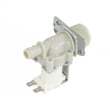
| Won’t fill / fills slowly | LG washer water inlet valve 5221ER1003A | Opens to let hot/cold water into the washer |
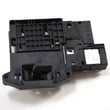
| Door won’t lock or washer won’t start | LG washer door lock EBF61315802 | Confirms door is locked so the cycle can run |
Why it matters
Drain, fill, and door-lock problems can stop a cycle mid-wash, leave water in the tub, or cause leaks that damage flooring. Catching clogs early and keeping filters clean helps prevent repeat failures and unnecessary part replacements.
Last updated: January 2026
What are the common errors on an LG washing machine?
On the LG WM3270CW washer, the most common “errors” customers run into are the display’s error messages tied to load balance, water fill, draining, door lock, and excessive suds. The exact code letters can vary by version, so we recommend confirming the message list in the WM3270CW use & care manual.
Common error-message situations on WM3270CW
These are the most frequent categories called out in the model’s troubleshooting guidance:
- Out-of-balance load: Items gather on one side; the washer can’t spin smoothly.
- Water not filling or low water pressure: Faucet off, frozen supply, kinked hose, or clogged inlet filter.
- Water line leak at connections: Loose or mis-threaded hose connections.
- Door not secured: Door not fully closed or a lock issue.
- Slow drain or no drain: Drain hose routing, clogs, or a blocked drain pump filter.
- Power interruption: Cycle stops after a power failure.
- Too many suds: Washer adds a suds-reducing routine; often caused by too much detergent or non-HE detergent.
Quick checks we recommend first
Try these WM3270CW-SAFE steps before assuming a failed component:
- Turn the washer off, then back on; retry the cycle.
- Redistribute the load; avoid washing single heavy items alone.
- Verify both hot and cold faucets are fully open.
- Inspect inlet hoses for kinks; clean inlet screens/filters if flow is weak.
- Clean the drain pump filter and confirm the drain hose isn’t pinched.
- Use only HE detergent; reduce the amount if you see excess suds.
When a part is commonly involved
If the same message returns after the checks above, these parts are often related:
| Symptom category | What it affects | Example part for this model |
|---|---|---|
| Draining problems | Pumping water out of the tub | Drain pump motor (4681EA2001T) - washer part by LG electronics 4681EA2001T |
| Filling problems | Letting water into the washer | LG washer water inlet valve 5221ER1003A |
| Door won’t lock/close errors | Door lock sensing and latch | LG washer door lock EBF61315802 |
Why it matters
Error messages help protect the washer from leaks, overheating, and out-of-balance spin damage. Addressing the underlying cause quickly can prevent repeat shutdowns and reduce wear on the drain pump, inlet valve, and door lock.
Last updated: January 2026





