Installation guide
 Owner’s manual
 Error Codes




Do Frigidaire refrigerators last?
Yes. Frigidaire refrigerators typically last 10 to 15 years, and your Frigidaire PHSC39EGSS0 can reach the high end of that range with steady maintenance like keeping airflow clear, maintaining tight door seals, and following the care steps in the PHSC39EGSS0 owner's manual.
What affects how long a PHSC39EGSS0 lasts
A refrigerator’s lifespan is mostly driven by heat load, airflow, and how hard the sealed system has to work.
- Keep cold air vents unblocked so the fan can circulate air properly
- Open doors less often; warm air makes the unit run longer
- Keep the refrigerator level so doors close and seal correctly
- Clean or replace worn seals; air leaks force longer run times
- Give temperature changes time; allow about 24 hours for settings to stabilize
Quick maintenance checklist (high impact)
Use this as a simple routine to extend compressor and fan life.
| Task | How often | Why it helps |
|---|---|---|
| Check door closing and seal contact | Monthly | Prevents warm air leaks and long run times |
| Keep vents clear inside both compartments | Weekly | Maintains proper circulation and even temps |
| Replace the water filter (if equipped/used) | About every 6 months | Protects water flow and dispenser performance |
| Confirm temps after adjustments | Next day | Prevents overcooling and unnecessary run time |
Parts that commonly support long-term performance
These are common wear items that help the refrigerator run efficiently when kept in good shape.
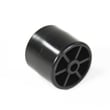
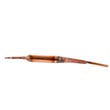
- Refrigerator defrost bi-metal thermostat 5303918214 (helps prevent frost issues that restrict airflow)
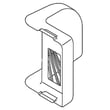
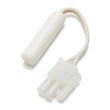
- Refrigerator sensor 240597220 (supports accurate temperature control)
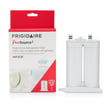
- Frigidaire puresource2 refrigerator water filter WF2CB (helps maintain dispenser water quality and flow)
Why it matters
When airflow is restricted or a door seal leaks, the refrigerator runs longer to hold temperature. That extra run time increases wear on key components like the compressor, evaporator fan, and defrost system, shortening overall life.
Last updated: February 2026
How do I clear the error code on my Frigidaire refrigerator?
On the Frigidaire PHSC39EGSS0, you clear most error-like messages by correcting the condition that triggered the alert, then using the control panel to reset alarms. Start with the Alarm Reset button; if the temperature displays keep flashing, the refrigerator is reporting a performance problem that needs diagnosis.
What to do first (PHSC39EGSS0)
- Press Alarm Reset to turn off an active alarm.
- If the alarm system was turned off, press and hold Alarm Reset for 3 seconds to reset (activate) the alarm system.
- If you see a power failure indication, press Alarm Reset to turn off the alarm, then press it again to reset.
- If both temperature displays are continuously flashing, treat it as a performance alert and arrange service.
Quick reset checklist
- Make sure both doors are fully closed and sealing.
- Press Alarm Reset once.
- Restore normal temperatures; after a restart or warm event, allow 8 to 12 hours for the refrigerator to cool completely.
- Keep food from blocking air vents so temperatures stabilize normally.
Common display and alarm situations
| What you notice | What it usually means | What clears it |
|---|---|---|
| Alarm sounding or active | Door left open, high temp, or other alarm condition | Correct the cause, then press Alarm Reset |
| Power failure indication | A power outage was detected | Press Alarm Reset to turn off, press again to reset |
| Both temperature displays flashing | Control detected a performance problem | Service diagnosis after basic checks |
Why it matters
Resetting the alert without fixing the cause lets temperatures drift, which leads to spoiled food, longer run times, and repeat alarms.
For model-specific control behavior and alarm details, use the PHSC39EGSS0 owner’s manual. For code definitions and troubleshooting steps, use Frigidaire refrigerator error codes.
Last updated: February 2026
How to reset a Frigidaire refrigerator?
To reset your Frigidaire PHSC39EGSS0 side-by-side refrigerator, we recommend a simple power reset first: unplug the refrigerator (or switch off the breaker) for about 5 minutes, then restore power. For alarm-related resets, use the Alarm Reset button described in the PHSC39EGSS0 owner's manual.
Quick reset options (most common)
- Power reset (best first step): Unplug for ~5 minutes, then plug back in.
- Alarm reset: Press Alarm Reset to silence an alarm; for some alarm functions you press again to reset.
- Cooling system On/Off reset: Press and hold the Cooling System On/Off button for 3 seconds to toggle cooling off or on.
- After changing temperature settings: Give the refrigerator time to stabilize; temperature changes are not instant.
What the buttons actually reset on this model
On the PHSC39EGSS0, the control panel includes a Cooling System On/Off button and an Alarm Reset button. These do different jobs.
| Action | What it affects | When to use it |
|---|---|---|
| Power reset | Reboots the control board | Glitches, after a power event, odd display behavior |
| Alarm Reset button | Silences and resets alarm conditions | Door ajar, high temp, power failure alarm |
| Cooling System On/Off (hold 3 sec) | Turns refrigeration cooling off/on | Cleaning, moving the unit, service situations |
Why it matters
A “reset” can mean different things: rebooting the electronics, clearing an alarm, or turning cooling back on. Using the correct reset prevents warm temperatures, nuisance alarms, and unnecessary parts replacement.
If the temperature displays keep flashing
If both temperature displays continuously flash, the refrigerator is signaling a performance problem. We treat that as a diagnostic indicator (not a normal reset condition); follow the guidance in the PHSC39EGSS0 owner's manual for next steps.
Last updated: February 2026
How to troubleshoot a Frigidaire fridge?
For a Frigidaire PHSC39EGSS0 side-by-side refrigerator, we troubleshoot by confirming the cooling system is on, setting temperatures correctly, allowing 24 hours for changes to stabilize, and making sure airflow vents are not blocked. Flashing temperature displays point to a control-system performance problem.
Quick checks that solve most cooling complaints
- Verify the cooling system is turned on (the On/Off button must be held about 3 seconds).
- Adjust the refrigerator and freezer settings in 1 degree steps; wait 24 hours between changes.
- Do not overpack shelves; keep food from blocking cold-air vents.
- Confirm doors close fully and nothing is preventing a tight seal.
- Expect longer run times after heavy door opening or warm food loads; full cool-down typically takes 8 to 12 hours.
What the display and controls are telling you
If both temperature displays continuously flash, the electronic control system has detected a performance problem. Use the troubleshooting guidance in the PHSC39EGSS0 owner’s manual and record what you see on the display before service.
Temperature adjustment basics (what to do)
| Task | What we recommend | What to expect |
|---|---|---|
| Make it colder/warmer | Press the Up/Down button nearest the display in 1 degree steps | Display shows the new setting briefly, then returns |
| After changing settings | Wait before changing again | Temperatures stabilize in about 24 hours |
| Air circulation | Keep vents clear | More even temps in both compartments |
When to focus on parts and common failure areas
If temperatures drift, frost builds up, or cooling is uneven, these parts are often involved:
- Defrost system issues (example: refrigerator defrost bi-metal thermostat 5303918214).
- Airflow problems at the evaporator (ice buildup, noise, weak airflow).
- Temperature sensing problems (example: refrigerator sensor 240597220).
Why it matters
Correct settings and clear airflow prevent warm spots, food freezing in drawers, and excessive run time. Catching a flashing-display condition early also helps avoid extended temperature swings that can spoil food.
Last updated: February 2026
What does CF mean on a Frigidaire refrigerator?
On the Frigidaire PHSC39EGSS0, CF is a control-system fault indicator; it points to the refrigerator detecting a performance or communication problem in the cooling controls. Start by power-resetting the unit and checking for obvious airflow or temperature issues before moving to wiring or control checks.
What to do first (safe, quick checks)
- Reset power: unplug the refrigerator (or switch off the breaker) for 5 minutes, then restore power.
- Confirm cooling is on: make sure the cooling system was not turned off at the control panel.
- Check airflow: do not block interior air vents with food; restricted airflow can trigger control warnings.
- Watch the display: if temperature displays keep flashing along with CF, the control is still detecting a problem.
- Give it time after a reset: allow 8 to 12 hours for temperatures to pull down after power is restored.
Likely causes behind CF
CF commonly shows up when the control cannot reliably read sensors or communicate between components.
- Loose or damaged wiring harness connection at the user interface or main control
- Failing control board or user interface
- Temperature sensor (thermistor) out of range or intermittent
- Cooling performance issue that the control interprets as a fault (for example, poor airflow)
Troubleshooting path (what to check next)
| Check | What you are looking for | What it tells you |
|---|---|---|
| Power reset result | CF returns quickly | Ongoing control or communication issue |
| Air vents and loading | Vents blocked, overpacked shelves | Airflow problem affecting temperatures |
| Temperature stability | Temps drift, unit runs constantly | Cooling system struggling or sensor issue |
| Display behavior | Continuous flashing | Control detected a performance problem |
For control locations, button functions (including cooling on/off), and display behavior, use the PHSC39EGSS0 owner’s manual.
Why it matters
When CF is active, the refrigerator is telling you it cannot confidently manage temperatures. Addressing it quickly helps protect food temperatures and prevents longer run times.
Helpful DIY references
Last updated: February 2026
Why is my Frigidaire ice maker so slow?
On the Frigidaire PHSC39EGSS0 side-by-side refrigerator, “slow” ice is often normal production speed (about 8 cubes every 75 to 90 minutes) or it is caused by a warm freezer, restricted water flow (valve not fully open, kinked line), or a clogged water filter. See the PHSC39EGSS0 owner's manual for the expected ice rate and checks.
What “normal” ice production looks like
Your ice maker is designed to make ice steadily, not instantly.
| What you notice | What’s typical | What to do |
|---|---|---|
| New install or ice bin was empty | Can take about 2 days to fill the bin | Let it run; discard early discolored cubes |
| Ice seems slow between dumps | 8 cubes every 75 to 90 minutes | Confirm freezer temp and airflow |
| Not enough ice per day | About 4 to 5 lb per 24 hours (up to 6 lb depending on conditions) | Check water flow and freezer cooling |
Fast checks that fix most slow-ice complaints
- Make sure the ice maker power switch is On and the wire signal arm moves freely (do not use it as a manual shutoff).
- Confirm the household water shutoff valve is fully open.
- Inspect the water supply line for kinks, pinches, or freezing.
- If the water dispenser flow is slower than normal, replace the water filter; a restricted filter slows ice production.
- Keep food from blocking cold air vents so the freezer can freeze the mold quickly.
- If the freezer was recently adjusted, allow 24 hours for temperatures to stabilize.
Parts that commonly restore water flow
If your dispenser is slow or cubes are hollow/small, the filter is the first maintenance item to replace.
- Frigidaire puresource2 refrigerator water filter WF2CB (clogged media restricts flow to the ice maker and dispenser)
For step-by-step filter replacement, use how to replace the water filter in a Frigidaire refrigerator.
Why it matters
Ice makers depend on two things: cold enough freezer temperatures and steady water flow. When either one is marginal, the harvest cycle stretches out and daily ice output drops.
Last updated: February 2026
Why is my Frigidaire side by side freezer frosting up?
Freezer frost in your Frigidaire PHSC39EGSS0 almost always comes from warm, moist air leaking in or poor airflow inside the freezer. Start by confirming the door closes fully, the gasket seals all the way around, and food packages are not blocking the cold air vents (air circulation is required to maintain stable temperatures). See the PHSC39EGSS0 owner’s manual for vent locations and temperature control steps.
Quick checks that fix most frosting
- Make sure the freezer door closes completely and nothing is sticking out.
- Inspect the door gasket for gaps, tears, or areas that look flattened.
- Clean the gasket and the cabinet sealing surface with mild soap and warm water; dry fully.
- Check the ice chute area; clear any ice that prevents the chute door from closing.
- Rearrange items so they do not block interior vents (blocked vents reduce circulation).
- Adjust the freezer temperature 1 degree warmer if it is set very cold; wait 24 hours for temperatures to stabilize.
What to do if frost keeps returning
If the door is sealing and vents are clear but frost continues, the issue is usually in the defrost system (frost building on the evaporator cover, reduced airflow, warmer temps). A common service part in that circuit is the refrigerator defrost bi-metal thermostat 5303918214.
Symptoms guide
| What you notice | Most likely cause | What we recommend |
|---|---|---|
| Frost only near the door opening | Door not sealing, frequent openings | Clean/reshape gasket, reduce openings |
| Heavy frost on back wall, weak airflow | Defrost system problem | Check defrost components, schedule service if needed |
| Frost after power outage | Melt and refreeze cycle | Clear frost, monitor temps for 24 hours |
Why it matters
Frost buildup restricts airflow, so the refrigerator runs longer and temperatures swing. That can lead to soft ice cream, thawing food, and higher energy use.
Last updated: February 2026