Owner’s manual
 View engine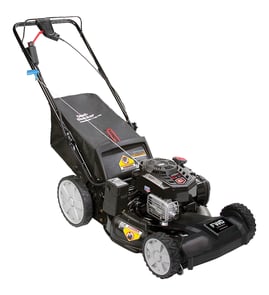




How old is my mower by serial number?
For a Craftsman rotary lawn mower model 917377540, the serial number is on a decal attached to the rear of the mower housing. The serial number itself does not reliably decode into an exact build date, so we use it to identify the correct parts and manual, then confirm age using purchase records or manufacturer date codes shown in documentation like the Craftsman 917377540 owner's manual.
Where to find the model and serial number
The manual specifies the location on this mower:
- Look on the rear of the lawn mower housing for the decal
- Record the model number (917377540) and serial number together
- Write down the date of purchase if you still have it
- Take a clear photo of the decal before it fades
How to estimate the mower’s age (practical methods)
Because serial formats vary, these steps give the most accurate result:
- Check your receipt, warranty registration, or service invoice for the purchase date
- Compare the mower’s configuration to the parts diagrams in the Craftsman 917377540 owner's manual
- If your serial label includes a date code (often 6 digits), read it as a possible MMDDYY or YYMMDD pattern
- If the engine has its own ID plate (common on walk-behind mowers), use that engine’s date code as a supporting clue
- If you are replacing wear items, match the exact parts used on your build (for example, the lawn mower mulching blade 532406713)
Quick reference: what the serial number is best for
| What you need | Serial number helps? | Best source |
|---|---|---|
| Identify correct parts list | Yes | Model + serial decal, parts diagrams |
| Confirm exact manufacture date | Sometimes | Date code on label or engine tag |
| Confirm “how old” in years | Indirectly | Purchase date and maintenance history |
Why it matters
Knowing the approximate age helps us choose the right replacement parts (blade, belt, control cable, wheels) and set realistic maintenance expectations for a gas walk-behind mower, especially when decals fade and parts change across production runs.
Last updated: January 2026
How to find Craftsman model number?
On the Craftsman rotary lawn mower model 917377540, the model and serial number are printed on a decal attached to the rear of the mower housing (rear of the deck). We use that model number to match the correct parts list, owner’s manual, and specifications.
Where to look on model 917377540
Check these common spots on the mower deck:
- Rear of the mower housing (most common on this model)
- Back edge of the deck, between the lower handle mounts
- Near the rear door area (bagging models)
- On a decal that may be partially covered by grass buildup
Quick tips to read the decal
If the sticker is dirty or faded, these steps usually help:
- Turn the engine off and let the muffler cool completely
- Brush off dry clippings first, then wipe with a damp rag
- Use a flashlight at a low angle to make faint printing easier to see
- Write down both the model number and serial number
- Record the purchase date if you still have it (helpful for maintenance tracking)
What the model number helps us match
| What you need | Why the model number matters |
|---|---|
| Parts diagrams | Ensures the right deck, drive, and handle parts for your exact build |
| Engine tune-up specs | Confirms items like spark plug type and blade bolt torque |
| Owner’s manual | Gives maintenance intervals, lubrication points, and safety info |
Why it matters
Craftsman walk-behind mowers can look similar across years, but small changes in the deck, self-propel drive, or engine setup can require different parts. Using the exact model number prevents ordering the wrong blade, belt, or control cable.
For model-specific identification and specs, use the 917377540 owner’s manual.
Last updated: January 2026
What are the most common issues with 917377540?
The most common issues we see on the Craftsman 917377540 walk-behind mower involve starting/running problems, weak self-propel drive, and poor cutting or bagging performance. Most of these trace back to routine maintenance items, drive system wear (belt, gears, cable), or a dull/damaged blade.
Common problems and what usually causes them
- Won’t start or runs rough: old fuel, dirty spark plug, incorrect engine oil level/type, restricted airflow.
- Self-propel won’t pull or slips: worn or stretched drive belt, loose/worn drive components, cable out of adjustment.
- Cuts unevenly or leaves strips: dull/bent blade, blade adapter wear, deck buildup, incorrect cutting height.
- Poor bagging or rear discharge clogging: wet grass, deck packed with clippings, bag overfilled, cutting too low.
- Vibration: bent blade, loose blade bolt, debris wrapped at the blade area.
Quick checks we recommend first (fast and safe)
- Shut the engine off and disconnect the spark plug wire before working near the blade.
- Confirm blade bolt torque is 35 to 40 ft-lbs (from the owner’s manual).
- Inspect the blade for damage; replace if bent or heavily nicked (use the correct lawn mower mulching blade 532406713).
- Check the self-propel drive for belt wear or glazing (common wear item: belt 532157769).
- Verify the drive/control cable moves freely and isn’t kinked (see control cable 532168552).
Specs that help with troubleshooting (model 917377540)
| Item | Specification |
|---|---|
| Engine power | 6.5 horsepower |
| Gas capacity/type | 1.6 quarts, unleaded regular |
| Engine oil type | SAE 30 (above 32°F); SAE 5W-30 (below 32°F) |
| Engine oil capacity | 20 oz |
| Spark plug | Champion RJ19LM or J19LM; gap 0.030 in |
Why it matters
On a power-propelled rotary mower like the 917377540, small wear items (belt, cable, blade, fasteners) directly affect safety and performance. Keeping the blade tight and sharp and the drive system adjusted prevents vibration, poor cut quality, and premature gear wear.
Last updated: March 2026