 Owner’s manual


What is the life expectancy of a GE washing machine?
A GE washing machine typically lasts 10 to 14 years. For your GE GTW680BSJ3WS top-load washer, lifespan depends most on load size, how often you run cycles, and routine maintenance like replacing fill hoses on schedule and keeping the tub and dispenser clean (see the owner's manual).
Typical lifespan and what changes it
- Normal household use: 10 to 14 years
- Heavy use (large family, daily loads): tends toward the lower end
- Good maintenance and correct loading: pushes lifespan toward the higher end
- Hard water and frequent overloading: shortens component life (valves, pumps, bearings)
Maintenance that extends washer life
The GTW680BSJ3WS manual calls out a key interval: replace water supply hoses every 5 years to reduce the risk of hose failure and water damage.
- Replace hot and cold fill hoses every 5 years
- Turn off water faucets when not in use (helps reduce leak risk)
- Use the right detergent amount (too much can cause residue and odors)
- Avoid overloading; keep loads balanced to reduce suspension wear
- Run periodic cleaning cycles and wipe the lid and rim dry
Parts that commonly affect “end of life” symptoms
When a washer is nearing the end of its useful life, problems often trace to a few high-wear systems.
| Symptom | Common system involved | Example part on this model page |
|---|---|---|
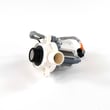
| Won’t drain, stops mid-cycle | Drain system | Washer drain pump assembly WH23X28418 |
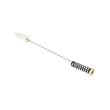
| Loud banging, walking, off-balance | Suspension | Washer suspension rod and spring assembly WH16X26911 |
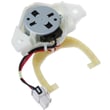
| Won’t spin or shifts poorly | Drive/shifting | Washer shifter WH03X30517 |
Why it matters
Knowing the typical 10 to 14 year lifespan helps you decide whether to repair or replace. If your GTW680BSJ3WS is within that range, replacing a targeted part (pump, shifter, suspension) often restores reliable performance for years.
You can order replacement parts for your GTW680BSJ3WS from the parts list for this model, or search by model number on Sears PartsDirect.
Last updated: February 2026
Where is the reset button on GE washer?
GE washers such as model GTW680BSJ3WS typically do not have a dedicated physical reset button. For a basic electronics reset, we unplug the washer for 2 minutes, plug it back in, then press Start; this clears many control glitches and “won’t operate” situations.
Quick reset options that work on GTW680BSJ3WS
Try these in order:
- Power reset: Unplug for 2 minutes, plug back in, press Start.
- Pause restart: If the cycle is paused, press Start again to resume.
- Lid reset: Open the lid, close it, then start a new cycle (helpful if “Lid” shows).
- Wait out lockout: If the display scrolls “CAnCELEd,” wait 4 minutes for the control lockout to end, then restart.
- Water supply check: Turn both hot and cold faucets fully on if “H2O SUPPLY” appears.
For the exact display messages and what they mean on this model, use the GTW680BSJ3WS owner's manual.
What “reset” means on this GE top-load washer
On GTW680BSJ3WS, “resetting” usually means restoring the control to a responsive state after a pause, lid event, power interruption, or an error stop.
| Symptom on display | What it usually indicates | What we do first |
|---|---|---|
| PAUSE | Cycle paused by Start/Pause | Press Start |
| Lid | Lid open, or 3 cycles started without opening lid | Open and close lid, then start |
| CAnCELEd | Cycle stopped or paused too long; control lockout | Wait 4 minutes |
| H2O SUPPLY | Washer cannot sense water level | Turn on faucets; check hoses |
When a “reset” points to a part problem
If the washer powers on but still will not start, fill, drain, or unlock after the steps above, a failed component is more likely than a control glitch.
Common parts tied to “won’t start” or “won’t drain” symptoms include:
- Washer lid lock WH08X37938 (lid must lock for spin on many cycles)
- Washer water inlet valve assembly WH13X26637 (no fill or slow fill)
- Washer drain pump assembly WH23X28418 (won’t drain, standing water)
You can order model-matched replacement parts from the parts list for GTW680BSJ3WS, or search by model on Sears PartsDirect.
Why it matters
Using the correct reset method prevents unnecessary part replacement and avoids restarting built-in timers (like the 4-minute lockout). It also helps you match the symptom to the right system: lid lock, water fill, or drain.
Last updated: February 2026
How do I find the model number on my GTW680BSJ3WS?
On the GE washer model GTW680BSJ3WS, the model and serial number label is located under the washer lid. Lift the lid and look along the underside area for the tag; then write down the model and serial exactly as shown (including any letters).
Where to look (quick checklist)
- Open the washer lid fully
- Look under the lid for a printed label or sticker
- Check near the rim of the opening (top edge of the cabinet)
- Use a flashlight if the label is hard to see
- Copy the model number and serial number character-for-character
What the label typically includes
| Item on label | What it’s used for |
|---|---|
| Model number (GTW680BSJ3WS) | Matching the correct GE washer parts and diagrams |
| Serial number | Identifying the production run for service and warranty records |
Why it matters
Using the exact model number prevents ordering the wrong parts for your washer. Even small model-number differences can change which components fit, such as a washer lid lock WH08X37938 or washer drain pump assembly WH23X28418.
Tip for confirming you wrote it correctly
- Match letters and numbers carefully (for example, 0 vs O, 1 vs I)
- Take a clear photo of the label for reference
- Use the model number when checking diagrams and procedures in the owner's manual
Last updated: March 2026


