Owner’s manual
 View engine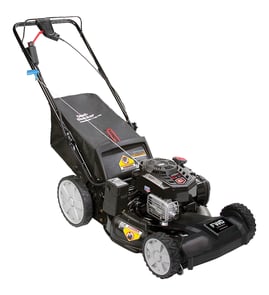




How to read a Craftsman mower serial number?
For Craftsman walk-behind mower model 247370001, read the serial number from the mower’s product ID label on the mower deck or frame (not the engine label). The serial number format varies by production run; use the label fields shown in the 247370001 owner's manual to identify what each group of characters means.
Where to find the serial number label
On most Craftsman walk-behind mowers, the product ID label is on the mower, not on the engine shroud.
Common locations to check:
- Rear of the deck near the discharge opening
- Top of the deck housing (above the blade area)
- Near the handle mounting brackets
- Rear skirt area
- Side of the deck near the wheel height adjuster
How to interpret what you see
Start by writing down every character exactly as printed, including dashes and letters. Then compare it to the label format shown in the manual.
Use these checks:
- Confirm the model number on the tag matches 247370001 exactly
- Look for separate fields such as Model, Serial, and sometimes DOM (date of manufacture)
- If the serial includes a date-style block, read it as a date only when the label indicates a date code
- If the serial is letters plus numbers, treat it as a production sequence unless the label calls out a date
Quick comparison table
| What you see on the label | What it usually indicates | What to do next |
|---|---|---|
| Separate “DOM” or “Date” field | Build date | Use that field for the date |
| 6 digits inside the serial | Sometimes a date-style code | Confirm the order using the manual’s label example |
| Letters + numbers | Production/lot sequence | Use it for identification, not as a calendar date |
Why it matters
The serial number helps match the correct parts configuration for deck components, handle hardware, and control cable routing so replacement parts fit your exact 247370001 build.
Last updated: January 2026
What are the most common issues with 247370001?
For the Craftsman 247370001 walk-behind mower, the most common problems are no-start or stalling, poor cut quality, and discharge or mulching issues. These usually trace to routine wear items, cable/handle controls, or deck and chute components; use the 247370001 owner's manual for model-specific checks and adjustments.
Most common symptoms and what typically causes them
- Won’t start or starts then dies: old fuel, dirty air filter, fouled spark plug, carburetor varnish, or a misadjusted/dragging zone control (operator presence) cable.
- Uneven cut or vibration: bent/dull blade, debris packed under the deck, or a worn blade adapter.
- Poor mulching or clumping: blade wear, wet/tall grass, or a mulching plug/door not sealing.
- Grass not discharging well: clogged deck, damaged side chute deflector, or a stuck mulching door.
- Handle/control issues: loose handle hardware or a stretched/binding control cable.
Quick checks we recommend (in order)
- Drain and replace old gasoline; use fresh fuel.
- Inspect and replace the spark plug if fouled.
- Clean the underside of the 21-in deck housing after the engine cools.
- Check the blade for damage; replace if bent or badly worn.
- Verify the control bar fully engages and releases; adjust or replace the cable if it drags.
Parts that commonly solve these issues on model 247370001
| Symptom | Commonly involved part | What it affects |
|---|---|---|
| Vibration, poor cut | 21-in deck mulching blade 942-0741A | Cut quality and balance |
| Vibration, blade won’t stay tight | Blade adapter 748-0376E | Blade mounting and drive fit |
| Won’t keep running when handle is held | Zone control cable 946-04661A | Engine stop/kill control |
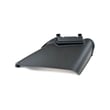
| Discharge problems | Side chute deflector 731-07486 | Side discharge direction and safety |
| Mulching performance | Mulching plug assembly 987-02516A | Seals discharge for mulching |
Why it matters
These issues are usually progressive: a worn blade or clogged deck reduces airflow, which hurts cut quality and can overload the engine. Keeping the blade, deck, and control cable in good shape improves starting, safety, and mowing results.
Last updated: March 2026
Where is Craftsman's model number?
On a Craftsman walk-behind mower like model 247370001, the model number is typically on the mower’s deck housing or rear discharge area on a sticker or metal tag. For exact label locations and diagrams, use the 247370001 owner's manual.
Common places to check on model 247370001
Look for a white/silver sticker, a stamped plate, or a tag near these areas:
- Top of the mower deck, near the engine mounting area
- Rear of the deck by the rear skirt and discharge opening
- Side of the deck near the side chute deflector mounting points
- Handle support area (near the lower handle attachment points)
- Under the deck lip (wipe off grass buildup to see the label)
What the model number looks like (and what it is not)
The mower model number and the engine model number are different. Use this quick guide:
| You are looking at | What it identifies | Where it’s found |
|---|---|---|
| Mower model number (example: 247370001) | The Craftsman mower and its parts diagrams | Deck or rear discharge area |
| Engine model/type/code | The engine and engine-specific parts | On the engine shroud, valve cover area, or stamped on the engine |
Tips to find it fast
- Clean the deck label area with a damp rag; dried clippings hide the tag.
- Use a flashlight and look at a low angle to spot stamped numbers.
- Write down the full model number exactly; it drives the correct parts match.
Why it matters
The mower model number (247370001) is what we use to match the correct Craftsman walk-behind mower parts like wheels, cables, and blades. The engine numbers are used for engine-only items like carburetor or ignition parts.
Last updated: January 2026