Owner’s manual
 View engine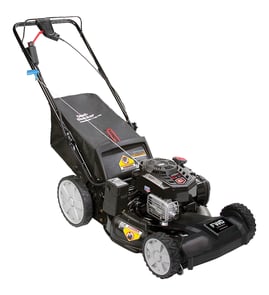




Where is the serial number on a Poulan Pro?
On the Poulan PR55R621CA walk-behind mower, the model and serial number are printed on the mower’s model/serial tag on the deck (the main mower housing), typically near the rear of the unit by the handle brackets. Use the number exactly as shown when ordering parts or looking up service info in the PR55R621CA operator’s manual.
Where to look on the mower
Check these common tag locations on a Poulan walk-behind rotary mower:
- Top of the deck near the rear discharge area
- Rear of the deck near the lower handle mounting points
- Side of the deck near the height adjuster area
- Under the grass bag flap (rear bagging models)
- Near the engine mounting area on the deck (less common)
Quick steps to find it fast
- Shut the engine off and let the muffler cool completely.
- Remove the grass bag (if equipped) and look at the rear deck panel.
- Look along the left and right rear corners where the handle bolts to the deck.
- Wipe dirt off the tag; use a flashlight to read stamped or printed characters.
What you should write down
Record these items exactly (including dashes and letters):
| Item | What it’s used for |
|---|---|
| Model number (example: PR55R621CA) | Ensures diagrams and parts lists match your mower |
| Serial number | Identifies production run for correct part variations |
| Engine model/type/code (on engine shroud) | Helps match engine parts like carburetor or ignition |
Why it matters
Poulan mowers can have small part changes by serial range. Using the correct model and serial number helps us match the right blade adapter, drive belt, control cable, and hardware the first time.
Last updated: February 2026
How old is my lawn mower by serial number?
On the Poulan PR55R621CA, the mower’s serial number can include a date code, but the exact format varies by engine and production run. We use the model’s identification labels plus the date-code guidance in the PR55R621CA operator’s manual to narrow down the build timeframe.
Where to find the numbers that matter
Look in these common locations before decoding anything:
- Mower deck or rear housing (model and serial label)
- Handle support area (sticker or stamped tag)
- Engine shroud (engine model and engine code)
- Under the grass discharge guard area (sometimes a secondary label)
- Paperwork from purchase or service (often lists serial)
How to decode the serial number (practical approach)
Because Poulan mowers often use a mower serial plus a separate engine code, we decode in this order:
- Confirm the mower model is PR55R621CA (don’t decode using a different model’s chart).
- Record the full serial number exactly (letters and numbers).
- Record the engine identification from the engine decal (manufacturer and type). The manual notes the engine decal identifies the engine maker and type.
- Match the date code to the correct system (mower label vs. engine label). Many “MMDDYY” or “YYWW” style codes are engine-based.
Common date-code patterns you may see
| Code style | What it usually means | Example interpretation |
|---|---|---|
| MMDDYY | Month, day, year | 011504 = Jan 15, 2004 |
| YYWW | Year, week of year | 0415 = 2004, week 15 |
| WWYY | Week of year, year | 1504 = week 15 of 2004 |
Why your “1504” reading can be confusing
A code like 1504 is commonly read as week 15 of 2004 (not “January 150, 04”). If you also see 0115 nearby, that can point to January 15. Using both the mower label and the engine label is the fastest way to land on the correct year.
Why it matters
Knowing the build year helps us match the right blade, drive parts, and hardware for your PR55R621CA, especially for wear items like the lawn mower ground drive belt 532166060 and blade-related components.
Last updated: February 2026
What are common self-propelled mower problems?
On the Poulan PR55R621CA, most self-propelled problems come from the drive control not fully engaging, drive wheels not turning under load, or a worn drive system (belt, pulleys, or adapter parts). Start by confirming you are using the correct drive-control steps in the PR55R621CA owner's manual.
Most common symptoms and what they usually mean
- Mower will not pull itself: drive control is not engaging, drive wheels are not turning, or the belt is slipping.
- Moves, then stops: drive control cable out of adjustment, belt worn, or debris binding the drive.
- Weak or slow drive: belt wear, pulley wear, or heavy grass load.
- Jerky drive: belt glazing, pulley issues, or inconsistent cable tension.
- Drive works only when lifting the front wheels: technique and traction; the manual notes lifting the front wheels slightly when turning to keep drive engaged.
Quick checks we recommend (in order)
- Confirm correct control operation: hold the operator presence control bar down; then engage the drive control as described for your drive type (front-wheel or rear-wheel) in the manual.
- Inspect the drive control cable for kinks, binding, or a stretched inner wire; a cable that does not pull far enough will not fully engage the drive.
- Check the ground drive belt for cracking, glazing, or looseness; replace if worn (a common cause of “won’t move”).
- Look for grass and debris buildup around the belt path, pulleys, and wheels; buildup can cause slipping and drag.
- Check blade and blade adapter condition; abnormal vibration or a loose/broken adapter can indicate impact damage that also affects drive components.
Parts that commonly relate to self-propelled issues
| What you notice | Likely area | Example part for this model |
|---|---|---|
| No forward motion with drive engaged | Belt/drive system | Lawn mower ground drive belt 532166060 |
| Drive engagement feels inconsistent | Cable/controls | Lawn mower zone control cable 532133107 |
| Drive slips or squeals | Pulleys/belt wear | Husqvarna lawn mower idler pulley 532166042 |
Why it matters
A slipping belt or misadjusted control can quickly overheat and wear the drive system. Fixing the root cause restores traction, protects pulleys and bearings, and helps the mower maintain a consistent walking speed in thick grass.
Last updated: February 2026