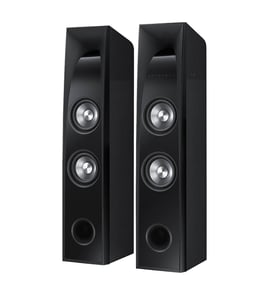

Can a Sony Bluetooth speaker be repaired?
Yes. A Sony speaker system like the Sony SA-VA3 can usually be repaired, but the right fix depends on whether the problem is power, charging, audio output, or a damaged connection. We recommend basic troubleshooting first, then component-level testing if the issue persists.
What you can try first (no parts needed)
- Power-cycle the unit: unplug it for 5 minutes, then reconnect.
- Verify the outlet and power strip work with another device.
- Check all audio cables for a loose fit, bent plug, or frayed insulation.
- Test with a different input source (phone, TV, receiver) and a different cable.
- If it has a remote or control pod, check for stuck buttons and clean around them.
Common repairable problems on speaker systems
Many “dead speaker” complaints come from a few repeat issues:
- Blown fuse or failed power supply components
- Broken or damaged wires inside the cabinet
- Loose solder joints at the input jack or amplifier board
- Failed speaker driver (no sound, rattling, scraping)
- Protection mode triggered by a shorted speaker lead
Quick checks and what they point to
| Symptom | Most likely cause | Best next step |
|---|---|---|
| No power at all | Outlet issue, fuse, power supply | Test outlet, then check fuse and power path |
| Powers on, no sound | Input/cable issue, amp fault | Swap source/cable, then test amp output |
| Distorted or rattling sound | Damaged driver, loose mounting | Inspect driver, tighten fasteners, test driver |
| Sound cuts in/out | Loose jack, cracked solder, wire break | Inspect jacks and internal wiring |
How we recommend testing safely
Unplug the speaker system before opening any panels. If you’re comfortable using a meter, use these guides to pinpoint the failure:
- How to tell if a fuse is blown
- How to use a multimeter to test electrical parts video
- How to repair broken or damaged wires video
Why it matters
Accurate diagnosis prevents replacing the wrong component and helps avoid repeat failures (for example, a shorted wire can blow a replacement fuse again). A few targeted tests usually identify whether the issue is in the power path, amplifier section, or speaker driver.
Last updated: February 2026
How many watts is the Sony SA-VA3 subwoofer?
The wattage for the subwoofer in the Sony SA-VA3 speaker system depends on the exact subwoofer/amplifier configuration used with your set. For accurate watts (RMS) and impedance, match the rating label on the subwoofer or powered bass unit to the correct specs before ordering parts or troubleshooting.
Where to find the wattage rating
Check these spots first; they give the most reliable, model-specific numbers:
- The rear label on the subwoofer or powered bass unit (often lists power consumption, output power, and impedance)
- The amplifier/control unit label (some systems rate subwoofer power at the amp)
- The speaker terminal area (may list ohms and channel assignment)
- Any included spec sheet that came with the system packaging
Quick troubleshooting if bass seems weak
If you are asking because the subwoofer output feels low, these checks usually pinpoint the cause:
- Verify the subwoofer level setting (if your system has a sub level control)
- Confirm the correct input and cable seating (loose RCA or speaker wire reduces output)
- Inspect for damaged wires or intermittent connections
- Listen for distortion or rattling (can indicate a failing driver or loose cabinet)
- Test with a different source at the same volume to rule out a low-level recording
For safe electrical testing steps, use our guide: how to use a multimeter to test electrical parts video.
Typical wattage ranges (for context)
We use this as a practical reference when comparing systems, not as a guaranteed SA-VA3 spec.
| Speaker system type | Typical subwoofer power range | Notes |
|---|---|---|
| Compact home theater-in-a-box | 30 to 150 W RMS | Often rated with higher “peak” numbers |
| Powered subwoofer (mid-size) | 100 to 300 W RMS | Common for bass-reflex designs |
| Larger powered subwoofer | 300 W+ RMS | Usually larger driver and cabinet |
Why it matters
Wattage and impedance affect how the subwoofer matches the amplifier, how loud it can play cleanly, and which replacement components are compatible. Using the rating label helps prevent mismatched parts and repeat failures.
Last updated: February 2026
What are the parts of the speaker?
A typical speaker in the Sony SA-VA3 speaker system is built from a moving cone assembly driven by a voice coil in a magnetic gap, all supported by a frame and suspension parts that keep the cone centered. These components work together to turn an audio signal into sound.
Main parts you will see in most speakers
- Cone (diaphragm): The lightweight surface that moves air to create sound.
- Voice coil: A coil of wire attached to the cone; it moves when current flows through it.
- Magnet and pole pieces: Create the magnetic field the voice coil moves within.
- Surround: Flexible outer ring that lets the cone move while sealing the edge.
- Spider: Inner suspension that centers the voice coil and controls cone travel.
- Dust cap: Covers the voice coil opening to help keep debris out.
- Basket (frame): The rigid structure that holds everything together.
How the parts work together (quick overview)
When your amplifier sends an audio signal to the speaker terminals, the voice coil becomes an electromagnet. That interaction with the permanent magnet makes the coil move forward and backward, which moves the cone and produces sound.
| Part | Primary job | Common symptom when damaged |
|---|---|---|
| Cone/surround | Moves air; seals and flexes | Buzzing, rattling, weak bass |
| Voice coil | Converts signal to motion | Distortion, scraping sound, no output |
| Spider | Centers coil; controls travel | Rubbing, uneven movement |
| Terminals/leads | Connect wiring to coil | Intermittent sound, crackling |
Why it matters for troubleshooting
Knowing the basic speaker parts helps you pinpoint whether a problem is mechanical (torn surround, loose dust cap) or electrical (open voice coil, broken lead wire). For electrical checks, we use a meter to confirm continuity and rule out a blown fuse or broken wire.
Practical checks we recommend
- Inspect the cone and surround for tears, dents, or separation.
- Gently press the cone evenly; scraping indicates voice coil rub.
- Check speaker wire connections for looseness or corrosion.
- Test continuity with a meter if the speaker is completely silent.
- If you find damaged wiring, repair it correctly before replacing components.
For step-by-step electrical testing and wire repair techniques, use how to use a multimeter to test electrical parts video and how to repair broken or damaged wires video.
Last updated: February 2026
What is Sony's loudest speaker?
Sony does not publish one universal “loudest speaker” ranking across every product line, but their largest AC-powered party speakers are typically the loudest options. For your Sony SA-VA3 speaker system, the practical focus is matching the right replacement parts and restoring full output (no distortion, no dropouts, balanced channels).
How to think about “loudest” (what actually matters)
Speaker loudness depends on more than the brand name. The biggest factors are:
- Sound pressure level (SPL) rating (dB) at a defined distance
- Amplifier power and power supply (plug-in systems usually play louder than battery-only)
- Driver size and cabinet design (woofer size, porting, enclosure volume)
- Limiter/protection tuning (some speakers cap volume to prevent damage)
- Room size and placement (corner loading can boost bass and perceived loudness)
Quick comparison: plug-in party speaker vs. home speaker system
| Type | Typical max loudness | Best use | Common “not loud” causes |
|---|---|---|---|
| Plug-in party speaker | Very high (often the loudest category) | Large rooms, events | Limiter active, damaged woofer, clipping source |
| Home speaker system (like SA-VA3 setups) | Moderate to high (room-filling) | TV, music listening | Bad speaker wire, blown fuse, failing amp channel |
If your SA-VA3 is not getting loud, check these first
Many “not loud” complaints are repairable without guessing at specs:
- Verify the source volume is high (phone/TV output level) and any “night mode” is off
- Inspect speaker wire for breaks, corrosion, or strands shorting at terminals
- Swap left/right connections to see if the problem follows the speaker or stays with the channel
- Listen for distortion (often points to a damaged driver or clipping)
- Check for a blown fuse (if your system uses one) and correct replacement type
Why it matters
Chasing “the loudest” model is less useful than getting clean, undistorted output. A speaker that plays quieter than it used to often has a wiring issue, a failing component, or a protection circuit limiting output to prevent damage.
For safe electrical troubleshooting steps, we recommend using how to use a multimeter to test electrical parts video and how to tell if a fuse is blown.
Last updated: February 2026