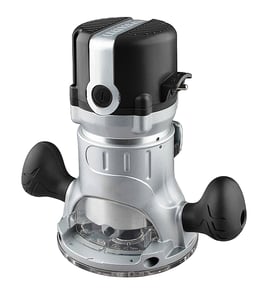

Does CRAFTSMAN make a corded router?
Yes. Craftsman makes corded routers. The Craftsman 25188-EDGE is an edge crafter accessory used with a router (it is not the motorized router itself), so you would choose a separate corded router to power your routing work.
How the 25188-EDGE fits in
The 25188-EDGE edge crafter is a guide/attachment system that helps control edge work. Your cutting power and RPM come from the router you pair with it.
What this means when shopping:
- You are shopping for a corded router as the power tool
- The edge crafter is the accessory that helps guide the cut
- Compatibility depends on the router base style and mounting points
- Bit size and collet size are determined by the router, not the edge crafter
What to look for in a corded router for edge work
Most corded routers are chosen based on control and bit compatibility, not just raw power.
- Variable speed control for larger bits and cleaner cuts
- Comfortable handles and stable base for consistent edge tracking
- 1/4-inch collet (common) or 1/4-inch and 1/2-inch collets (more flexibility)
- Easy depth adjustment and a reliable lock
- Dust collection options that fit your setup
Quick comparison: corded vs cordless routers
| Feature | Corded router | Cordless router |
|---|---|---|
| Runtime | Continuous | Limited by battery |
| Power consistency | Steady under long use | Varies by battery and load |
| Best for | Long sessions, heavier cuts | Quick jobs, portability |
Why it matters
Using the right router with an edge-guiding accessory improves cut consistency and reduces chatter, burning, and uneven profiles, especially on long edges.
For help confirming the exact model number when ordering parts or looking up diagrams, use how to find your appliance model number (and what it means for parts).
Last updated: February 2026
How to change the router bit on a CRAFTSMAN router?
To change the router bit on your Craftsman 25188-EDGE edge crafter, unplug the tool, lock the spindle (or hold the shaft), loosen the collet nut, swap the bit, then tighten the collet securely before testing at low speed.
Step-by-step: changing the bit safely
- Unplug the router (do not rely on the switch).
- Remove the base if it blocks access to the collet and bit.
- Engage the spindle lock button (if equipped) or use the proper wrench setup for the shaft.
- Turn the collet nut counterclockwise to loosen.
- Pull the old bit out; if it is stuck, loosen a bit more and gently wiggle the shank.
- Insert the new bit shank fully, then pull it back out about 1/16 inch so it is not bottomed out.
- Tighten the collet nut firmly (snug plus a bit more); do not overtighten.
Quick checks before you power up
| Check | What you want | Why it matters |
|---|---|---|
| Bit seating | Shank inserted, then backed off slightly | Prevents the bit from binding in the collet |
| Collet grip | Bit does not slip when you tug it | Reduces chatter and kickback risk |
| Shank size | Matches the collet (commonly 1/4 inch on compact routers) | Wrong size can slip or damage the collet |
| Test run | Brief low-speed run, no wobble | Confirms the bit is centered and secure |
Common mistakes to avoid
- Changing bits while the router is plugged in.
- Bottoming the bit shank in the collet (it can loosen during use).
- Clamping on the flutes instead of the smooth shank.
- Using pliers instead of the correct wrench(es), which can round the collet nut.
Why it matters
A properly seated router bit and a tight collet help your Craftsman 25188-EDGE cut cleanly and reduce vibration, burning, and the chance of the bit slipping during edging or trimming.
For general DIY safety practices when working on tools, see are diy appliance repairs safe.
Last updated: February 2026
What is the average lifespan of 25188-EDGE?
A Craftsman edge crafter like model 25188-EDGE typically lasts 10 to 15 years with normal DIY use and basic maintenance. Heavy use, frequent overheating, and running dull bits shorten life; keeping it clean and using the right accessories extends it.
What most affects lifespan
- Motor heat: long continuous cuts and clogged vents raise temperature and wear brushes/bearings faster.
- Bit condition: dull router bits force the motor to work harder.
- Dust control: packed sawdust around the collet, switch, and vents accelerates wear.
- Storage: moisture and corrosion damage bearings, armature, and fasteners.
- Power quality: damaged cords, loose connections, or intermittent switches cause arcing and heat.
Maintenance that adds years
- Blow out vents and housing after use (dry compressed air, short bursts).
- Keep the collet and nut clean; remove pitch buildup so the bit seats fully.
- Make multiple shallow passes instead of one deep pass to reduce load.
- Inspect the power cord and strain relief; repair damage before it worsens.
- If performance drops, check common wear items (carbon brushes, bearings, switch) and replace as needed.
Quick lifespan expectations by use
| Use pattern | Typical lifespan | What to watch for |
|---|---|---|
| Occasional DIY (few projects/year) | 12 to 15 years | Dust buildup, bit care |
| Regular DIY (monthly) | 10 to 12 years | Brushes, bearings, cord |
| Heavy/near-pro use | 5 to 10 years | Overheating, switch wear |
Signs it is nearing end of life
- Noticeable loss of power or bogging with sharp bits
- Excessive sparking at the motor vents (often brushes)
- Grinding or squealing noises (bearings)
- Intermittent start or cutting out (switch/cord)
Why it matters
Knowing the expected lifespan helps you decide whether to tune up the edge crafter (cleaning, brushes, bearings) or plan for replacement before a failure ruins a workpiece. For help confirming the correct model number before ordering parts, use [how to find your appliance model number (and what it means for parts)].
Last updated: March 2026