 Owner’s manual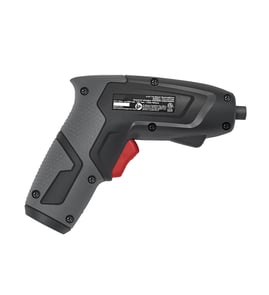

What is a power screw driver called?
A “power screwdriver” is most commonly called a cordless screwdriver or electric screwdriver. Some models are also described as a drill/driver when they can both drive screws and drill holes; the Craftsman 315111371 is a 3.6V cordless screwdriver designed primarily for screwdriving.
Common names you will see
- Cordless screwdriver
- Electric screwdriver
- Power screwdriver
- Screwdriver/nutdriver (when used with nutdriver bits)
- Drill/driver (typically higher-voltage tools with a drill chuck)
How to tell if it is a drill/driver or a screwdriver
A quick way to classify the tool is by the bit holder and torque control.
| Feature | Cordless screwdriver (like Craftsman 315111371) | Drill/driver (typical) |
|---|---|---|
| Bit holder | 1/4-inch hex collet | 3/8-inch or 1/2-inch drill chuck |
| Voltage | Often 3.6V to 8V | Often 12V to 20V |
| Torque control | Multi-position clutch | Clutch plus drill mode |
| Best use | Driving screws, light assembly | Drilling and heavier fastening |
Model-specific details for Craftsman 315111371
From the tool specifications, this model is a 3.6V DC cordless screwdriver with a 1/4-inch hex shank collet, single-speed forward/reverse, and an adjustable clutch with 22 positions. For the exact terminology and feature list, use the owner's manual.
Why it matters
Using the right name helps you buy the correct accessories (1/4-inch hex bits), set the clutch to avoid stripping screw heads, and choose a tool with enough torque and speed for your project.
Last updated: February 2026
Where can I buy Craftsman replacement parts?
You can buy replacement parts for your Craftsman cordless screwdriver model 315111371 through Sears PartsDirect by using the model-based parts list and diagrams to match the exact component you need. For model-specific part identification and safe servicing guidance, use the owner's manual.
The best way to get the right part for model 315111371
The operator’s manual calls out that you should always reference the model number when ordering repair parts, and it lists the primary serviceable items for this tool.
- Confirm the model number on the plate attached to the motor housing (should read 315111371)
- Use the parts list to identify the exact item name before ordering
- Match the part to your symptom (no charge, weak power, won’t run, etc.)
- Replace only customer-serviceable parts; keep internal repairs for a qualified technician
- Use only identical Craftsman replacement parts for safe fit and function
Parts commonly referenced for this model
Based on the manual’s parts list for the Craftsman 315111371 3.6V cordless screwdriver, these are the items typically ordered:
| Part description | What it does | When you replace it |
|---|---|---|
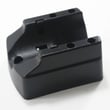
| Charging stand | Holds the tool for charging | Stand is cracked, loose, or won’t hold contact |
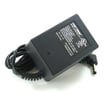
| Charger | Supplies power to charge the batteries | No charging, intermittent charging, damaged cord |
| Operator’s manual | Specs, safety, parts list | Missing manual or need diagrams/instructions |
Why it matters
Cordless screwdriver charging problems are often caused by the charger, charging stand contacts, or damaged wiring. Ordering by model number helps you avoid mismatched electrical parts and reduces repeat failures.
Last updated: February 2026
How to release a bit from an electric screwdriver?
On the Craftsman 315111371 cordless screwdriver, the bit is held in the collet (not a drill-style chuck). To release it, pull the 1/4-inch hex bit straight out of the collet; if it is stuck, gently wiggle while pulling, then reinsert fully until it seats.
Quick steps to remove the bit
- Turn the screwdriver switch to OFF and keep your finger off the trigger/switch
- If you were using the built-in light, switch it OFF as well
- Grip the bit close to the collet
- Pull the bit straight out; do not twist hard enough to bend the bit
- If it is tight, wiggle slightly while pulling, then inspect the bit shank for burrs
If the bit will not come out
A stuck bit is usually caused by debris, a slightly mushroomed bit shank, or the bit not being fully seated previously.
- Remove the battery power by keeping the tool switched OFF and do not attempt removal while driving
- Check for rust, drywall dust, or metal shavings around the collet opening
- Try a different 1/4-inch hex bit to confirm the collet is not binding
- If the bit shank is damaged, replace the bit (a damaged shank can keep sticking)
What type of bit does this model use?
The 315111371 collet is designed to accept 1/4 in. hex bits.
| Item | What to use | What to avoid |
|---|---|---|
| Bit type | 1/4-inch hex screwdriver bits | Round-shank drill bits |
| Insertion | Push in as far as possible | Leaving the bit partially seated |
| Removal | Pull straight out | Prying sideways against the collet |
Why it matters
Pulling the bit out straight protects the collet from spreading or cracking and helps the bit seat fully next time, which reduces cam-out and stripped screw heads.
For diagrams and the exact control locations (switch, light, collet), use the owner's manual.
Last updated: February 2026
What is an 11 in 1 screwdriver?
An 11 in 1 screwdriver is a multi-bit hand screwdriver that combines several common driver tips (and often nut drivers) into one tool, usually by storing reversible bits in the handle. It is different from the Craftsman 315111371 cordless screwdriver, which is a 3.6V powered driver with forward/reverse and an adjustable torque clutch (details in the owner's manual).
What “11 in 1” usually includes
Most 11 in 1 screwdrivers are built around a single handle and a multi-bit shaft; the “11” refers to the number of usable tips/ends.
Commonly included:
- Phillips and slotted (flat) driver sizes
- Square (Robertson) drive tips
- Torx tips on some versions
- Nut driver sizes (often 1/4 in. and 5/16 in.)
- Reversible, double-ended bits stored in the handle
How it compares to your Craftsman 315111371 cordless screwdriver
Your Craftsman 315111371 is a powered screwdriver designed for driving and removing screws with a motor and clutch control.
| Feature | 11 in 1 screwdriver (hand tool) | Craftsman 315111371 (powered) |
|---|---|---|
| Power source | Hand force | 3.6V DC motor |
| Direction control | Flip bit or reposition | Rocker switch forward/reverse |
| Torque control | Your wrist | Adjustable torque clutch (22 settings) |
| Speed | Manual | Single speed, about 180 RPM no-load |
Why it matters
If you need versatility in a tool pouch for mixed fasteners, an 11 in 1 screwdriver reduces the number of separate drivers you carry. If you need faster screw driving with less hand strain, your Craftsman cordless screwdriver is the better fit, especially when you set the clutch to help avoid stripping screw heads.
Quick tips for choosing the right tool
- Use an 11 in 1 for light-duty work, tight spaces, and quick bit changes
- Use the 315111371 for repetitive driving, longer screws, and controlled clutch settings
- Match the bit type to the screw head to prevent cam-out and premature bit wear
- For electrical or wiring-related DIY, follow safe practices and reference the owner's manual for tool operation and warnings
Last updated: February 2026
What is a good torque for a cordless screwdriver?
For the Craftsman cordless screwdriver model 315111371, a good torque is the lowest clutch setting that consistently seats the screw flush without stripping the head or damaging the material. This model has a 22-position adjustable torque clutch, so you set torque by results rather than chasing one universal number; see the 315111371 owner's manual.
Recommended way to set torque (fast and accurate)
Use a scrap piece of the same material and dial in the clutch:
- Start on a low clutch number
- Drive a test screw until it stops
- Increase 1 to 2 clicks and repeat
- Stop increasing as soon as the screw seats flush reliably
- If the bit slips in the screw head, switch to a fresh bit before raising torque
Practical starting points (then fine-tune)
These ranges get you close for most cordless screwdrivers with a multi-position clutch.
| Task | Starting clutch range | What you are trying to prevent |
|---|---|---|
| Small screws, plastics | 1 to 5 | Stripping, cracking |
| Furniture assembly, light fastening | 6 to 12 | Overdriving, cam-out |
| Larger screws in softwood | 10 to 18 | Snapped screws, stripped heads |
| Dense wood or stubborn fasteners | 15 to 22 | Broken screws, damaged workpiece |
Model-specific notes for 315111371
From the operator guidance for this model:
- The clutch has 22 positions for torque control
- Higher torque than needed can damage or break screws
- The tool ships with the clutch set to the lowest torque setting
Why it matters
Correct torque protects screw heads, threads, and the workpiece. On a clutch-equipped Craftsman screwdriver, the clutch slipping at the right point also reduces bit cam-out and helps you avoid overdriving.
Last updated: February 2026