Owner’s manual
 Error Codes


How do you reset an LG refrigerator water dispenser?
On the LG LRSC26923TT, there is no single “water dispenser reset” button; most dispenser issues clear by resetting the filter indicator (if it’s on) and power-cycling the refrigerator. After a filter change, press and hold LOCK for more than 3 seconds to reset the filter light.
Quick reset steps (most common fixes)
- Turn Child Lock/LOCK off if it’s enabled.
- If you just replaced the filter: press and hold LOCK for 3+ seconds until the filter indicator resets.
- Power-cycle the refrigerator: unplug for 5 minutes, then plug back in.
- Dispense and discard water to purge air: run about 7 glasses of water.
- If the refrigerator was newly installed or unused for a long time: discard about 20 ice cubes.
If water still won’t dispense
These checks fix the most common “no water” complaints on side-by-side dispensers:
- Confirm the household shutoff valve is fully open.
- Check the supply line for kinks or crushing behind the refrigerator.
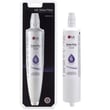
- Replace a clogged filter (low flow is a classic symptom).
- If you hear the valve hum but get no water, the inlet valve may be restricted.
- If you get slow flow plus sputtering, keep dispensing to purge trapped air.
Parts that commonly affect dispenser flow
| Symptom | Most likely cause | Part to consider |
|---|---|---|
| Slow water, weak ice production | Clogged filter | LG lt600p refrigerator water filter 5231JA2006F |
| No water, no ice, valve noise | Water inlet valve issue | LG refrigerator water inlet valve 5221JA2006D |
| Intermittent flow, leaks in cabinet | Damaged tubing | Refrigerator water tubing 5210JA3005A |
Why it matters
A proper reset and purge prevents air pockets and false “filter” warnings, and it helps protect the ice maker and dispenser from low-flow problems that can lead to jams and dripping.
For button locations and the exact filter reset procedure on this model, use the LRSC26923TT owner's manual.
Last updated: January 2026
How many cubic feet is a LG LRSC26923TT?
The LG LRSC26923TT side-by-side refrigerator is typically about 26 cubic feet of total capacity. For the exact rated capacity for your specific version, check the specifications section in the LRSC26923TT owner's manual.
How to confirm the exact capacity
Use these quick checks to match what you see on the rating label and in the manual:
- Look for the model and serial label inside the fresh food compartment (often on a side wall).
- Confirm the model is LRSC26923TT (not a close model like LRSC26925TT).
- In the manual, find the “Specifications” or “Product information” section.
- If you see multiple related models listed, match the exact model number line.
- Use the manual value for shopping comparisons (it is the official rated capacity).
Typical capacity range for this LG platform
Many LG side-by-side refrigerators in the LRSC269xx family fall into a narrow capacity range.
| Refrigerator type | Typical total capacity | Notes |
|---|---|---|
| Side-by-side (full-size) | 25 to 27 cu. ft. | Most common range for this style |
| Counter-depth side-by-side | 20 to 23 cu. ft. | Shallower cabinet reduces volume |
Why it matters
Cubic feet helps you compare usable storage space across brands and models, but it also affects energy use, airflow needs, and how quickly the refrigerator recovers temperature after door openings.
Related maintenance tip
If you are comparing models because water or ice performance seems weak, a restricted filter can reduce flow and make the dispenser seem “slow.” For this model, the compatible filter is the LG lt600p refrigerator water filter 5231JA2006F.
Last updated: January 2026
How to use ice plus on LG refrigerator?
On the LG LRSC26923TT refrigerator, Ice Plus (also shown as Express or Jet Freezer in the controls) boosts freezer cooling for a limited time to help speed up ice production. Turn it on before you need extra ice; you still need a few hours for the next batches to freeze.
How to turn Ice Plus on and off
Use the freezer quick-freeze button on the control panel.
- Press the Express or Jet Freezer (Ice Plus) button to turn the feature On.
- Keep pressing to cycle the setting; many LG models repeat OFF → EXPRESS → JET → OFF (some repeat OFF → ON → OFF).
- Let it run; the feature shuts off automatically after a set time.
- For exact button names and display icons on your unit, follow the LRSC26923TT owner's manual.
What to expect after you turn it on
Ice Plus helps the freezer recover temperature faster, but it does not create ice instantly.
| Situation | Typical result | What we recommend |
|---|---|---|
| Normal daily use | Steady ice production | Keep freezer at the recommended setting |
| Party or heavy use | Faster recovery, more consistent ice making | Turn Ice Plus on several hours ahead |
| New install or long downtime | Slow start | Allow about 12 hours to begin making ice; discard first ice |
Quick checks if ice is still slow
These are the most common reasons ice production lags even with Ice Plus enabled:
- Ice is clumped in the bin; break up clumps and shake the bin to level ice.
- Ice is not used often; cubes can clump and make the icemaker think the bin is full.
- The ice passage is blocked by food or frost.
- Water supply issues (low flow, kinked line, clogged filter).
- The icemaker is off; confirm the icemaker switch is set to ON.
If you suspect low water flow or a valve problem, the LG refrigerator water inlet valve 5221JA2006D is the model-matched inlet valve used to feed the icemaker and dispenser.
Why it matters
Ice Plus is a planning feature: it reduces temperature swings after door openings and heavy dispensing, which helps the icemaker cycle more reliably when you need extra ice.
Last updated: January 2026