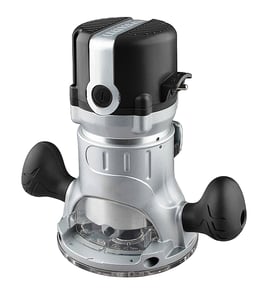

How to replace a Craftsman router bit?
To replace a router bit on your Craftsman model 25479 router table, unplug the router, loosen the collet nut, remove the old bit, insert the new bit to the correct depth, then tighten the collet securely before restoring power.
Step-by-step: changing the bit safely
- Unplug the router (or remove the battery if your router is cordless).
- Raise the bit above the table for access (use the lift or height adjuster).
- Lock the spindle if your router has a spindle lock; otherwise hold the shaft with the correct wrench.
- Loosen the collet nut counterclockwise until the bit releases.
- Remove the old bit; clean dust from the collet and nut.
- Insert the new bit, then pull it back out slightly before tightening.
- Tighten the collet nut firmly (snug plus a bit more); do not overtighten.
Correct bit insertion depth (important)
Most router bits should not be bottomed out in the collet. A good rule is:
| Item | What we recommend | Why |
|---|---|---|
| Bit insertion | Insert fully, then back out about 1/16 to 1/8 inch | Helps the collet grip evenly |
| Shank size | Match the collet size (commonly 1/4 inch or 1/2 inch) | Prevents slippage and vibration |
| Tightening | Firm, even tightening with the proper wrench(es) | Reduces chatter and bit walkout |
If the bit is stuck in the collet
- Loosen the collet nut a few turns, then tap the wrench lightly to help break the taper.
- Remove the collet and clean resin or sawdust buildup.
- Inspect the collet for cracks, bell-mouthing, or heavy wear.
Why it matters
A properly seated router bit reduces vibration, improves cut quality, and helps prevent the bit from slipping during a cut. That protects your workpiece, your router table, and your safety.
For more DIY safety basics before working on power tools, use our guide: are diy appliance repairs safe.
Last updated: February 2026
How to remove collet from Craftsman router?
On the Craftsman 25479 router table, you typically remove the collet by loosening the collet nut until it “breaks” the taper and releases the collet, then sliding the collet out. This is the same self-releasing collet style used on many Craftsman routers.
Steps to remove the collet (most Craftsman routers)
- Unplug the router (or remove the battery if it is cordless).
- Lock the spindle (or hold the shaft with the correct wrench, depending on your router design).
- Use the collet wrench to loosen the collet nut counterclockwise.
- Keep loosening past the point where it first feels loose; you should feel a small “pop” as the collet releases from the taper.
- Unscrew the nut enough to slide the collet out of the nut (some collets snap into the nut and come out with it).
- Wipe the collet and inside of the nut clean before reinstalling.
If the collet is stuck
A stuck collet is usually caused by pitch buildup, fine dust, or an over-tightened nut.
- Loosen the nut 1 to 2 more turns (do not remove it completely).
- Tap the wrench lightly to help shock the taper loose.
- Remove the bit; then remove the collet from the nut.
- Clean the taper and collet with a dry cloth; avoid oil inside the taper because it can increase slip.
Quick checks before you reinstall
| What to check | What you want to see | Why it matters |
|---|---|---|
| Collet slots | Clear, not packed with dust | Dust prevents full clamping |
| Collet nut threads | Smooth, not gritty | Grit can cause over-tightening |
| Bit shank | Clean, not bottomed out | Bottoming out can trap the bit |
Why it matters
A properly seated collet grips the bit shank evenly. That helps reduce bit slippage, vibration, burning, and chatter, which improves cut quality and safety.
For more DIY safety basics before working on power tool parts, use our guide: are diy appliance repairs safe.
Last updated: February 2026
What size shank does a Craftsman router use?
Most Craftsman routers use 1/4-inch shank bits; many full-size routers also support 1/2-inch shank bits when they have a 1/2-inch collet. For Craftsman model 25479, the correct shank size is the size that matches the collet installed on the router you are using with the table.
How to confirm the shank size on your setup
- Look for a size marking on the collet or collet nut (commonly 1/4 or 1/2).
- Measure the collet opening with a caliper or measure a bit shank that fits snugly.
- Check whether you have multiple collets in your accessories (some routers include both sizes).
- Do not rely on the router table alone; the router motor and collet determine bit shank size.
- If a bit slips or will not seat, stop and verify you have the correct collet.
Common shank sizes and what they are used for
| Shank size | Typical use | Why it matters |
|---|---|---|
| 1/4-inch | Trim work, edge profiles, lighter cuts | Fits many common bits; easier on smaller routers |
| 1/2-inch | Larger bits, deeper cuts, heavier routing | More rigidity; reduced vibration and chatter |
Why it matters
Using the correct shank size lets the collet clamp evenly on the bit. That improves cut quality and reduces the chance of bit slippage, chatter, and overheating during routing.
Safe bit-install tips
- Unplug the router before changing bits.
- Insert the bit shank fully, then pull it back out slightly before tightening so the collet grips evenly.
- Never force a 1/2-inch shank into a 1/4-inch collet.
- Replace a worn collet if the bit will not stay tight.
If you need help confirming the exact model identification on your equipment before buying accessories, use how to find your appliance model number (and what it means for parts).
Last updated: February 2026