Installation guide
 Owner’s manual





Is GE JVM3670SK04 considered high end?
GE JVM3670SK04 is a mid-range over-the-range microwave/hood combo, not a luxury or high-end model. It is built for dependable everyday cooking and ventilation; “high end” in microwaves usually means premium design lines, advanced sensor features, and higher-end trim packages.
How we define “high end” for microwave/hood combos
Most customers consider a microwave “high end” when it has several of these traits:
- Premium design line branding (for example, a brand’s flagship series)
- More advanced sensor cooking and auto-reheat options
- Quieter, higher-performance venting and better lighting
- More robust fit-and-finish (door feel, trim, stainless appearance)
- Higher price point and more feature-rich control panel
For model-specific features and options on your unit, use the JVM3670SK04 owner’s manual.
What you can expect from JVM3670SK04
This GE microwave/hood combo is typically chosen for practical performance and common replacement-part support.
| Category | What “high end” usually includes | What JVM3670SK04 typically delivers |
|---|---|---|
| Cooking performance | More sensors, more presets | Solid everyday heating and presets |
| Venting | Higher CFM, quieter operation | Standard hood ventilation for most kitchens |
| Fit and finish | Premium trim and styling | Standard stainless look and common parts |
| Serviceability | Parts available, clear diagrams | Strong parts availability and documentation |
Why it matters
If you are deciding whether to repair or upgrade, “mid-range” models like JVM3670SK04 are often cost-effective to maintain because common wear items (door interlock parts, switches, and vent components) are readily available.
Parts that commonly affect performance (and perceived “quality”)
If your microwave feels less “premium” due to door issues, noise, or weak heating, these are common areas to check:
- Door interlock and latch alignment (a frequent cause of no-start symptoms)
- Interlock switches such as the micro-switch WB24X830 and switch-micro WB24X829
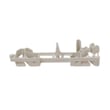
- Latch hardware such as the microwave latch body WB06X10676
- Venting components like the microwave vent fan motor assembly WB26X10210
- Heating system components (for example, magnetron issues can cause no-heat symptoms)
For safe installation clearances and venting configuration details, follow the JVM3670SK04 installation guide.
Last updated: February 2026
Do all GE microwaves use the same mounting bracket?
No. GE over-the-range microwaves do not all use the same mounting bracket; even when the cabinet opening is the same width, the wall plate (mounting plate), top-cabinet hole pattern, and hardware can change by model. For a GE JVM3670SK04 replacement, we install using the bracket and template specified in the installation guide.
What to expect when replacing an over-the-range GE microwave
When you swap models, these are the fit points that most often differ:
- Wall plate shape and tab locations (how it sits under flat, framed, or recessed cabinets)
- Top-cabinet bolt locations (the holes you drill in the cabinet above)
- Exhaust adaptor and duct alignment (outside top, outside back, or recirculating)
- Cord length and outlet location requirements
- Overall height and door swing clearances
How we confirm bracket compatibility (without guessing)
Use the installation instructions for your exact model and compare these items before you remove the old unit:
| Checkpoint | What to compare | Why it matters |
|---|---|---|
| Wall plate location | Centerline and tab position under the cabinet | Keeps the microwave level and supported correctly |
| Mounting holes | Holes A, B, C, D (and stud location in the support area) | Ensures the unit is anchored into framing safely |
| Venting type | Outside top, outside back, or recirculating | Prevents misaligned ductwork and poor airflow |
| Cabinet style | Flat bottom vs recessed vs front overhang | Changes where the plate must sit to stay level |
Why it matters
The mounting plate carries a large share of the microwave’s weight and sets the final level. Using the correct plate and hole pattern helps prevent vibration, door alignment issues, and venting problems.
Model-specific tip for JVM3670SK04
The GE JVM3670SK04 installation instructions call out aligning the wall plate to the cabinet bottom (or a level line for cabinets with a front overhang) and using the mounting plate as the drilling template. Following that template is the most reliable way to avoid rework.
Last updated: February 2026
What are common problems with GE JVM3670SK04 microwaves?
Common problems with the GE JVM3670SK04 microwave/hood combo include no heat, dead display/no power, runs but will not start, door not latching, loud humming, sparking/arcing, and weak or noisy venting. Many issues trace to door interlock parts, airflow/filters, or high-voltage heating components; use the owner's manual for model-specific feature and care details.
Most common symptoms and what they usually point to
- Not heating: magnetron or other high-voltage components; also check for simple issues like incorrect settings and short cook times.
- No power or goes dead: door interlock switch circuit, thermal cut-off, or a blown fuse (often related to door switch problems).
- Starts then stops when the door moves: worn door latch parts or misaligned interlock lever/switches.
- Loud buzzing/humming: failing magnetron or high-voltage transformer; sometimes a vent fan issue if the noise is from the hood area.
- Sparking/arcing: food splatter, metal in the cavity, or damaged interior surfaces.
Quick checks we recommend first (safe, no disassembly)
- Reset power by turning the breaker off, then back on.
- Confirm the door closes firmly and evenly; do not slam it.
- Clean the door seal area and the bottom of the oven (grease buildup can cause performance issues).
- If you use recirculating venting, replace the charcoal filter when it is dirty or discolored (typically every 6 to 12 months).
- Run a 1-cup water heat test for 1 minute; water should be noticeably hot if heating is normal.
Parts that commonly fix “won’t start” or “no power”
Door-interlock problems are among the most frequent causes of a microwave that will not run.
| Symptom | Common suspect | Example part for this model |
|---|---|---|
| Won’t start, door feels “off” | Latch/lever not engaging switches | Microwave latch body WB06X10676 |
| Intermittent start, stops when closing door | Door interlock lever or switch | Microwave door interlock switch lever WB06X10128 |
| Dead or blows fuse when opening/closing door | Interlock micro-switch | Micro-switch WB24X830 |
Why it matters
A microwave that will not start or heats inconsistently is often reacting to a safety condition (especially the door interlock system). Addressing door latch and switch issues early helps prevent repeat shutdowns and protects the control and high-voltage circuit.
For installation-related airflow and venting setup (recirculating vs. outside vent), follow the installation guide.
Last updated: February 2026
What is the average lifespan of a GE microwave?
A GE microwave typically lasts about 7 to 10 years with normal household use. For a GE over-the-range unit like JVM3670SK04, lifespan depends most on ventilation, keeping the cavity clean, and avoiding misuse (running empty, blocked vents, repeated overheating); good care helps it reach the upper end of that range.
Typical lifespan and what affects it most
Most microwave failures come down to heat stress, door/interlock wear, and high-voltage component aging.
- Daily run time (reheating all day shortens life faster than occasional use)
- Ventilation and grease buildup (over-the-range models work harder when filters and vents are dirty)
- Door closing habits (slamming can wear latches and interlock switches)
- Cleaning routine (grease and food splatter trap heat and odors)
- Power quality (frequent surges can stress electronic controls)
What “end of life” usually looks like
These symptoms often show up as a microwave approaches replacement time:
| Symptom | Common cause | What we check first |
|---|---|---|
| Runs but does not heat | High-voltage system issue | Magnetron and related components |
| Stops when door moves or won’t start | Door interlock problem | Latch and micro-switches |
| Loud hum or buzzing while heating | High-voltage component strain | Magnetron/transformer area |
| Fan runs but performance seems weak | Venting/airflow issue | Filters, fan motor, ducting |
If your JVM3670SK04 runs but won’t heat, our DIY article why is my microwave not heating is a solid starting point.
Model-relevant parts that commonly wear
For door-related starting issues on JVM3670SK04, these parts are commonly involved:
- Micro-switch WB24X830 (door interlock switch)
- Switch-micro WB24X829 (interlock switch)
- Microwave latch body WB06X10676 (door latch body)
- Microwave door interlock switch lever WB06X10128 (switch lever)
Why it matters
Microwaves can contain high-voltage components that store energy even when unplugged. When symptoms point to heating or interlock problems, using the correct troubleshooting steps from the owner's manual helps you avoid unnecessary parts replacement and reduces safety risk.
Last updated: February 2026