Installation guide
 Owner’s manual



How do I reset a Speed Queen dryer?
On the Speed Queen ADG4BRGS116TW01-START-S dryer, there is no special “reset” sequence for normal operation. To restart after a stop, close the door, set the timer back to the desired cycle if needed, then press the Start button (or push in the timer knob) as shown in the owner's manual.
- Make sure the door is fully closed; the dryer will not run with the door open.
- Turn the timer to OFF, then set it to the cycle you want.
- Select the fabric/temperature setting.
- Press Start (or push in the timer knob, depending on your control style).
- If the dryer stopped mid-cycle, reset the timer and start again.
These are the most common “looks like it needs a reset” causes:
- No power at the outlet (tripped breaker, blown fuse, loose plug).
- Door not latching or a door switch issue.
- Timer not set to a run position.
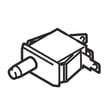
- Start switch not making contact.
| Check | What you should see | What it means |
|---|---|---|
| Door closes firmly | Solid latch feel | Door switch can engage |
| Timer not on OFF | Knob points to a cycle | Dryer is being commanded to run |
| Power is present | Lights or response when starting | Control can operate |
A “reset” usually just restores the correct start conditions: door closed, timer set, and Start engaged. That prevents bypassing safety features and helps you avoid repeat no-start problems.
Last updated: February 2026
What causes a Speed Queen dryer not to heat up?
On the Speed Queen ADG4BRGS116TW01-START-S, no-heat is usually caused by a power or gas supply issue, restricted venting, or a failed heating component (such as the igniter on gas models). Start with the simple checks in the owner's manual before replacing parts.
- Electric dryer: Check both fuses or both breakers; many homes use a 2-pole supply and one side can trip while the drum still turns.
- Gas dryer: Confirm the equipment gas valve and the main gas line valve are fully on.
- Vent restriction: Inspect the exhaust duct for kinks, crushing, lint buildup, or a blocked exterior hood.
- Airflow at the hood: Make sure the flapper moves freely and is not stuck closed.
- Cycle selection: Use a heat setting and let it run a few minutes before judging temperature.
If your ADG4BRGS116TW01-START-S is a gas dryer, the normal sequence is: motor runs, igniter glows red, then the main burner ignites. If the igniter glows but the burner does not light, air in the gas line or a gas supply issue is common. If the igniter never glows, the igniter circuit or related safety controls are typical suspects.
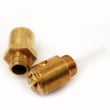
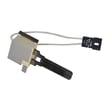
Helpful replacement part when the igniter is the issue: igniter and bracket assembly D510184P.
Poor airflow can make a dryer seem like it has “no heat” because heat is not moving through the drum and out the exhaust. It can also cause overheating that trips safety devices.
| What you notice | Most likely cause | What to check first |
|---|---|---|
| Drum tumbles, air at vent is cool | No heat being produced | Power (electric) or gas valve (gas) |
| Air is warm inside, clothes still damp | Restricted exhaust | Duct, hood flapper, lint buildup |
| Heat starts then stops | Overheating protection | Vent restriction, airflow |
Restoring proper heat and airflow protects the dryer’s heater or burner system, improves dry times, and helps prevent repeat shutdowns caused by restricted venting.
Last updated: February 2026
What are common problems with Speed Queen dryers?
Common problems on the Speed Queen ADG4BRGS116TW01-START-S dryer include not starting, not heating, long dry times, excess vibration/noise, and cycle timing issues. Most of these trace back to power or door-start conditions, restricted venting and lint buildup, or worn drive components; see the owner's manual troubleshooting table for model-specific checks.
- Dryer won’t start: door not fully closed, timer/start not engaged, house fuse/breaker issue, or motor overload protector tripped
- Dryer won’t heat: supply power issue (especially on electric setups with two fuses/breakers), airflow restriction, or a heat system component problem
- Takes too long to dry: restricted venting, lint blockage, poor makeup air in the room, or overloading
- Loud squeal/thump or drum not turning well: worn belt, idler, or drum support rollers
- Wrinkles or overdrying: heat setting too high or load size too large for proper tumbling
- Confirm the door closes firmly and the start/timer control is set correctly.
- Check the home electrical supply; many electric dryer circuits use two fuses/breakers.
- Clean the lint screen and inspect the entire vent run for kinks, crushing, or heavy lint.
- Run a timed cycle with a small load to compare performance.
- If the dryer stopped mid-cycle, let it sit 10 minutes and retry (motor overload protector can reset).
If you have squealing, slipping, or a drum that struggles to turn, these model-matched parts are common fixes:
| Symptom | Likely wear item | Model-matched part |
|---|---|---|
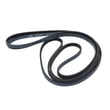
| Squeal, belt slip, drum not turning | Drum belt | Commercial dryer drum belt D511255P |
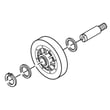
| Squeal, intermittent drum movement | Idler pulley/arm | Idler lever and wheel assembly D516792 |
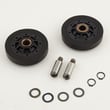
| Thumping/rumble, uneven drum support | Drum roller | Cylinder roller D510708P |
Restricted venting and lint buildup can cause long dry times and overheating conditions that shorten the life of thermostats, igniters, and motors. Keeping airflow strong is one of the best ways to prevent repeat failures and reduce drying time.
Last updated: February 2026