
How do I find the model number on my 15-7000?
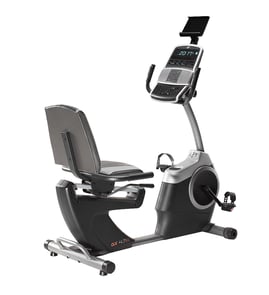
The model number is printed on the ID label (model/serial tag) attached to your Dp TRAC 20. On most fitness and exercise machines like the Dp 15-7000, the label is on the frame near the base, under a shroud/cover, or on the rear upright.
Where to look on a Dp TRAC 20
Check these common label locations first:
- Rear of the main frame near the floor stabilizers
- Underside of the base frame (you may need a flashlight)
- Inside or behind a plastic motor/drive cover (if equipped)
- On the upright post near the power cord entry (if equipped)
- Near the pedal/crank area on the side of the frame
What the label looks like
Most model tags include a few key fields. Use the model number for parts lookup.
| Label field | What it’s used for | Example format |
|---|---|---|
| Model number | Identifies the exact machine version for parts | 15-7000 |
| Serial number | Production identifier; not used for most parts matching | Letters and numbers |
| Electrical rating (if powered) | Helps confirm correct electrical parts | Volts/amps |
Tips to make the number easy to read
- Wipe dust off the tag with a dry cloth; avoid soaking the label.
- Take a phone photo and zoom in to confirm characters.
- Write it exactly as shown, including dashes.
Why it matters
Dp often produced multiple versions of similar fitness equipment; the correct model number (15-7000) ensures diagrams and replacement parts match your exact TRAC 20 configuration.
For more help identifying model tags across appliances and equipment, use how to find your appliance model number (and what it means for parts).
Last updated: March 2026
What are the most common issues with 15-7000?
The most common problems we see on the Dp 15-7000 TRAC 20 are drive and resistance issues (slipping, jerky motion, or no load), console or power problems (won’t turn on, resets), and noisy or loose moving parts. Most fixes start with a quick safety check and a basic inspection.
Common symptoms and what they usually point to
- Pedals/arms slip or feel uneven: worn drive belt, loose pulley, or misaligned linkage
- No resistance or resistance stuck: worn friction parts, loose tension hardware, or a damaged resistance mechanism
- Unit won’t power on: bad power cord/connection, blown fuse, failed switch, or damaged wiring
- Display/buttons act up: dirty contacts, loose console connector, or failing control board
- Squeaking/clicking/grinding: dry bearings, loose fasteners, worn bushings, or rubbing shrouds
Quick checks we recommend first
- Unplug the unit and wait 1 minute; then reconnect and retest.
- Inspect for looseness: check pedals, crank arms, handles, and frame bolts.
- Look for rubbing: rotate the moving parts by hand and listen for contact points.
- Check wiring condition: look for pinched, cut, or disconnected wires near moving joints.
- Confirm the symptom is repeatable: note when it happens (only under load, only at certain speeds, only after warm-up).
Troubleshooting guide by symptom
| Symptom | Most likely area | Best next step |
|---|---|---|
| Slipping/jerky motion | Belt, pulley, linkage | Inspect belt path and tension; tighten hardware |
| No resistance | Resistance mechanism | Check tension parts for looseness or wear |
| Dead console | Power/wiring | Verify outlet, cord, fuse; inspect connectors |
| Loud squeal/click | Bearings/bushings | Tighten fasteners; lubricate where appropriate |
Why it matters
Catching looseness, belt wear, or damaged wiring early prevents bigger failures like stripped pulleys, broken linkages, or electrical shorts, and it keeps workouts smooth and safe.
Helpful DIY resources
If you’re comfortable doing electrical checks, use how to use a multimeter to test electrical parts video to safely test continuity on switches, fuses, and wiring.
Last updated: March 2026
What is the average lifespan of 15-7000?
For the Dp TRAC 20 model 15-7000, the average lifespan is 7 to 12 years with regular home use. Lifespan depends most on how often you use it, how well it’s kept clean and tight, and whether wear items (belts, rollers, cables) are replaced as they age.
Typical lifespan by use level
- Light use (a few times per week): 10 to 12 years
- Moderate use (most days): 8 to 10 years
- Heavy use (long daily sessions or multiple users): 7 to 9 years
- Poor maintenance (dust buildup, loose hardware): 5 to 7 years
| Use pattern | What wears fastest | What extends life |
|---|---|---|
| Light | Belts, rollers | Cleaning, bolt checks |
| Moderate | Drive components, cables | Lubrication where applicable, alignment checks |
| Heavy | Bearings, electronics, resistance system | Early replacement of wear parts |
Signs your 15-7000 is nearing end-of-life
- Resistance feels uneven, slips, or surges
- Squealing, grinding, or rhythmic thumping during motion
- Excessive side-to-side play in moving arms or pedals
- Frequent need to re-tighten the same fasteners
- Console resets, flickers, or won’t power consistently
Maintenance that adds years
- Tighten frame and pivot bolts; recheck after the first few workouts following any move
- Keep dust and sweat off moving joints and the console area
- Inspect cables, belts, and rollers for fraying, glazing, flat spots, or cracking
- Keep the unit level to reduce bearing and bushing wear
- Use the right tools and safe repair habits before opening covers or testing circuits
Why it matters
Most “early failures” on fitness equipment come from loosened hardware, misalignment, and ignored wear parts. Catching noise, wobble, or slipping early helps you avoid secondary damage to the frame, resistance system, and electronics.
For safe DIY checks on electrical components (if your unit has a powered console), use our guide: how to use a multimeter to test electrical parts video.
Last updated: March 2026