 Installation guide
 Owner’s manual
 Error Codes







Can you replace the oven heating element in a Kenmore oven?
Yes. On Kenmore electric range model 79096012405, we replace the oven heating element (bake element) by shutting off power, removing the failed element, transferring the wires, and installing the correct replacement so the oven can heat evenly again. Use the steps in the 79096012405 owner's manual for safe access and handling.
Safety first (before you touch anything)
- Turn off power at the breaker (240V); confirm the display is off.
- Let the oven cool completely.
- Pull the range forward only as needed; avoid stressing the power cord.
- Never immerse heating elements in water (they self-clean during normal operation).
- Keep the oven vent area clear; it gets hot during operation.
Bake element replacement steps (typical for this model style)
- Remove oven racks for working room.
- Locate the bake element at the bottom of the oven (some versions are visible; others are under the oven floor panel).
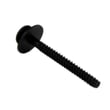
- Remove the mounting screws holding the element to the rear wall.
- Gently pull the element forward a few inches and hold the wires so they do not slip back.
- Transfer the wires to the new element terminals (one at a time).
- Reinstall mounting screws, reinstall any oven bottom panel if equipped, and put racks back.
- Restore power and test Bake at 350°F.
Which part usually fixes “oven not heating”?
If the oven will not heat in Bake, the bake element is the most common fix.
| Symptom | Most likely part | Notes |
|---|---|---|
| No heat on Bake, broil still works | Frigidaire range bake element 316075103 | Often shows blisters, cracks, or burn spots |
| Broil also weak or dead | Frigidaire range broil element 316203200 | Less common than bake element failure |
| Oven heats but temperature is off | Probe 316490001 | Can cause over/under-heating |
Why it matters
A failing bake element can cause long preheat times, uneven baking, and temperature swings. Replacing the correct element restores normal heat output and helps protect the control and wiring from overheating.
Last updated: February 2026
How big is the Kenmore 79096012405?
The Kenmore 79096012405 is a 30-inch class freestanding electric range; most models in this series fit a standard range cutout and stand roughly 36 inches tall to the cooktop. For the exact height, width, depth, and oven capacity for your unit, use the specifications section in the 79096012405 owner's manual.
Typical size you can plan around
These are the common planning dimensions for a 30-inch freestanding electric range like the Kenmore 79096012405 (use your manual for exact numbers):
- Width: about 30 in.
- Overall height: about 36 in. to the cooktop (leveling legs can change this)
- Depth: often 25 to 28 in. to the front of the door handle area
- Oven capacity: commonly 3.3 to 4.0 cu. ft. depending on configuration
Quick planning table
| What you’re measuring | What to expect | What can change it |
|---|---|---|
| Width | ~30 in. | Side trim, slight cabinet variations |
| Height | ~36 in. | Leveling legs, floor slope |
| Depth | ~25 to 28 in. | Door/handle profile, backguard |
| Capacity | ~3.3 to 4.0 cu. ft. | Oven design, insulation, convection hardware |
How we recommend measuring your range
For the most accurate “how big is it” answer, we measure the appliance and the opening:
- Measure width at the widest point of the range body.
- Measure height from floor to cooktop; then check the leveling legs.
- Measure depth from the back to the front-most point (often the handle).
- Confirm the model/serial plate location (commonly on the oven front frame area near the storage drawer) so you’re matching the correct model.
Why it matters
Correct dimensions prevent installation problems like a range that sits proud of the cabinets, a door that hits adjacent drawers, or a cooktop that won’t level. The 79096012405 installation guide also helps you confirm clearances and leveling so the range fits and cooks evenly.
Last updated: February 2026
How to find Kenmore range model number?
For Kenmore electric range model 79096012405, we find the model and serial number on the identification plate on the right side of the oven front frame, inside the storage or warmer drawer compartment. Pull the drawer out and look along the right-side frame.
Where to look on model 79096012405
Check these spots in this order:
- Open the storage drawer (or warmer drawer) and look on the right side of the oven front frame
- Look just inside the drawer opening, not on the drawer itself
- If your range has a front lower panel instead of a drawer, check behind that lower panel
- Write down both the model number and serial number for parts matching and service history
Use the diagram and “Product Record” section in the 79096012405 owner's manual to confirm the exact label location.
Quick checklist before you order parts
Having the full model number prevents wrong-part returns, especially for heating and control parts.
- Record the model number exactly as printed (include all digits)
- Record the serial number (helps with production variations)
- Match the model number on your parts list to 79096012405
- If you are replacing an oven heating part, confirm whether you need the bake or broil circuit
| What you need | Where it’s used | Why it matters |
|---|---|---|
| Model number (79096012405) | Parts lookup | Ensures correct fit and wiring style |
| Serial number | Service identification | Helps match revisions and production runs |
| Color code (if shown) | Cosmetic parts | Helps match panels, handles, overlays |
Why it matters
Kenmore ranges often share similar-looking control panels and elements across model families (like 790.9601*, 790.9602*, 790.9603*). Using the exact model number from the ID plate is the fastest way to get the right parts the first time.
Last updated: February 2026
Why is my Kenmore electric oven not working?
If your Kenmore 79096012405 electric range oven is not working, start by confirming the range has power and the control is not showing an F-code fault. Many “dead oven” problems come from a power supply issue, a tripped breaker, or an electronic control fault you can clear and recheck.
Quick checks we recommend first
- Verify the range cord is fully plugged in and the outlet has power.
- Check your home breaker; electric ranges often use a double-pole breaker that can trip on one side.
- If the display is blank, reset power at the breaker for 1 minute, then restore power.
- If the control is beeping and shows an F code, press STOP/CLEAR to clear it and test Bake again.
- If the oven stopped during a power outage, keep the oven OFF until power is stable, then reset the clock and try again (per the 79096012405 owner’s manual).
What the error code or symptoms usually mean
| What you see | What it points to | What to do next |
|---|---|---|
| Display shows an F code (example: F11) and beeps | Electronic control detected a fault | Press STOP/CLEAR; if it returns, troubleshoot the control circuit |
| Cooktop works but oven will not heat | Oven heating circuit issue (bake element, wiring, control) | Inspect and test the bake element and connections |
| Entire appliance does not operate | Power supply problem | Check outlet power, breaker, and cord connection |
Common part failures when the oven will not heat
If the cooktop works but the oven will not heat, we typically focus on these items:
- Bake element: look for blisters, cracks, or burned spots; test for continuity. Consider the frigidaire range bake element 316075103 if your element matches this model’s parts list.
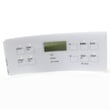
- Control or control interface: if the control is unresponsive or repeatedly throws faults, the overlay or panel can be involved (for example, range control panel 316402706 on this model).
- Loose/burned wiring: especially at the bake element terminals and rear harness connections.
Why it matters
An oven that will not heat is often a simple power or heating-element issue. Checking power and clearing F-code faults first prevents unnecessary part replacement and gets you to the right repair faster.
Last updated: February 2026






