Installation guide
 Owner’s manual
 Error Codes



Does Whirlpool make gas ranges?
Yes. Whirlpool manufactures gas ranges, including the Whirlpool WFG520S0FS0 gas range; these appliances use gas burners for cooktop cooking and a gas oven system, with operating and safety details covered in the WFG520S0FS0 owner's manual.
What “Whirlpool gas range” means
A Whirlpool gas range is a single appliance that typically combines:
- A gas cooktop with multiple surface burners
- A gas oven (bake and broil functions vary by model)
- Safety features and installation requirements (grounded outlet, anti-tip bracket)
- Replaceable service parts such as igniters, electrodes, and oven light bulbs
How to confirm you have a Whirlpool gas range
Use these quick checks on your WFG520S0FS0:
- Look for the model and serial label on the upper-left side of the front frame (inside the oven door area).
- Confirm the brand badge says Whirlpool.
- Verify the fuel type is gas (natural gas or LP, depending on installation).
- Match the full model number exactly: WFG520S0FS0.
| What to check | Where you’ll see it | Why it helps |
|---|---|---|
| Model number | Rating label on the front frame | Ensures correct parts and instructions |
| Serial number | Same label | Helps with service history and support |
| Installation requirements | Manual and install guide | Prevents unsafe setup and performance issues |
Why it matters for parts and troubleshooting
Gas ranges use ignition and gas-delivery components that are specific to the model. When you’re diagnosing “won’t heat,” “won’t ignite,” or “no oven light,” matching the model number first helps you choose the right repair steps and parts.
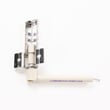
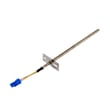
If you’re troubleshooting ignition or heating issues, common related parts for this model include the range oven igniter WP8054129 and the electrode WPW10515459.
Last updated: February 2026
How to identify a Whirlpool stove model?
For a Whirlpool gas range like model WFG520S0FS0, the model number is printed on the appliance’s rating label; on this series it’s located on the upper-left side of the front frame. Use that exact model number to match the correct parts, manuals, and service information in our system.
Where to look on your Whirlpool range
We recommend checking these common spots in this order:
- Upper-left side of the front frame (open the oven door and look along the front frame)
- Inside the storage or warming drawer area (if equipped)
- Behind the control panel area (varies by design)
- On the back of the range (sometimes on a metal tag)
- On paperwork that came with the range (owner’s packet)
For the exact label location and how Whirlpool references it, use the WFG520S0FS0 owner's manual.
What to write down (and why)
The label typically includes both a model number and a serial number. Record both.
| Item | What it’s used for | Example format |
|---|---|---|
| Model number | Matching parts diagrams and replacement parts | WFG520S0FS0 |
| Serial number | Identifying production details for service | Letters and numbers |
Tips to avoid ordering the wrong part
Small differences in a model number can change the correct igniter, door hinge, or control parts.
- Copy the model number exactly, including all letters and digits
- Do not use the serial number in place of the model number
- If the label is hard to read, take a clear photo and zoom in
- Match the model number first, then confirm the part by name and ID
- For door issues, confirm left vs right hinge before ordering (this model uses specific hinges)
Why it matters
Whirlpool ranges often share a similar look across multiple model numbers, but internal components (like an oven igniter, door lock assembly, or control assembly) can differ. Using the exact model number keeps troubleshooting accurate and prevents returns.
Last updated: February 2026
Why is my Whirlpool gas oven not getting hot?
If your Whirlpool WFG520S0FS0 gas range oven is not getting hot, the most common causes are Demo mode being turned on, air trapped in the gas line (especially after installation), or an ignition problem. Start by checking Demo mode and basic gas and power supply conditions in the WFG520S0FS0 owner's manual.
Quick checks we recommend first
- Make sure the range is plugged into a grounded 3-prong outlet and the breaker is not tripped.
- Confirm the main or regulator gas shut-off valve is fully ON.
- If the oven is newly installed or the gas was shut off recently, purge air by lighting a surface burner for 30 to 60 seconds.
- Verify you are selecting a normal Bake or Broil cycle and pressing Start (not just setting a temperature).
- Cancel any active special modes; Demo mode disables oven heating.
Demo mode: a common “oven won’t heat” cause
Demo mode is designed for showroom display and prevents the oven from heating.
How to toggle Demo mode (control panel sequence):
| Goal | Key sequence |
|---|---|
| Turn Demo mode off (or on) | Press CANCEL, CANCEL, Temp/Time Up, TIMER SET/OFF (repeat to change back) |
If the display changes but the oven still does not heat, continue with the checks below.
When it is likely an ignition or gas flow issue
If the control responds normally but the burner never lights or heats, these are the most common culprits:
- Weak or failed igniter (may glow dimly or not at all)
- Gas supply valve not fully open
- Air still trapped in the line
- Control settings not being accepted (cycle not started)
For this model, a common igniter-related replacement is the range oven igniter WP8054129.
Why it matters
A gas oven that does not heat is often a simple mode or supply issue (Demo mode, air in the line, shut-off valve). Fixing those first prevents unnecessary parts replacement and gets your Whirlpool range baking safely and consistently again.
Last updated: February 2026