Owner’s manual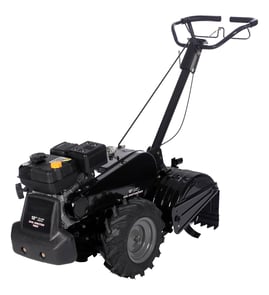
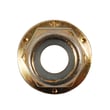


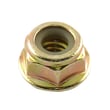
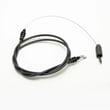


Where is the model number on a tiller?
On the Kmart rear-tine tiller model 01721957-7, the model number is printed on the equipment ID label (a sticker or metal tag) attached to the tiller frame. Most commonly, you will find it near the tine shield/tine guard area, on or near the handle support, or on the front of the unit.
Look for a rectangular label that includes the model number and sometimes a serial number.
- Tine shield or tine guard area (near the tines, but on the frame, not on a rotating part)
- Handle mount or upper handle support bracket
- Front of the tiller frame (facing forward from the operator position)
- Side of the transmission housing area
- Near the engine mounting plate (on the tiller frame, not on the engine shroud)
If the label is dirty or worn, a few minutes of cleaning usually makes it readable.
- Brush off packed soil and plant debris first
- Wipe with a damp rag and mild soap; avoid soaking the label
- Use a flashlight at a low angle to make faint printing stand out
- Take a photo and zoom in; this often reveals faded characters
- Write down the full model number exactly as shown (including dashes)
We use the model number to match the correct parts diagrams and ensure you get the right hardware and drive components for your exact rear-tine tiller. Even small differences can affect fit for items like a drive belt, tine assemblies, and transmission parts.
| What you’re looking for | What it’s used for | Example from this tiller family |
|---|---|---|
| Model number | Identifies the exact tiller version | 01721957-7 |
| Serial number | Production tracking | Often on the same label |
| Engine model/type/code | Engine-specific tune-up parts | Listed on the engine label |
For additional identification and parts breakdowns, use the 01721957-7 owner's manual.
Last updated: January 2026
What is the bar on the back of a tiller for?
On the Kmart 01721957-7 rear-tine tiller, the bar at the back is the drag bar (depth regulator). We use it to control how deep the tines dig and to help keep the tiller from “running away” as the counter-rotating tines pull into the soil. See the 01721957-7 owner's manual for the exact adjustment points and hardware.
- Sets tilling depth by limiting how far the tiller can bite into the ground
- Adds stability and control, especially in hard or untilled soil
- Helps the tines “chop” soil and residue more consistently (less bouncing)
- Reduces operator effort by letting the machine work at its own pace
Most rear-tine tillers adjust the drag bar with a pin-and-hole setup:
- Park on level ground and shut the engine off; wait for all moving parts to stop.
- Pull the lock pin and remove the clevis pin.
- Move the drag bar up or down to the desired hole (deeper setting usually means more resistance and deeper digging).
- Reinstall the clevis pin, then secure it with the lock pin.
| Goal | Drag bar setting | What you will notice |
|---|---|---|
| First pass in hard soil | Shallower | Easier control, less engine load |
| General garden tilling | Medium | Good breakup and steady forward pace |
| Deep soil prep | Deeper | More resistance, slower travel |
This model is a CRT (counter-rotating tine) tiller; the tines can try to propel the machine backward if we push down on the handlebars. Setting the drag bar correctly helps maintain traction and control while achieving the depth you want.
Last updated: January 2026
Are tiller tines universal?
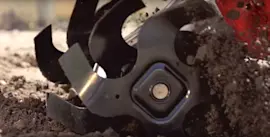
No. Tiller tines are not universal; they must match your Kmart rear-tine tiller model 01721957-7 by mounting style, shaft fit, and left-hand versus right-hand orientation. Use the 01721957-7 owner's manual to follow the correct removal and installation steps and confirm tine positioning.
Even when two tine sets look similar, fit and performance depend on several details:
- Mounting method: many tillers use a clevis pin and cotter pin, others use bolts
- Shaft fit: tine shaft diameter and the location of the retaining holes must match
- Left-hand vs right-hand assemblies: this model uses a matched left and right tine assembly
- Tine offset and clearance: the tine shape must clear the tine shield and side shields
- Rotation and cutting edge orientation: the cutting edges must face the correct direction for the tiller’s tine drive
The manual describes a tine assembly as a left-hand tine and a right-hand tine, and it outlines how the assembly slides on and is pinned in place.
- Confirm you have one left and one right tine assembly
- Make sure the assembly slides onto the tine shaft without forcing
- Verify the clevis pin passes through the shaft and tine hub cleanly
- Secure it with the correct cotter pin and recheck for play
| What you notice | What it usually points to |
|---|---|
| Tines hit shields or covers | Incorrect tine offset or wrong assembly style |
| Tiller pulls to one side | Left/right assemblies swapped or mismatched |
| Shallow digging, poor chopping | Worn tines or incorrect cutting edge orientation |
If your hardware is worn or missing, replace it at the same time so the tine assembly stays secure.
- Tiller tine assembly, left 642-04071-4044
- Tiller tine assembly, right 642-04072-4044
- Yard-man lawn tractor cotter pin 714-04043
Correct-fit tines protect the tine shaft and transmission, keep the tiller controllable, and restore digging depth. The manual also recommends inspecting tines regularly and replacing them when they become shorter, narrower, and pointed from wear.
Last updated: January 2026
What are the common problems with lawn tillers?
Common problems on the Kmart 01721957-7 rear-tine tiller include no-start or rough running, overheating, poor tilling performance, and drive issues where the wheels or tines will not turn. Use the 01721957-7 owner's manual to match your symptom to the correct checks and safe service steps.
- Engine will not start: stale fuel, clogged fuel path, fouled spark plug, or a control not fully engaged
- Engine runs erratically: contaminated fuel, dirty carburetor, loose ignition connection, or restricted airflow
- Engine overheats: low oil, debris around the engine or muffler, or overloading from tilling too deep
- Wheels and tines will not turn: drive belt worn or off the pulleys, or a drive engagement issue
- Poor tilling performance: tines packed with debris, incorrect depth, or traction loss from pushing down on the handlebars
- Stop the engine; disconnect and ground the spark plug wire before any service
- Drain old gasoline and refill with fresh fuel
- Check engine oil level and clear debris around the engine and muffler
- Inspect the drive belt for glazing, cracking, fraying, and correct routing under the belt cover
- Clear wrapped debris from the tines; while tilling, a gentle side-to-side “fishtailing” motion helps clear buildup
| Symptom | Most likely area | What to do first |
|---|---|---|
| Won’t start | Fuel/ignition | Fresh fuel; inspect spark plug |
| Runs rough | Fuel delivery | Check for restrictions; clean fuel system |
| Overheats | Oil/cooling | Verify oil level; clear debris around engine |
| Wheels/tines don’t drive | Belt/drive | Inspect belt and pulleys; correct routing |
| Poor tilling | Technique/tines | Clear tines; adjust depth; improve traction |
Drive problems often trace back to a worn drive belt. For this model, the listed drive belt is [belt 754-04091].
Catching fuel problems, belt wear, and debris buildup early prevents bigger failures (such as damaged pulleys or transmission wear) and keeps the tiller digging efficiently without overloading the engine.
Last updated: January 2026