- Kenmore refrigerator water filters
- Whirlpool refrigerator water filters
- Samsung refrigerator water filters
- GE refrigerator water filters
- LG refrigerator water filters
- Frigidaire refrigerator water filters
- KitchenAid refrigerator water filters
- Maytag refrigerator water filters
- Kenmore Elite refrigerator water filters
- Estate refrigerator water filters
- GE Profile refrigerator water filters
- Amana refrigerator water filters
- Bosch refrigerator water filters
- Dacor refrigerator water filters
- Electrolux refrigerator water filters
Top DIY repair help
View All Repair Categories
Appliances
Lawn & Garden
Power Tools
Home Improvement
Sports & Leisure
Heating & Cooling
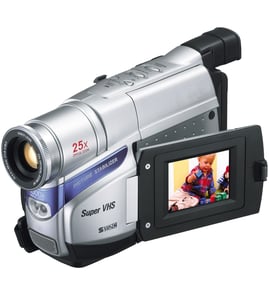
Samsung Vhs camcorder Parts — Browse All Models
Samsung VHS camcorders set the industry standard for recording video clearly and accurately. Video recording components inside Samsung VHS camcorders capture and store images and action that you can keep and share forever. When your Samsung VHS camcorder breaks, find the repair parts you need to fix the camcorder at Sears PartsDirect.
Browse by Category
VHS Camcorders

Frequently bought Samsung parts

Samsung Dryer Drum Support Roller
In Stock
$33.31
15% OFF Phone Price : $39.31

Qty

Refrigerator Auger Motor Assembly
In Stock
$242.47
5% OFF Phone Price : $254.47
Qty
Suspension Rod And Spring Assembly (dc97-16350u) - Washer Support Part By Samsung
In Stock
$63.60
9% OFF Phone Price : $69.60
Qty

Dryer Thermistor
In Stock
$54.08
10% OFF Phone Price : $60.08
Qty

Samsung Dryer Idler Assembly
In Stock
$40.59
13% OFF Phone Price : $46.59
Qty

Dryer Heating Element Assembly - Dryer Part By Samsung
In Stock
$251.53
5% OFF Phone Price : $263.53
Qty
Popular maintenance items for VHS Camcorders

Transistor
In Stock
$26.75
Qty
Sylvania Service Manual
In Stock
$86.49
Qty
C-ceramic,
In Stock
$26.75
Qty
Hitachi Cathode Ray Tube Assembly
In Stock
$131.49
Qty
Top replacement parts for Samsung VHS camcorders
- Len cover. The lens cover protects the camcorder lens from scratches, spills, dirt and debris when you're not using the device.
- Carrying strap. The carrying strap attaches to the camcorder and allows you keep control of the camcorder so you don't drop it when filming video.
- Battery. The battery provides electrical current to operate the camcorder control board and video capture components.
- USB cable. The camcorder USB cable connects the camcorder to a computer, television or home theater system so you can store or watch recorded video.
Playing Samsung VHS camcorder video using the audio/video cable
- Connect the audio/video cable to audio/video out jacks on your camcorder. Connect the other end of the audio/video cable to audio/video in jacks on your television.
- Turn on your television and select line input to play video from the camcorder.
- Connect your VHS camcorder to a power source such as a battery pack, AC adapter or car battery cord.
- Turn on the camcorder power button and select the VCR or Camera playback mode on the camcorder.
- Start playback or begin recording to send the video signal to the television.
Parts & More
Air Handler
Bottom-Mount Refrigerator
Electric Leaf Blower
Electric Range
Front-Engine Lawn Tractor
Furnace
Garage Door Opener
Ice Cream Maker
Planer
Side-By-Side Refrigerator
Top-Mount Refrigerator