 Installation guide
 Owner’s manual

Is TMV151FBA getting discontinued?
We treat TMV151FBA as a Tappan microwave/hood combo model number, not a product that is actively “discontinued” in the way consumables are. Even if the TMV151FBA unit is no longer being manufactured, you can still service it using the correct replacement parts and the procedures in the owner's manual.
What “discontinued” means for TMV151FBA
A discontinued microwave model typically means the manufacturer stopped producing new units, but support can continue through parts availability and standard service procedures.
Common impacts:
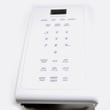
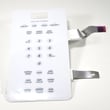
- Some cosmetic parts (trim, door panels) can become harder to source over time
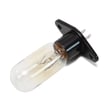
- Wear items (filters, lamps) often remain available longer
- Electrical parts availability varies by production run
- Installation requirements stay the same for safe operation
Quick checks before you assume the microwave is “done”
If your TMV151FBA is acting up, many symptoms are repairable and are not tied to model availability.
Start here:
- Confirm it is plugged into a dedicated 20 amp outlet/circuit (shared circuits can cause slow cooking and nuisance fuse issues)
- Reset power: unplug for 10 seconds, then plug back in and reset the clock
- Check the house breaker or replace a blown house fuse
- Verify the turntable and ring are installed correctly
- Make sure all packing material was removed (common after reinstall)
Installation and electrical requirements (what matters most)
Your TMV151FBA is designed for standard household power (110-120V) and performs best on its own circuit.
| Item | What to use | Why it matters |
|---|---|---|
| Supply voltage | 110-120V | Prevents weak performance and control issues |
| Circuit | Dedicated 20 amp | Avoids voltage drop and blown fuses |
| After outage | Reset clock/programs | Restores normal operation |
Helpful DIY guidance
If the concern is performance (not “discontinued” status), these guides help narrow the cause:
Why it matters
Most “discontinued” worries come up when a microwave stops heating or keeps blowing fuses. In many cases, correcting the power supply setup or replacing a failed electrical component restores normal cooking without replacing the entire microwave.
Last updated: February 2026
What are the most common issues with TMV151FBA?
The most common issues we see with the Tappan TMV151FBA microwave/hood combo are no heat, no power, sparking or burning smells, turntable problems, and vent fan or light failures. Many of these symptoms trace back to door switches, fuses, airflow, or high-voltage components.
Common TMV151FBA symptoms and likely causes
- Runs but does not heat: failed magnetron, high-voltage diode, capacitor, or transformer; sometimes a door-switch problem that prevents proper operation
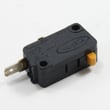
- Dead, no display, or trips breaker: blown ceramic fuse, failed door interlock switch, shorted wiring, or control board issue
- Sparks, arcing, or burn marks: damaged waveguide cover, metal in the cavity, chipped rack/paint, or food splatter causing arcing
- Turntable not rotating: worn turntable motor, coupler/roller guide issues, or a control problem
- Vent fan loud or weak: grease buildup, blocked damper/ducting, or a worn fan motor
- Cooktop light not working: burned-out bulb, socket issue, or control problem
Quick checks we recommend first
- Confirm settings: make sure you are not in timer/demo mode (see the TMV151FBA owner’s manual).
- Test with a cup of water: heat 1 cup for 60 seconds; no temperature rise points to a heating-circuit issue.
- Check airflow: clean grease filters and confirm the vent path is not blocked.
- Inspect the cavity: remove any metal, clean splatter, and look for a damaged waveguide cover.
- Power reset: unplug for 2 minutes, then retry.
Symptom-to-action guide
| Symptom | What to do next | Safety note |
|---|---|---|
| No heat | Follow heating troubleshooting steps | High voltage hazard inside |
| No power | Check outlet, then inspect fuse/door switches | Unplug before any checks |
| Arcing | Stop using; inspect waveguide cover and cavity | Do not run while sparking |
| Weak vent | Clean filters, verify damper opens | Grease buildup is common |
Why it matters
Microwaves combine high voltage, heat, and moving air. Addressing early signs (arcing, breaker trips, weak venting) helps prevent further damage to the control board, wiring, and cooking cavity.
For deeper troubleshooting, we use the wiring and component access guidance in the TMV151FBA installation guide, and for heating failures we follow the steps in why is my microwave not heating and how to replace a microwave fuse.
Last updated: March 2026
What is the average lifespan of TMV151FBA?
A Tappan TMV151FBA microwave/hood combo typically lasts 9 to 10 years with normal household use. Lifespan depends most on ventilation (grease buildup), door use, and avoiding overheating from running empty; routine cleaning and proper installation help it reach that range.
Typical lifespan and what affects it
- Average service life: 9 to 10 years
- Heavier use (multiple long heat cycles daily) shortens life
- Poor airflow (blocked filters or ducting) overheats internal components
- Door slamming wears door switches and latch parts faster
- Grease and steam from cooking can damage the hood fan area over time
Quick care checklist to help it last longer
- Clean the grease filters regularly and keep the intake area clear.
- Run the hood fan when cooking on the range to reduce heat and moisture.
- Never run the microwave empty; it can overheat quickly.
- Use microwave-safe cookware to prevent arcing and interior damage.
- Keep the door closing smoothly; avoid pushing on the handle to shut it.
What “end of life” usually looks like
| Symptom | Common cause area | What to do next |
|---|---|---|
| Runs but does not heat | High-voltage system | Use our troubleshooting steps; consider professional service |
| Dead display/no power | Fuse, door switches, control | Check power supply first; then follow diagnostic steps |
| Loud buzzing or arcing | Waveguide cover/interior, stirrer area | Stop using until inspected and repaired |
| Weak venting | Grease filter, blower, ducting | Clean filters and confirm vent path |
Why it matters
Microwave/hood combos like the TMV151FBA handle both cooking heat and range-top grease. Keeping airflow and filters maintained reduces heat stress on the magnetron and control components, which is the biggest factor in reaching the normal 9 to 10 year lifespan.
For model-specific use, care, and installation details, follow the TMV151FBA owner’s manual and the TMV151FBA installation guide. If you are troubleshooting heating problems, our why is my microwave not heating guide helps you narrow down the most common causes safely.
Last updated: March 2026


