Owner’s manual
 Error Codes



Where is the model number on a Kenmore side by side refrigerator?
On Kenmore side-by-side refrigerator model 25351232102, the model number is printed on the serial plate (rating label) inside the refrigerator compartment. Open the fresh food door and look along the interior walls for the label that lists both the model and serial numbers; our 25351232102 owner's manual confirms this location.
Check these common label spots in the fresh food (refrigerator) section:
- Side wall near the top front (left or right)
- Side wall near the crisper drawers
- Ceiling area near the light housing
- Back wall behind the top shelf area
- Near the hinge side of the door opening
The serial plate is a small printed sticker or metalized label. It typically includes:
- Model number (for example, 25351232102)
- Serial number
- Electrical ratings (volts/amps)
- Refrigerant information
| What you need | Where it appears | Why you need it |
|---|---|---|
| Model number | Serial plate inside refrigerator compartment | To match parts and diagrams to your exact unit |
| Serial number | Same serial plate | To identify production details for service and support |
If the label is hard to read, these steps usually help:
- Wipe the serial plate gently with soap and water, then dry it
- Use a flashlight and view from an angle to reduce glare
- Take a close-up photo and zoom in
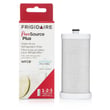
Kenmore refrigerators often have similar-looking doors, shelves, and ice and water dispenser parts across multiple models. Using the exact model number from the serial plate helps us match the correct replacement parts (like a water filter, door gasket, or control board) the first time.
Last updated: January 2026
How do you find the cubic feet of a Kenmore refrigerator by model number?
For Kenmore model 25351232102, the most reliable way to find cubic feet is to look up the capacity listed in the product specifications section of the 25351232102 owner's manual. If you cannot access the spec, you can estimate capacity by measuring the usable interior space and converting cubic inches to cubic feet.
- Check the model and serial plate inside the fresh food compartment; it confirms you are matching the correct model number to the correct specs.
- Look in the specifications section of the 25351232102 owner's manual for “capacity” or “cubic feet.”
- If you are comparing similar Kenmore 253-series units, use the full model number (all digits) when searching specs; small digit changes can mean different cabinet sizes.
- If you only need an estimate, measure the interior and calculate cubic feet (steps below).
- Empty the compartment you are measuring (refrigerator side or freezer side).
- Measure width x height x depth of the usable interior space in inches.
- Multiply to get cubic inches.
- Divide by 1728 to convert to cubic feet.
Tip: Measure the main “box” space; shelves, bins, and the ice maker housing reduce usable volume, so your estimate is typically a little lower than the advertised capacity.
| What you’re doing | Formula | Example (inches) | Result |
|---|---|---|---|
| Convert interior volume to cubic feet | (W x H x D) ÷ 1728 | 18 x 60 x 18 | ~11.3 cu ft |
Cubic feet helps us match the right replacement parts and accessories (like shelves, bins, and water filters), and it also helps you compare energy use and storage space between side-by-side refrigerator models.
Last updated: January 2026
Where is the reset button on a Kenmore side by side refrigerator?
On Kenmore model 25351232102, the reset button most people are looking for is the Filter Reset button on the ice and water dispenser (front of the freezer door). You press and hold it until the green filter light flashes (about 3 to 15 seconds). See the 25351232102 owner's manual for the exact dispenser button layout.
On this refrigerator, the reset function in the manual is for the water filter status light, not for rebooting the entire refrigerator.
- Resets the filter status indicator after a filter change
- Helps you track filter life so water flow and taste stay consistent
- Does not fix cooling, ice maker, or dispenser mechanical problems by itself
- Replace the water filter (if needed).
- Do not dispense ice or water while installing the filter.
- Press and hold the Filter Reset button on the dispenser.
- Keep holding until the green light flashes (3 to 15 seconds).
- Dispense water for about 3 minutes to purge air from the water line.
| What you see | What it means | What to do |
|---|---|---|
| Green light flashes after holding reset | Reset accepted | Release the button |
| Light does not change | Button not held long enough or wrong button | Press and hold again for a full 15 seconds |
| Water sputters after filter change | Air in the line | Flush water for about 3 minutes |
A power reset is useful for a stuck control or dispenser glitch.
- Unplug the refrigerator (or switch off the breaker)
- Wait 2 to 5 minutes
- Restore power and allow 24 hours for temperatures to stabilize
Resetting the filter light keeps your maintenance schedule accurate, which helps protect the water dispenser, ice maker, and water tank from reduced flow caused by a clogged filter.
Last updated: January 2026
What are the dimensions of a Kenmore refrigerator model 25351232102?
The exact overall dimensions for Kenmore side-by-side refrigerator model 25351232102 are listed in the product specifications section of the 25351232102 owner's manual. Use those published measurements (not series averages) when planning delivery, doorway clearance, and the installation cutout.
In the 25351232102 owner's manual, look for a section labeled similar to “Specifications”, “Installation”, or “Clearances”. That is where you will typically find:
- Overall width, height, and depth
- Depth with doors and depth with handles (if provided)
- Minimum airflow clearances (top, sides, rear)
- Door swing or “required space” notes
To avoid fit issues, match your measurements to the spec type:
- Measure width at the narrowest point of the opening (trim, cabinets, door jambs)
- Measure height floor to the lowest overhead obstruction (cabinet, soffit)
- Measure depth from the back wall to the front edge of counters or doors
- Plan extra room for door swing and pulling drawers out
- Leave ventilation space so the condenser can shed heat properly
| What you’re checking | Use this spec from the manual | Why it’s different |
|---|---|---|
| Cutout width | Overall width | Cabinets and trim can pinch the opening |
| Under-cabinet height | Overall height (include hinges if listed) | Hinge covers can add height |
| Walkway/doorway clearance | Depth with handles (if listed) | Handles often add the most depth |
Using the model-specific specs prevents delivery-day surprises, protects airflow for proper cooling, and helps ensure the doors and ice and water dispenser area have enough room to operate.
Last updated: January 2026