Installation guide
 Owner’s manual


How old is my GE Nautilus dishwasher?
To estimate the age of your GE dishwasher (including Nautilus models), we use the serial number date code. On model PDW9980N00SS, the model and serial label is typically on the tub wall just inside the door; once you have the serial, the first 1 to 2 characters identify the manufacturing month and year.
Where to find the serial number
Check these common locations on GE dishwashers:
- Tub wall just inside the door opening (most common)
- Door frame area (open the door and look along the inner edges)
- Side of the tub near the front (visible with the door open)
For the exact label location and how GE lists model and serial information, use the PDW9980N00SS owner’s manual.
How to decode the age from the serial number
GE typically encodes the build date in the first characters of the serial number.
Use this process:
- Write down the full serial number exactly as shown
- Identify the first letter (commonly the month code)
- Identify the next letter or number (commonly the year code)
- Match those characters to GE’s date-code chart to get the month and year
Quick example (format only)
| Serial starts with | What it usually means | What you do next |
|---|---|---|
| 2 characters | Month code + year code | Convert both using GE’s chart |
| 1 letter + numbers | Date code + production sequence | Convert the first letter/character(s) |
Why it matters
Knowing the manufacturing month and year helps us pick the right GE parts (like a door seal, control module, or spray arm) and avoid ordering a look-alike part that does not fit your exact series.
Last updated: January 2026
How do you force a GE dishwasher to drain?
On the GE PDW9980N00SS dishwasher, you can force a drain by canceling the cycle: press START/RESET once, then close the door and wait while it pumps out. The unit typically drains for about 90 seconds before the light stops flashing.
Quick steps to force a drain
- Press START/RESET one time.
- Close the door fully (the drain won’t run with the door open).
- Listen for the drain pump; you should hear water moving to the sink drain.
- Wait until the START/RESET light stops flashing (about 90 seconds).
- Open the door and confirm the standing water level dropped.
If it still won’t drain: check the most common causes
A forced drain won’t work if the drain path is blocked or the hose is kinked.
- Check the sink/disposer connection; make sure the disposer inlet plug was removed (common after a new disposer install).
- Check the air gap (if your setup has one) and clean it.
- Inspect the drain hose under the dishwasher for kinks or crushing.
- Make sure the drain hose routing rises up under the sink before going to the drain (high loop).
- Clean the filter area if debris is restricting flow; consider replacing the dishwasher filter WD12X10109 if it’s damaged or won’t clean up.
What to expect (normal timing)
| Action | What you’ll see/hear | Typical time |
|---|---|---|
| Cancel cycle (START/RESET) | Light flashes; pump runs | ~90 seconds |
| Installation test drain | Unit drains then shuts off | ~5 minutes |
Why it matters
Standing water usually points to a restriction in the drain system (air gap, disposer connection, hose routing) or a drain component issue. Clearing the drain path first prevents repeat clogs and helps you avoid unnecessary part replacement.
For control-panel behavior and indicator light meanings, follow the PDW9980N00SS owner’s manual.
Last updated: January 2026
What is the most common problem with a GE dishwasher?
The most common GE dishwasher problems are drainage issues (clogged filter, air gap, disposer connection, or drain hose), followed by “won’t start” symptoms tied to the door latch or control inputs. For GE model PDW9980N00SS, start with the troubleshooting steps in the PDW9980N00SS owner’s manual.
Most common issues we see (and what to check first)
- Not draining: food debris in the filter area, a clogged air gap, or a blocked disposer inlet.
- Won’t start or stops mid-cycle: door not fully latched, or START/RESET behavior after a cancel/reset.
- Not cleaning well: spray arms blocked by dishes, improper rack loading, or detergent dispenser blocked.
- Spots/film: hard water, low incoming water temperature, or empty rinse aid.
- Leaks: worn door seal, tub gasket, or loose hose connections.
Quick troubleshooting checklist (PDW9980N00SS)
- Confirm drain path is clear: check the sink air gap (if used) and disposer connection for clogs.
- Verify proper drain setup: GE calls out using an air gap or a high drain loop; see the PDW9980N00SS installation guide.
- Check loading: large items should not block the detergent dispenser or wash arms.
- Reset correctly: pressing START/RESET during a cycle cancels it; the unit typically drains for about 90 seconds.
- Inspect common leak points: look for tears, flattening, or gaps in the door seal and tub gasket.
Common symptom-to-cause map
| Symptom | Most likely cause | Best first action |
|---|---|---|
| Water left in tub | Air gap/disposer clog, drain restriction | Clear air gap/disposer; inspect drain hose routing |
| Detergent left in cup | Dishes blocking dispenser, poor loading | Reload; keep dispenser area clear |
| Won’t run after pressing Start | Door not latched, cycle canceled | Re-latch door; restart cycle properly |
| Leaking at door | Worn seal/gasket | Inspect and replace if damaged |
Parts that commonly solve these problems
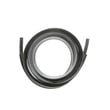
- If you see water at the bottom edge of the door, the dishwasher door seal WD08X10055 is a common fix.
- If the leak appears around the tub perimeter, the dishwasher tub gasket WD08X10032 is often involved.
- If draining is slow and the sump area is dirty, the dishwasher filter WD12X10109 is a frequent maintenance and replacement item.
Why it matters
Drain and loading problems can mimic bigger failures. Clearing a clog, correcting the high drain loop, or fixing a worn seal often restores normal washing, prevents odors, and reduces repeat leaks.
Last updated: January 2026
Can a clogged drain cause an FTD error?
Yes. On the GE PDW9980N00SS dishwasher, an FTD (fail to drain) condition commonly happens when water cannot leave the tub due to a clog in the drain path (filter area, air gap, disposer connection, or drain hose routing). See the PDW9980N00SS owner’s manual for drain checks and troubleshooting.
What to check first (fast, no parts)
- Cancel the cycle and let the unit attempt to drain; many GE models drain for about 90 seconds after a reset.
- Check the sink: if the kitchen sink drains slowly, the dishwasher often will not drain well either.
- If you have an air gap, remove the cap and clean it (food debris here is a frequent cause).
- If the drain connects to a garbage disposer, confirm the disposer inlet plug was removed.
- Inspect the drain hose for kinks, crushing, or a sag that traps water.
- Verify proper drain hose routing: use an air gap or a high drain loop (minimum 32 inches above the floor).
Installation details that directly affect draining
The drain system must be set up correctly or the dishwasher can drain poorly even with a good pump.
| Item to verify | What “correct” looks like | What goes wrong if not correct |
|---|---|---|
| High drain loop | Hose rises to at least 32 inches | Water can backflow; slow drain |
| Total hose length | 10 feet max | Weak drain performance |
| Disposer connection | Disposer plug removed | Dishwasher will not drain |
When a part is likely involved
If the drain path is clear and the dishwasher still will not drain, a failed or restricted component is more likely.
Common part-related suspects include:
- Clogged or damaged filter: dishwasher filter WD12X10109
- Restricted drain line: drain tube WD24X10045
- Debris interfering with internal draining (sump area); cleaning and inspection are the first steps
Why it matters
FTD symptoms are usually a flow problem, not an “electronics” problem. Clearing the drain path and confirming the air gap or high loop prevents repeat clogs, standing water, odors, and pump strain.
Last updated: January 2026