 Owner’s manual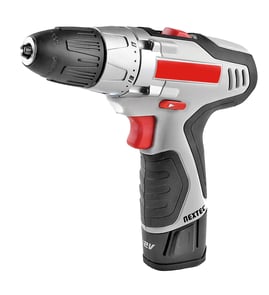

How to replace drill bit on Craftsman drill?
To replace the drill bit on your Craftsman 315114520 drill/driver, lock the trigger, loosen the chuck jaws by rotating the chuck body to UNLOCK, remove the bit, then insert the new bit straight and tighten to LOCK. See the 315114520 owner's manual.
Steps to remove the old bit
- Set the direction-of-rotation selector to the center (lock) position.
- Hold the chuck collar with one hand.
- Rotate the chuck body with your other hand toward UNLOCK to open the jaws.
- Pull the bit straight out of the chuck jaws.
- Keep fingers clear of the bit and chuck while rotating.
Steps to install the new bit
- Open the jaws slightly larger than the bit shank.
- Insert the bit straight into the chuck to the full length of the jaws.
- Hold the chuck collar; rotate the chuck body toward LOCK until the jaws clamp firmly.
- Hand-tighten only; do not use a wrench on the chuck.
- Avoid inserting the bit at an angle (it can slip or be thrown during use).
Quick reference: what to turn
| Task | What you hold | What you turn | Direction |
|---|---|---|---|
| Loosen/remove bit | Chuck collar | Chuck body | UNLOCK |
| Tighten/install bit | Chuck collar | Chuck body | LOCK |
Why it matters
A straight, fully seated bit reduces wobble, improves drilling accuracy, and helps prevent the bit from loosening or binding. Locking the trigger before you touch the chuck also prevents accidental startup.
Last updated: February 2026
What are the parts of a drill?
On the Craftsman drill/driver model 315114520, the main user-facing parts include the keyless chuck (holds the bit), switch trigger (starts/stops), forward/reverse selector, two-speed gear switch, and torque adjustment ring; your tool may also include a battery pack, charger, LED light, level, and bit storage (see the owner's manual).
Main parts you will see and use
- Keyless chuck: Hand-tightens and releases the bit in the chuck jaws.
- Torque adjustment ring: Sets clutch slip to help prevent stripping screws.
- Switch trigger (variable speed): Controls on/off and speed based on trigger pressure.
- Switch lock: Locks the trigger in the OFF position to reduce accidental starts.
- Forward/reverse selector: Changes bit rotation direction; center position typically locks the trigger.
- Two-speed gear train (HI/LO): Slide switch on top selects LO for power/torque or HI for faster drilling/driving.
Common accessory and convenience parts (315114520)
The manual for this model also shows these features:
| Part/feature | What it does | Where you’ll find it |
|---|---|---|
| Battery pack | Powers the drill/driver | Slides into the handle/base |
| Charger and charger stand | Recharges the battery pack | Separate accessory |
| LED light | Illuminates the work area | Near the front of the tool |
| Level | Helps keep the bit level while drilling | Recessed on the back of the motor housing |
| Bit storage | Stores bits when not in use | Bottom of the motor housing |
| Wrist strap | Helps prevent drops while carrying | Attached to the tool |
Why it matters
Knowing the part names helps you use the right control for the job (HI vs. LO speed, torque setting for driving screws) and makes it easier to follow troubleshooting and safe-use steps in the owner's manual.
Quick safety and use reminders
- Wear safety glasses with side shields when operating the drill/driver.
- Clamp or secure the workpiece so it cannot spin.
- Use LO speed for higher torque applications; use HI speed for faster drilling/driving.
- Use the trigger lock (OFF) when carrying or storing the tool.
Last updated: February 2026
How to remove the chuck on a Craftsman drill?
To remove the chuck on your Craftsman drill/driver model 315114520, you lock the trigger, use a 5/16-inch (or larger) hex key and a mallet to loosen the internal chuck screw (left-hand threads), then tap the hex key to break the chuck loose from the spindle and unscrew it by hand. See the owner's manual.
Steps to remove the chuck (model 315114520)
- Lock the trigger: set the direction-of-rotation selector to the center (lock) position.
- Clamp a hex key in the chuck: insert a 5/16 in. or larger hex key and tighten the chuck jaws securely.
- Loosen the chuck screw:
- Tap the hex key sharply with a mallet in a clockwise direction.
- Open the chuck jaws, remove the hex key.
- Remove the chuck screw by turning it clockwise (the screw uses left-hand threads).
- Remove the chuck from the spindle:
- Reinsert the hex key and tighten the chuck jaws.
- Tap the hex key sharply with a mallet in a counterclockwise direction.
- Unscrew the chuck from the spindle by hand.
Direction guide (what turns which way)
| What you are loosening | Tool/action | Turn direction |
|---|---|---|
| Chuck screw (inside chuck) | Screwdriver | Clockwise (left-hand threads) |
| Chuck on spindle | Hex key + mallet, then hand | Counterclockwise |
Tips that prevent damage
- Use a mallet, not a steel hammer, to reduce the chance of cracking the keyless chuck.
- Tighten the chuck firmly on the hex key before tapping so the jaws do not slip.
- Keep the direction selector in center lock so the drill cannot spin unexpectedly.
- Do not use a wrench to tighten or loosen the chuck jaws.
Why it matters
Removing the chuck correctly protects the spindle threads and lets you install certain accessories without creating wobble or runout that can ruin drill bits and fasteners.
Last updated: February 2026