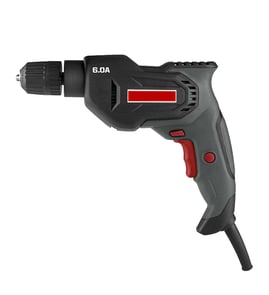

What's the difference between a power drill and a power driver?
A power drill (like the Craftsman 31510510 3/8" electric drill) is built to drill holes and can also drive screws using a chuck that grips many bit types. A power driver (most often an impact driver) is built mainly for driving fasteners with higher torque using a quick-change hex collet.
Quick comparison
| Feature | Power drill | Power driver (impact driver) |
|---|---|---|
| Primary job | Drilling holes; light to moderate screw driving | Driving screws/lag bolts; fastening work |
| Bit holding | Keyless or keyed chuck (many shank styles) | 1/4-inch hex quick-change collet |
| Torque feel | Smooth, controlled | Strong, pulsing impacts to reduce cam-out |
| Best materials | Wood, metal, plastic (with the right bit) | Wood framing, deck screws, stubborn fasteners |
Which one should you use?
- Choose a power drill for drilling accurate holes, using larger drill bits, or when you need steady speed control.
- Choose a power driver for long screws, repetitive fastening, or when screws keep stripping out.
- For mixed projects, many DIYers keep both: drill for holes, driver for fasteners.
Why it matters
Using the right tool helps prevent stripped screw heads, broken bits, and overheated motors. A drill’s chuck gives you flexibility for different bit types; an impact driver’s torque and impacts make fastening faster and more reliable.
Helpful DIY reference
If you are troubleshooting a corded drill that will not run or has intermittent power, start with basic electrical checks using a multimeter and cord inspection steps from how to use a multimeter to test electrical parts video.
Last updated: February 2026
What is the highest rated cordless drill?
There is no single “highest rated” cordless drill for every job; the best pick depends on what you drill, how often you use it, and which battery platform you want to stay on. For most homeowners, a 18V to 20V Max brushless drill/driver kit from a major brand is the safest all-around choice.
How we recommend choosing a top cordless drill
- Battery platform first: pick a brand you will keep long-term (batteries cost more than the tool over time).
- Brushless motor: runs cooler, typically lasts longer, and delivers better power efficiency.
- Voltage class: 12V for compact/light work; 18V to 20V Max for most DIY and remodeling.
- Chuck size: 3/8-inch is common for general drilling; 1/2-inch helps with larger bits and hole saws.
- Clutch and speed ranges: more clutch settings help prevent stripped screws; 2-speed gearboxes cover drilling and driving.
Quick match guide (what “highest rated” usually means)
| Your main use | What to look for | Typical kit to buy |
|---|---|---|
| Furniture, light repairs | 12V compact, brushless if possible | 1 battery + charger + bits |
| General DIY, decks, studs | 18V to 20V Max, brushless, 2-speed | 2 batteries + charger + bag |
| Masonry (brick/block) | Hammer drill function | Hammer drill/driver kit |
| Big holes, mixing, heavy drilling | High torque, side handle, 1/2-inch chuck | Drill + separate impact driver |
Features that matter most in real use
- Ergonomics and balance (less wrist fatigue)
- Battery capacity (2.0Ah for light work; 4.0Ah to 6.0Ah for longer runtime)
- LED light and belt hook (small, but useful)
- All-metal chuck (better grip on bits under load)
Why it matters
A “top-rated” drill is usually the one that matches your tasks and battery ecosystem. The right voltage, brushless motor, and battery size prevent stalled bits, stripped fasteners, and premature tool wear.
For wiring-related troubleshooting on corded tools like the Craftsman 31510510 3/8-inch electric drill, our how to use a multimeter to test electrical parts video is a practical starting point.
Last updated: February 2026
What are the numbers on my power drill?
On the Craftsman 31510510 3/8" electric drill, the numbered ring behind the chuck is the clutch setting: lower numbers limit torque sooner (less driving force), and higher numbers allow more torque before the clutch slips and you hear a clicking/ratcheting sound.
What the numbers control (and what they do not)
The clutch is designed to help prevent stripped screws and overdriving fasteners.
- Lower numbers: clutch slips earlier; best for small screws and softer materials
- Higher numbers: more torque before slipping; best for larger screws and tougher materials
- Drill-bit icon (if present): typically bypasses the clutch for drilling (maximum torque output)
- Speed trigger: controls RPM; it is separate from the clutch numbers
- Forward/reverse switch: changes direction; it does not change torque limits
Quick guide: which setting should I use?
Use this as a starting point, then adjust up or down based on how the screw seats.
| Task | Typical clutch range | What you should notice |
|---|---|---|
| Driving small screws into soft wood | 1 to 6 | Screw seats without stripping; clutch may click at the end |
| General household screwdriving | 6 to 12 | Smooth drive; minimal cam-out |
| Larger screws or denser wood | 12 to max | Less clutch clicking; more driving force |
| Drilling holes | Drill-bit icon (or max) | No clutch slip; steady drilling power |
If the drill clicks constantly or won’t drive screws
These checks solve most “no power” or “keeps slipping” complaints on corded drills.
- Turn the clutch up a few numbers and try again
- Make sure the chuck is tight and the bit is not slipping
- Use the correct bit type and size to prevent cam-out
- Check the extension cord; use a heavier gauge cord for longer runs
- If power cuts in and out, inspect the cord and plug for damage and test continuity with a meter
Why it matters
Correct clutch settings protect your work and your drill. Setting the clutch too high can strip screw heads or split wood; setting it too low makes the clutch slip early so the screw never fully seats.
For safe electrical testing and wire checks, we recommend following the steps in how to use a multimeter to test electrical parts video.
Last updated: February 2026
What are the parts of a drill called?
On a Craftsman 31510510 3/8" electric drill, the main parts are the housing (body), trigger switch, motor (armature and field), chuck, and power cord; on the drill bit itself, the key parts are the shank, flutes, lands, and tip.
Common drill parts (the tool)
These are the names customers most often use when troubleshooting noise, power loss, or wobble:
- Housing (case): the outer body you hold
- Trigger switch: turns the drill on and controls speed
- Forward/reverse selector: changes rotation direction (if equipped)
- Motor: typically includes the armature, field, and brushes
- Gearcase: transfers motor power to the chuck
- Chuck: clamps the drill bit (keyed or keyless)
- Power cord and strain relief: brings power in and protects the cord at the entry point
Common drill bit parts (the cutting tool)
When someone says “parts of a drill,” they often mean the drill bit:
- Shank: the smooth end held by the chuck
- Neck: area between shank and body (often where size markings appear)
- Flutes: spiral grooves that carry chips out
- Lands: the raised surfaces between flutes
- Body: the section with flutes and lands
- Tip (point): the cutting end (includes cutting lips and chisel edge)
Quick reference table
| If you mean... | Part name you want | What it does |
|---|---|---|
| The drill tool | Chuck | Holds the bit straight and tight |
| The drill tool | Trigger switch | Starts the drill and varies speed |
| The drill tool | Brushes | Feed power to the spinning armature |
| The drill bit | Flutes | Clear chips and reduce heat |
| The drill bit | Shank | Lets the chuck grip the bit |
Why it matters
Using the right name helps you diagnose faster. For example, a wobble usually points to the chuck or a bent bit shank, while sparking often points to motor brushes.
Helpful DIY reading
For safe electrical checks on a corded drill, use how to use a multimeter to test electrical parts video.
Last updated: February 2026
How to replace drill bit on Craftsman drill?
To replace the drill bit on your Craftsman 31510510 3/8" electric drill, fully open the chuck, insert the bit straight, then tighten the chuck securely so the bit does not slip under load.
Steps to change the drill bit
- Unplug the drill (corded models) before touching the chuck.
- Hold the drill firmly and rotate the chuck sleeve counterclockwise to open the jaws.
- Insert the drill bit shank all the way into the chuck (centered).
- Rotate the chuck sleeve clockwise until it is hand-tight.
- Give the bit a quick tug to confirm it is locked in.
- Plug the drill back in and briefly test at low speed.
Key details that prevent slipping
A loose bit can wobble, slip, or damage the chuck jaws. These quick checks help the bit stay centered.
| What to check | What “good” looks like | What to do if it’s not right |
|---|---|---|
| Bit seating | Bit is straight and fully inserted | Reopen chuck, reseat bit, retighten |
| Tightness | Chuck is firmly hand-tight | Tighten again; avoid overtightening |
| Chuck jaws | Jaws close evenly around the bit | Clean jaws; inspect for wear |
If your drill has a keyless chuck vs. keyed chuck
Most 3/8" Craftsman drills use a keyless chuck, but some versions use a chuck key.
- Keyless chuck: tighten by hand until very snug.
- Keyed chuck: tighten with the chuck key in all three holes (if present) for the most secure grip.
Why it matters
A properly tightened chuck protects the bit, improves hole accuracy, and reduces vibration that can wear the chuck, bearings, and motor over time.
For more DIY safety basics before electrical tool work, use our guide: are diy appliance repairs safe.
Last updated: February 2026