


How long should my coffee maker last?
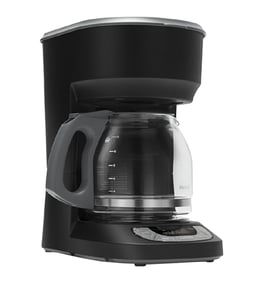
Most coffee makers last 3 to 5 years with average use. With consistent cleaning and regular descaling, many built-in style units like model JJB6424HM0 commonly reach 5 to 10 years, especially when water flow parts and seals stay in good condition.
Typical lifespan and what changes it
- Water quality: hard water shortens life by building scale in the heater and valves.
- Descaling frequency: regular descaling protects the heater and internal passages.
- Daily usage: multiple brew cycles per day wear pumps, valves, and switches faster.
- Heat and steam exposure: can age seals and plastic covers over time.
- Serviceability: replacing a worn seal or valve often extends usable life.
Quick “replace vs. repair” guide
| What you’re seeing | Most likely area | Usually worth doing first |
|---|---|---|
| Slow brew, weak flow | Scale restriction, pump path | Descale, then inspect flow-related parts |
| Water leaking inside cabinet | Seal, valve, ducting | Check for drips and replace the leaking component |
| No brew action, intermittent response | Switch or control issue | Verify power, then test the switch and controls |
Parts that commonly affect longevity
If performance is dropping after cleaning and descaling, these are common wear points to inspect on JJB6424HM0:
- Seal W10661107 (leaks, loss of pressure)
- Pump W11363564 (weak flow, noisy operation)
- Valve, solenoid W11363605 (inconsistent fill or flow)
- Switch W11363538 (intermittent operation)
Why it matters
A coffee maker usually “fails early” from scale buildup or small leaks that stress the heater, pump, and electronics. Staying ahead of mineral deposits and fixing minor leaks quickly is the most reliable way to reach the 5 to 10 year range.
Last updated: January 2026
How do I find the model number on my JJB6424HM0?
For the Jenn-Air coffee maker model JJB6424HM0, the model number is printed on the appliance’s rating label. On built-in coffee makers, that label is most often found around the door opening or on an interior side panel you can see after opening the unit.
Where to look on a built-in coffee maker
Check these common spots in this order:
- Inside the front opening after you pull the unit out on the slide rails
- Along the inner side wall near the brew group or service area
- On the frame behind the front trim (visible when the door is open)
- Near the drip pan area or lower front cavity
- On the back panel (usually only visible if the unit is removed)
What the label looks like
Most rating labels include a few key identifiers.
| Label item | What it’s used for |
|---|---|
| Model number | Ensures diagrams and parts match your exact unit |
| Serial number | Identifies production run for service and compatibility |
| Electrical ratings | Helps confirm correct power requirements |
Why it matters
Jenn-Air built-in coffee makers can have similar-looking versions with different internal parts (controls, valves, rails). Using the exact model number helps us match the correct diagrams and parts, such as the carafe W11363131 or coffee maker slide rail assembly, left W11363100.
Last updated: March 2026
How do I troubleshoot my JJB6424HM0?
To troubleshoot the Jenn-Air coffee maker model JJB6424HM0, start with the symptom (no power, no brew, leaks, weak flow, or not heating) and work from simple checks to component-level checks. Many issues trace to water supply, a blocked path, or a failed pump, valve, or heater.
Quick checks first (most common fixes)
- Confirm the unit has power and the outlet or breaker is on
- Make sure the water source is on and the reservoir or supply line is not empty or kinked
- Empty and reseat the drip pan and carafe so interlocks can close properly
- Run a rinse cycle to clear air from the system after the unit sits unused
- Look for visible leaks under the unit and around tubing connections
Symptom-based troubleshooting
| Symptom | What to check | Likely parts involved |
|---|---|---|
| No water flow / very slow flow | Airlock, blockage, scale, pinched line | Pump W11363564, tubing W11363608 |
| Leaking inside cabinet | Loose connection, worn seal, cracked line | Seal W10661107, duct, leak W11363164 |
| Not heating | Heater circuit, scale buildup, wiring | Heater W10661805 |
| Won’t start or stops mid-cycle | Door/pan seating, control input, sensor feedback | Switch W11363538, hall sensor (listed as W11370142) |
Safe diagnostic steps (before replacing parts)
- Unplug the coffee maker before removing panels or touching wiring
- Check for mineral buildup; descale if your water is hard
- Inspect tubing for kinks, splits, or loose clamps
- If you have a multimeter, test continuity on suspect electrical parts
For electrical testing basics, use our guide: how to use a multimeter to test electrical parts video.
Why it matters
Troubleshooting by symptom prevents unnecessary part swaps and helps you target the correct system (water path, heating, or controls). On built-in units like JJB6424HM0, catching a small leak early also helps prevent cabinet damage.
Last updated: March 2026