Installation guide
 Owner’s manual
 Error Codes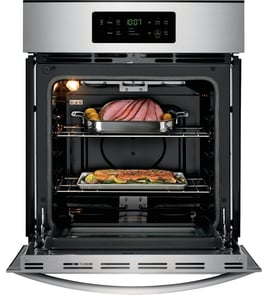






Does Frigidaire make wall ovens?
Yes. Frigidaire makes wall ovens, including single and double wall ovens, and the Frigidaire PLEB30S9FCD is an example of a Frigidaire electric wall oven model. For features, operating basics, and safety guidance specific to this oven, use the PLEB30S9FCD owner's manual.
What types of Frigidaire wall ovens you will see
Frigidaire’s wall oven lineup commonly includes these configurations:
- Single wall ovens
- Double wall ovens
- Wall oven and microwave combination units
- Convection-capable models (varies by model)
How to confirm what fits your kitchen
Wall ovens are sized to match cabinet cutouts, so the cabinet opening matters as much as the oven model.
Typical cutout sizing (what to check)
Use the PLEB30S9FCD installation guide to confirm the exact cutout requirements for your installation.
- Cabinet cutout width and height
- Cutout depth and required clearance
- Electrical supply requirements (dedicated circuit, grounding)
- Anti-tip bracket and mounting bracket requirements
| What you are choosing | What it affects | What to verify first |
|---|---|---|
| Single vs. double wall oven | Cutout height and mounting points | Cabinet opening dimensions |
| Standard vs. convection | Cooking performance and fan components | Control features and settings |
| Replacement vs. new install | Wiring, brackets, trim fit | Installation instructions |
Why it matters
Choosing the right Frigidaire wall oven is not just about features; it is about safe installation and proper fit. The installation instructions for this platform also note these ovens are not approved for stackable or side-by-side installation, and the oven must be secured to reduce tip risk.
Last updated: January 2026
How do I know which Frigidaire oven model I have?
To identify your Frigidaire oven model, open the oven door and look for the serial plate on the interior side trim; the model number and serial number are printed there. For the Frigidaire wall oven model PLEB30S9FCD, this is the standard ID location.
Where to find the model and serial number tag
On Frigidaire wall ovens like PLEB30S9FCD, the serial plate is visible when the door is open and is typically mounted on the interior side trim.
- Open the oven door fully and look along the left and right interior side trim
- Use a flashlight if the kitchen lighting is dim
- Write down the model number, serial number, and any lot number/letter shown
- Take a clear photo of the tag for future parts ordering
- If the tag is greasy, wipe it gently so the numbers are readable
For diagrams and model-specific details, use the PLEB30S9FCD owner's manual.
What to record (and why)
When we help match wall oven parts (like an oven temperature sensor, oven controller, or oven light bulb), the model and serial information ensures the correct fit and wiring style.
| What to capture | Example of how it’s used |
|---|---|
| Model number | Matches the correct parts list for your oven |
| Serial number | Helps confirm production variation |
| Lot number/letter (if shown) | Helps narrow down revision changes |
If you are ordering parts
Use the exact model number from the tag (not just “Frigidaire wall oven”) when selecting parts.
- For an oven light issue, match the bulb and socket style to your model
- For heating problems, confirm whether you are troubleshooting bake, broil, or convection
- For temperature accuracy issues, the sensor and control settings matter
A common replacement item for lighting is the range oven light bulb 316538904 (verify your bulb type in the manual before ordering).
Why it matters
Frigidaire wall ovens can look similar across model families, but parts like the electronic oven control, temperature sensor, and wiring connections can vary by production run. Using the serial plate information prevents wrong-part returns and repeat repairs.
Last updated: January 2026
How to reset a Frigidaire wall oven?
For a Frigidaire PLEB30S9FCD wall oven, the most reliable reset is a power reset: turn the oven off, shut off power at the circuit breaker for about 1 minute, then restore power and reset the clock. If an F-code returns after clearing it, the oven has detected a fault that needs troubleshooting.
Quick reset steps (safe and effective)
- Turn the oven controls to OFF.
- Shut off power at the circuit breaker (or remove the fuse) for about 60 seconds.
- Restore power.
- Reset the clock and reselect your cooking mode.
- If the control is beeping and showing an F-code, press CLEAR to stop the beeping and clear the display.
- If the same code comes back, write it down and move to troubleshooting.
What to do if an F-code keeps coming back
The manual guidance is: clear the code, reprogram the oven, and if the fault reoccurs, record the code and service the unit.
Common next checks we use for this model family:
- Power supply issues: a loose or overheated connection at the terminal block can cause control problems.
- Temperature sensing problems: a failing sensor can trigger temperature-related faults.
- Control failure: repeated F-codes after a reset often point to an electronic control issue.
Helpful parts to consider (when symptoms match)
| Symptom you see | Likely area to check | Example part for this model |
|---|---|---|
| Random resets, dead display, burning smell at wiring | Power connection | Terminal block 5304409888 |
| Oven temperature seems inaccurate, heats erratically | Temperature sensing | Frigidaire range oven temperature sensor 316217002 |
| Repeating F-codes after clearing and power reset | Electronic control | Oven controller 316462839 |
Why it matters
Resetting clears temporary control glitches after a power interruption, but repeated F-codes mean the electronic control is detecting a real fault. Addressing the underlying cause prevents no-heat problems, nuisance beeping, and unreliable baking.
For model-specific control functions and any special key sequences, follow the PLEB30S9FCD owner’s manual.
Last updated: January 2026