 Error Codes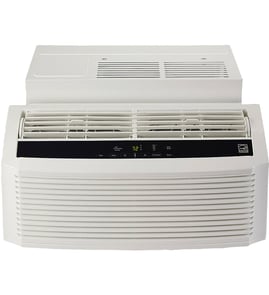

How much do AC spare parts usually cost?
For a Sharp AF-S125FX room air conditioner, AC spare part prices range from under $10 (small electrical items) to several hundred dollars (motors and controls). The biggest cost drivers are the part type, availability, and whether the repair involves sealed-system components.
Typical part cost ranges (parts only)
These are common price bands we see for room and window air conditioner repairs:
- Knobs, clips, small hardware, fuses: $5 to $25
- Thermistors and sensors: $10 to $60
- Capacitors and relays: $15 to $80
- Fan motor or blower components: $80 to $300
- Electronic control board or user interface board: $120 to $450
- Fan blade or fan wheel: $20 to $120
For step-by-step examples of a mid-cost repair, see how to replace a window air conditioner electronic control board.
What changes the price the most
- Sealed-system parts (compressor, coils, refrigerant work) typically cost the most and often require a technician.
- Model-specific availability can raise prices on older or less common models.
- Labor and tools can exceed the part cost for electrical diagnostics, disassembly, and reassembly.
- Shipping and lead time can vary by part size and sourcing.
Repair vs. replace: a quick way to decide
Use this simple comparison to keep the decision practical.
| If your situation is... | Usually makes sense to... |
|---|---|
| Minor electrical issue, sensor, capacitor, or fan blade | Repair |
| Control board failure but unit is otherwise in good shape | Repair |
| Compressor or refrigerant leak suspected | Compare repair total vs. replacement |
| Multiple failures, heavy corrosion, or recurring leaks | Consider replacement |
Why it matters
Room air conditioners like the Sharp AF-S125FX can look “dead” from a small, inexpensive failure (sensor, capacitor, or control issue). Pricing the likely parts first helps you avoid overpaying for a repair that does not restore reliable cooling.
Last updated: February 2026
Is it good to run AC on eco mode?
Yes. On a Sharp AF-S125FX room air conditioner, Eco (energy-saving) mode is a good choice when you want lower power use and steadier comfort; it typically cycles the compressor and fan less aggressively than standard cooling, which can reduce energy consumption.
When Eco mode is a good idea
- Mild to moderate heat and humidity (the room can hold temperature without constant cooling)
- Overnight use when you want quieter, steadier operation
- Long run times where small efficiency gains add up
- You are trying to avoid rapid on/off cycling
When to avoid Eco mode
- Very hot afternoons when you need fast pull-down cooling
- High humidity when you need stronger, longer dehumidification
- Rooms with frequent door openings or lots of sun gain
- If the room feels clammy even though the temperature looks right
What you can expect (typical behavior)
| Setting | Comfort feel | Energy use | Best for |
|---|---|---|---|
| Eco / Energy saver | More gradual, may feel slightly warmer between cycles | Lower | Maintaining a setpoint efficiently |
| Cool (standard) | More consistent cold air | Higher | Faster cooling and better humidity control |
| Fan only | No cooling | Lowest | Air circulation only |
Quick tips to get the most from Eco mode
- Set a realistic temperature (many homes do well around 74°F to 78°F).
- Clean the air filter regularly; restricted airflow hurts cooling and efficiency.
- Keep blinds/curtains closed on sunny windows.
- Make sure the unit tilts slightly outward so condensate drains correctly.
Why it matters
Eco mode can lower operating cost and reduce wear from constant compressor operation, but comfort depends on heat load and humidity. If the room is not staying comfortable, switching back to standard cooling is the fastest fix.
For more setup and usage best practices, see room air conditioner installation and operation tips.
Last updated: February 2026
What do the symbols mean on my air conditioner?
On a Sharp AF-S125FX room air conditioner, the symbols on the control panel or remote usually indicate the operating mode (Cool, Fan, Dry), fan speed, swing (air direction), and timer or sleep features. The exact icon set can vary by remote style, but the meanings are consistent across most room air conditioners.
Common air conditioner symbols and what they do
Most window and room air conditioners use these icons:
- Snowflake: Cool mode (compressor runs to lower room temperature)
- Fan: Fan-only mode (air circulation without cooling)
- Water droplet: Dry mode (dehumidifies; cooling is reduced)
- Auto (often “A” or “AUTO”): Unit chooses cooling and fan output automatically
- Swing (louvers with arrows): Moves the air direction up/down or left/right
- Clock: Timer on/off scheduling
- Moon: Sleep or night mode (quieter operation; gradual temperature adjustment)
- ECO/Leaf (if present): Energy-saving operation
Quick guide: which symbol to use for common goals
| What you want | Best symbol/mode | What to expect |
|---|---|---|
| Fastest cooling | Snowflake (Cool) | Strongest cooling; compressor cycles |
| Lower humidity | Water droplet (Dry) | Less moisture; lighter cooling |
| Air movement only | Fan | No cooling; helps circulate air |
| Hands-off comfort | Auto | Unit adjusts output for you |
Why the symbol matters
Choosing the right mode affects comfort and performance. For example, Dry helps with clammy rooms, while Fan will not lower temperature. Using Swing can reduce hot spots by spreading airflow.
If the icons don’t match what you see
Some Sharp AF-S125FX remotes use different artwork for the same features. Use these checks to confirm what an icon controls:
- Press the button once and watch what changes on the display (mode, fan bars, timer hours)
- Cycle modes until you see the compressor engage (Cool) versus only the fan running (Fan)
- If the unit cools briefly then focuses on moisture removal, you are likely in Dry
- If airflow direction changes by itself, Swing is enabled
For deeper troubleshooting tied to symptoms (like weak cooling or icing), use our DIY resources such as window air conditioner running but not cooling or window air conditioner evaporator fins are ice up.
Last updated: February 2026
Why is my Sharp AC not cooling?
If your Sharp AF-S125FX room air conditioner is running but not cooling, the most common causes are restricted airflow (dirty filter or blocked vents), dirty coils/fins, or an incorrect mode/temperature setting. Start with cleaning and airflow checks before assuming a sealed-system problem.
Quick checks (fastest fixes first)
- Set Mode to Cool and lower the set temperature at least 5°F below room temperature.
- Make sure the front grille and rear exhaust are not blocked by curtains, furniture, or a clogged exterior louver.
- Remove and clean the air filter; a packed filter can make the evaporator coil get too cold and reduce cooling.
- Inspect the evaporator and condenser fins for dust, lint, or leaves; gently clean to restore airflow.
- Confirm the unit is sized reasonably for the room; an undersized unit can run constantly and still feel warm.
What to inspect and what it usually means
| What you notice | Likely cause | What we recommend |
|---|---|---|
| Weak airflow from the front | Dirty filter, blocked inlet/outlet | Clean filter, clear obstructions |
| Coil/fins look matted with dirt | Dirty evaporator or condenser fins | Clean fins carefully, straighten bent fins |
| Runs but air is not cold | Sensor/control issue, low airflow, or sealed-system issue | Do airflow checks first; then follow a diagnostic guide |
| Ice on evaporator fins | Low airflow, very low set temp, dirty filter | Clean filter, raise temp, let ice melt |
Why it matters
A window or room air conditioner cools by moving a lot of air across the evaporator coil and dumping heat at the condenser. When airflow is restricted (filter, vents, fins), cooling capacity drops quickly and the unit can even ice up.
When to go deeper
If airflow is strong and the coils are clean but cooling is still poor, use these model-appropriate DIY resources to narrow it down:
- Window air conditioner running but not cooling
- Window air conditioner evaporator fins are ice up
- Room air conditioner installation and operation tips
Last updated: February 2026


