 Owner’s manual
 Error Codes
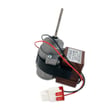



How do I know if my evaporator fan motor is bad in the freezer?
If your Kenmore 11173022020 has weak or no airflow from the freezer vents, the refrigerator section warms up, or you no longer hear the normal “whooshing” airflow sound, the evaporator fan motor is failing or not running. We confirm it with a spin check and electrical tests.
Symptoms that point to a bad evaporator fan motor
- Little to no airflow from freezer vents
- Refrigerator section warm while freezer is only partly cold
- No “whooshing” sound during cooling (the fan normally circulates air)
- Frost buildup on the back freezer panel paired with poor airflow
- Fan noise (grinding, squealing) that comes and goes
Quick checks before you test the motor
Use the 11173022020 owner's manual for safe access and panel removal guidance.
- Make sure the freezer drawer closes fully and seals consistently
- Limit long door openings; warm, humid air increases frost and can restrict airflow
- If the fan blade is packed in ice, fully defrost the freezer and recheck operation
Basic test results guide
| Check | What you see | What it means |
|---|---|---|
| Spin test (unplugged) | Blade does not spin freely | Ice obstruction or failing motor bearings |
| Continuity test (unplugged) | No continuity across motor windings | Motor is bad and needs replacement |
| Voltage test (powered, trained only) | Correct voltage present but fan not running | Motor is bad |
Why it matters
The evaporator fan motor pushes cold air from the freezer through both compartments. When it stops, temperatures become uneven and food spoils faster even if the compressor still runs.
Related help: how to fix your evaporator cooling fan.
Last updated: February 2026
How to adjust leveling feet on refrigerator?
To adjust the leveling feet (leveling legs) on your Kenmore 11173022020 bottom-mount refrigerator, turn the front leveling legs to raise or lower the front corners until the cabinet is stable and the doors close easily. The front should sit slightly higher than the rear for best door closing.
Steps to level the refrigerator
- Open the freezer compartment.
- Remove the upper drawer and the lower drawer basket to access the leveling legs.
- Use the provided wrench to turn each front leveling leg:
- Counterclockwise to raise the front corner
- Clockwise to lower the front corner
- Reinstall the drawer basket and upper drawer.
- Open and close the freezer several times to confirm smooth operation.
Quick checks that prevent wobble and door issues
- Make sure the refrigerator sits on a solid, stable floor.
- Level side-to-side first, then fine-tune front-to-back.
- Keep the front slightly higher than the rear to help doors self-close.
- If the floor is uneven, place shims under the leveling legs as needed.
- Recheck after loading food; weight changes can affect leveling.
What “raise” and “lower” changes
| Adjustment | What you’ll notice | Why you’d do it |
|---|---|---|
| Raise one front corner | Less rocking, better door alignment | Fix wobble or uneven door gaps |
| Lower one front corner | Cabinet settles, doors may close more evenly | Correct a corner that sits too high |
| Front slightly higher than rear | Doors close more reliably | Helps prevent doors from drifting open |
Why it matters
A refrigerator that is not level can wobble, vibrate, and make doors look uneven. Proper leveling also helps the doors seal consistently, which supports stable temperatures and reduces strain on components.
For the exact access points and illustrations for your model, follow the owner's manual.
Last updated: February 2026
How to tell if a Kenmore refrigerator compressor is bad?
A bad compressor in your Kenmore 11173022020 usually shows up as poor cooling with long run times, repeated clicking as it tries to start, or the unit running but never reaching temperature. Before blaming the compressor, we rule out airflow, dirty condenser vents, and normal operating noises listed in the owner's manual.
Quick checks before you suspect the compressor
These items commonly mimic a “bad compressor” and are safe to check first:
- Give it time after power loss or install: cooling can take up to 24 hours to stabilize.
- Confirm doors seal and close fully: frequent door openings and warm food loads increase run time.
- Clean condenser cover and vents: use a vacuum attachment; do not remove the condenser area panel.
- Listen for normal sounds: clicking at defrost start/stop, gurgling refrigerant flow, and a high-pitched/pulsating compressor sound can be normal.
- Check room temperature: in warm rooms, the compressor runs longer; avoid operating above 110°F.
Signs that point more strongly to a compressor problem
If the basics above check out, these symptoms are more compressor-related:
- Repeated clicking every few minutes with little or no cooling (often a start failure).
- Compressor extremely hot to the touch area (after it has been trying to run) and the refrigerator is still warm.
- No steady running sound or vibration from the compressor when cooling is needed.
- Breaker trips or the unit shuts down shortly after trying to start.
What’s normal vs. not normal (sound and run time)
| What you notice | Often normal | More concerning |
|---|---|---|
| Clicking | Defrost/control cycling on and off | Rapid, repeated start attempts with no cooling |
| Run time | About 40% to 80% at ~70°F | Runs nearly nonstop and stays warm |
| Sound | Whooshing, gurgling, pulsating/high-pitched | Loud hard-start clicks followed by silence |
Why it matters
A compressor is the heart of the sealed cooling system. Misdiagnosing it can lead to unnecessary parts and downtime, so we always eliminate airflow, door seal, and condenser clogging issues first.
For model-specific troubleshooting steps and normal noise descriptions, use the owner's manual.
Last updated: February 2026
How to tell what model Kenmore refrigerator?
To tell what Kenmore refrigerator model you have, look for the identification label inside the fresh food (refrigerator) compartment. On Kenmore model 11173022020, the owner's manual specifies the model and serial number are printed on an identification label on the interior liner of the refrigerator compartment.
Where to look for the model and serial label
Check these common label locations first (use a flashlight and look along flat interior surfaces):
- Inside the refrigerator compartment on a side wall (interior liner)
- Inside the refrigerator compartment near the top (ceiling area)
- Behind or beside the crisper drawers (still on the interior liner)
- Near the door opening edge (on the liner, not the gasket)
What the model number looks like
For this Kenmore bottom-mount refrigerator family, the manual lists models as 111.7302* (the asterisk indicates a color number). Your full model number is typically the base model plus a color suffix.
| What you see on the label | What it means | Example |
|---|---|---|
| 111.7302* | Model family/series | 111.7302 |
| Color number/suffix | Exact version for finish/trim | (varies by color) |
| Serial number | Unique ID for your unit | (varies) |
Why it matters
We use the exact model number to match the correct parts, diagrams, and troubleshooting steps for your refrigerator. Even small differences (like a color suffix) can change door bins, shelves, or control components.
Tips to get an accurate match fast
- Copy the model number exactly as printed (include dots, dashes, and suffixes)
- Record the serial number too; it helps confirm production details
- If the label is hard to read, take a clear photo and zoom in
- Keep the information with your purchase date for future service reference
If you are troubleshooting after identifying the model, use Kenmore 111 model bottom freezer refrigerator error codes to interpret display or diagnostic codes commonly seen on Kenmore 111 bottom-freezer designs.
Last updated: February 2026





