Installation guide
 Owner’s manual




Why is the display not working on my KitchenAid microwave oven combo?
If your KitchenAid KOCE500ESS07 wall oven/microwave combo display is blank, the most common causes are a recent power interruption (the unit may show “PF” after power is restored), the clock not being set, or a control/power supply issue. Start with a power reset and basic display checks in the owner's manual.
Quick checks that fix most “blank display” problems
- Confirm the unit has power (oven light, interior light, or fan response).
- Reset power: switch the breaker OFF for 2 to 5 minutes, then turn it back ON.
- After restoring power, look for “PF” (power failure) on the display.
- If the display shows “12:00” or prompts for time, set the clock, then touch START.
- For the upper microwave, remember the display can be blank when the microwave is not in use.
What the display behavior usually means
| What you see | What it points to | What to do next |
|---|---|---|
| “PF” after power returns | Power interruption/surge | Set clock if needed; test operation |
| “12:00” flashing or time prompt | Clock not set | Enter time, touch START |
| Upper microwave display blank only when idle | Normal on combo models | Start a cook cycle to confirm it lights |
| Completely dead display (no response) | Power supply/control issue | Check wiring connections; consider control replacement |
When a part is likely involved
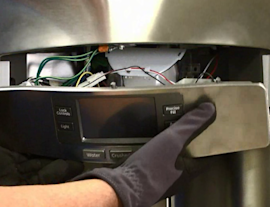
If the display stays dead after a breaker reset and the unit will not respond to keys, the issue is commonly in the electronic control or its power supply section. For this model, a common replacement is the control (with power supply) W11179310.
- If the unit powers up but acts erratically, inspect harness connections for looseness or heat damage.
- If you recently had electrical work done, recheck the breaker and junction box connections.
- If you see intermittent operation, a failing control board is a typical cause.
Why it matters
A blank or unstable display can prevent safe operation because you cannot confirm settings, time, or error prompts. Restoring stable power and confirming normal display behavior helps you avoid unnecessary part replacement.
Last updated: February 2026
Can you fix a KitchenAid microwave?
Yes, we can often fix a KitchenAid microwave, including the microwave section of your KitchenAid KOCE500ESS07 wall oven/microwave combo, when the problem is caused by a failed part, a door-interlock issue, or a control problem. Use the troubleshooting and safety guidance in the owner's manual before testing or replacing parts.
What you can safely try first
Start with checks that do not require disassembly; many “no heat” or “won’t start” complaints come down to settings, door closure, or power.
- Confirm the unit is not in Demo mode (if applicable) and that cooking time and power level are set
- Open and firmly re-close the door; listen for a solid latch engagement
- Try a different cook cycle (for example, timed cook vs. sensor cook)
- Reset power by turning the breaker off for 1 minute, then back on
- If the display is blank or erratic, check for a tripped breaker or loose supply connection
Common repairs for this model
These are frequent repair paths for built-in convection microwave ovens like KOCE500ESS07.
| Symptom | Likely area | Example part on this model |
|---|---|---|
| Won’t start, runs only with door held, or stops when door moves | Door interlock system | Microwave door switch W10211972 |
| Runs but does not heat | High-voltage system | Microwave magnetron W11346197 or inverter W10217711 |
| Dead display, random beeping, or unresponsive keys | Control and power supply | Control (with power supply) W11179310 |
Why the door switch matters
If the door interlock switches do not prove the door is fully closed, the microwave can refuse to run or can shut down mid-cycle. Replacing a worn or misaligned switch is a common fix when the door feels “loose” or operation is inconsistent.
Safety and when to stop
Microwaves contain high-voltage components that can store energy even when unplugged. If your troubleshooting points to the inverter, magnetron, wiring, or internal electrical testing, we recommend using a qualified technician.
- Disconnect power at the breaker before any inspection
- Do not run the microwave with a damaged door, hinge, or latch
- Avoid internal high-voltage testing unless you are trained
- Use the wiring and troubleshooting info in the owner's manual
Last updated: February 2026
Does KitchenAid sell replacement parts?
Yes. For your KitchenAid KOCE500ESS07 wall oven/microwave combo, KitchenAid specifies using factory-specified replacement parts and accessories so they fit and work correctly. You can also order many KOCE500ESS07 replacement parts directly from the parts list for this model; see the owner's manual for examples of accessory part numbers.
What “replacement parts” includes for KOCE500ESS07
KitchenAid replacement parts and accessories can include common microwave items (like turntable components) and core repair parts (like controls and switches). For this model, examples you may need include:
- Microwave door interlock parts such as a door switch
- Microwave heating components such as a magnetron
- Electronic components such as a control board or inverter
- Oven heating parts such as a bake element
- Convenience accessories listed in the manual (turntable, racks, pans)
Parts you can order for this model on Sears PartsDirect
If you are repairing a symptom (no heat, door won’t start, dead display, turntable not turning), these model-matched parts are commonly involved:
- Microwave door switch W10211972
- Microwave magnetron W11346197
- Control (with power supply) W11179310
- Inverter W10217711
- Microwave turntable motor W10911403
Quick guide: accessory vs repair part
| Type | What it’s for | Typical examples |
|---|---|---|
| Accessory | Cooking convenience, removable items | Turntable, racks, pans |
| Repair part | Fixes a failure or error condition | Switches, controls, elements |
Why it matters
Using factory-specified parts helps maintain proper fit, safe operation, and correct performance in a built-in wall oven/microwave combo. It also reduces repeat failures caused by mismatched electrical ratings or mounting differences.
Last updated: February 2026
Can you replace the microwave on a wall oven microwave combo?
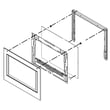
On the KitchenAid KOCE500ESS07 wall oven/microwave combo, the microwave is built into the combination unit, so it is not designed to be swapped out as a separate, standalone appliance. In most cases, you either repair the microwave section (using serviceable components) or replace the entire combo unit. See the installation guide for how the unit is mounted and secured in the cabinet.
What you can do instead
If the microwave side is failing, we focus on diagnosing and repairing the microwave components that commonly cause “no heat,” “won’t start,” or “door won’t latch” symptoms.
Common repair paths include:
- Check door interlock operation; a failed interlock can prevent starting (see microwave door switch W10211972).
- If the unit runs but does not heat, test high-voltage components; inverter or magnetron issues are common (see inverter W10217711 and microwave magnetron W11346197).
- If the turntable does not rotate, inspect the drive motor and coupler area (see microwave turntable motor W10911403).
- If you see arcing or burning near the waveguide area, inspect the cover (see o mica plate W10915651).
- If the display is dead or erratic, control and power supply issues are typical (see control (with power supply) W11179310).
Quick decision guide: repair vs. replace
| Situation | Most likely best next step |
|---|---|
| Microwave will not start and door feels “off” | Check interlocks and latch alignment; test door switch |
| Microwave runs but does not heat | Diagnose inverter and magnetron circuit |
| Multiple functions failing (microwave and oven controls) | Diagnose control/power supply and wiring harness |
| Cabinet removal is required for access | Plan for a full pull-out; follow installation steps |
Why it matters
A wall oven/microwave combo is installed and fastened as a single built-in appliance. Because of that integrated design, “replacing just the microwave” usually is not practical; targeted part replacement is the normal, cost-effective fix.
Last updated: February 2026