Owner’s manual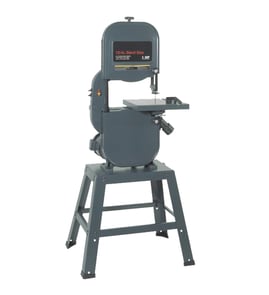

What is the 3-tooth rule for bandsaw blades?
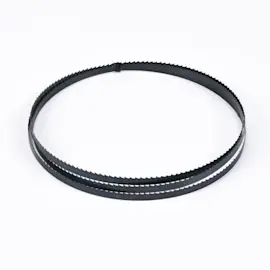
The 3-tooth rule means you should keep at least three blade teeth engaged in the cut at all times when using your Craftsman 351243951 band saw. This prevents “blade shocking” (tooth stripping) with coarse blades and helps avoid gullet clogging, heat buildup, and rough cuts with overly fine blades; see the owner's manual.
Use the thickness of the material (the direction the teeth are cutting through) to pick a blade pitch (TPI) that keeps 3 or more teeth in contact.
- Thin stock (sheet metal, thin wall tubing): use higher TPI so 3+ teeth stay engaged
- Thicker stock (blocks, thick hardwood, solid bar): use lower TPI so gullets can clear chips
- If teeth are ripping/stripping, the blade is usually too coarse or feed is too aggressive
- If the blade is burning, loading up, or cutting slowly, the blade is often too fine or speed/feed is too high
- For a smoother finish, choose more TPI, then slow the feed rate
| Material type | Typical blade pitch (TPI) | What you’ll notice |
|---|---|---|
| Soft materials (many woods, softer plastics) | 6 to 12 | Faster cutting with good chip clearing |
| Hard materials (harder metals) | 12 to 24 | Smoother cut, less tooth shock |
Our manual explains that pitch (TPI) controls how many teeth contact the work and that you should always have at least three teeth in contact to avoid shocking the blade. It also notes the tradeoff: too coarse can strip teeth; too fine can pack gullets, create heat, and shorten blade life.
Even with the right TPI, setup issues can mimic a “wrong blade” problem:
- Confirm teeth point downward through the table
- Recheck blade tension after a few minutes of running (new blades often need additional tension)
- Set guide blocks close to the blade (commonly about 0.002 inch clearance)
- Keep the upper guide just above the work (often about 1/4 inch)
- Reduce feed pressure if the cut is binding or the blade twists
For step-by-step blade replacement and tracking basics, use our how to replace a band saw blade guide.
Last updated: February 2026
What is the most common cause of a ruined band saw blade?
On the Craftsman 351243951 band saw, the most common cause of a “ruined” blade is normal tooth wear from use, made worse by cutting conditions that overheat or shock the blade (forcing the cut, wrong speed, or the wrong tooth pitch for the material). See the owner's manual for blade pitch, speed, and troubleshooting guidance.
- Forcing the cut: let the blade do the work; heavy feed can stall the saw and overheat the blade.
- Wrong blade pitch (TPI) for the material: keep at least 3 teeth in the cut to prevent tooth stripping.
- Wrong blade speed: use higher speeds for softer materials and lower speeds for harder materials.
- Blade guide misadjustment: set upper and lower guides to support the blade and reduce deflection.
- Starting the cut incorrectly: bring the work into the blade after the saw reaches full speed.
- Heat buildup: excess heat at the cut damages the blade and worsens cut quality.
- Confirm the blade travels down toward the table and is installed in the correct direction.
- Recheck blade tension and guide alignment; poor tension and misaligned guides increase breakage and crooked cuts.
- Match blade tooth pitch to the job:
- Soft materials: typically 6 to 12 TPI
- Hard materials: typically 12 to 24 TPI
| What you notice | Most likely cause | What to adjust first |
|---|---|---|
| Teeth strip or blade breaks at the cut | Pitch too coarse (blade “shocking”) or feed too heavy | Use finer TPI; reduce feed pressure |
| Blade dulls quickly | Too much speed, wrong blade type, heat buildup | Try next lower speed; correct blade selection |
| Crooked or rough cuts | Dull blade, guide blocks out of adjustment, low tension | Adjust guides; set proper tension; replace blade |
A band saw blade is a consumable, but correct speed, feed pressure, tooth pitch, and guide setup dramatically extend blade life and improve cut accuracy on wood or metal.
For step-by-step blade handling and setup, use our guide: how to replace a band saw blade.
Last updated: February 2026
How do I find the model number on my 351243951?
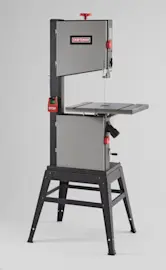
The model number for your Craftsman band saw is printed on the model tag located on the upper cabinet door. Use that full model number when looking up diagrams, the parts list, or service information in the [351243951 owner's manual].
Check these common spots first (in this order):
- Upper cabinet door (primary location for model tag)
- Inside the upper cabinet door (open the door and look along the inner panel)
- Frame near the upper wheel housing (near the door opening)
- Base or stand area (near the lower cabinet)
Record the information exactly as shown on the tag so parts and repair instructions match your saw.
- Model number (for this unit: 351243951)
- Product description (often listed as 18" band saw)
- Any additional identifiers (such as a service or stock number, if shown)
The model number ties your saw to the correct Craftsman parts diagrams and repair parts list. Even small design changes between similar band saws can affect blade drive components, wheel parts, guards, and hardware.
Use this to avoid common lookup issues:
| Check | What to do |
|---|---|
| Tag is dusty or faded | Wipe it clean; use a flashlight at an angle to read stamped text |
| Numbers look similar | Double-check 3/8, 1/I, 5/S |
| Ordering parts | Match the model number first, then confirm the part number and description |
Last updated: March 2026