 Owner’s manual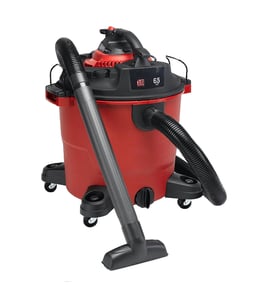

What are the most common issues with 113170260?
The most common issues we see with the Craftsman 113170260 wet/dry vacuum are loss of suction, the motor not starting, unusual noise or burning smell, and leaks at the hose or tank seal. Most problems trace back to a clogged filter, airflow blockage, or a power or switch issue; use the owner's manual for model-specific checks.
Common symptoms and likely causes
- Weak or no suction: clogged filter, full tank, blocked hose/nozzle, loose lid or gasket
- Won’t turn on: bad outlet, damaged cord, failed switch, tripped internal protection (if equipped)
- Loud noise or vibration: debris in impeller area, loose motor mount, cracked fan/impeller
- Dust blowing out: missing or incorrectly seated filter, torn filter media, poor lid seal
- Water leaking (wet pickup): tank crack, loose drain cap (if equipped), worn seal, hose connection leak
Quick checks we recommend (in order)
- Unplug the vacuum; empty the tank and remove the filter.
- Check the hose and wands for clogs; a small blockage causes a big suction drop.
- Inspect the lid seal and latches; reseat the top evenly.
- Test the outlet with another device; then inspect the cord for cuts or heat damage.
- If the motor hums but won’t spin, stop using it and inspect for debris at the fan area.
Troubleshooting guide by symptom
| Symptom | What to check first | What usually fixes it |
|---|---|---|
| Low suction | Filter and hose blockage | Clean/replace filter; clear hose/nozzle |
| No power | Outlet and cord | Reset breaker/GFCI; replace damaged cord/switch |
| Loud grinding | Debris at fan/impeller | Remove obstruction; replace damaged fan parts |
| Leaks | Lid seal and hose fit | Reseat/replace seal; tighten connections |
Why it matters
A wet/dry vacuum depends on sealed airflow. A dirty filter, small hose clog, or poor lid seal forces the motor to work harder, which reduces pickup and can overheat the motor.
Last updated: March 2026
Where is the reset button on a Craftsman shop vac?
On the Craftsman 113170260 wet/dry vacuum, there is no dedicated external “reset button” you press for normal operation. If the motor shuts off, it is typically the thermal overload protection inside the power head; let the unit cool, correct the cause (airflow restriction or overload), then restore power and test.
What to do when it won’t start (safe, fast checks)
- Unplug the vac before inspecting anything.
- Let the power head cool for 20 to 30 minutes if it stopped while running.
- Check for airflow restrictions: clogged filter, blocked hose, or a full drum.
- Reseat the hose fully in the inlet; it should snap in place when installed correctly.
- Try a different outlet (this vac uses a polarized plug; do not modify the plug).
- If you use the detachable blower, make sure the power head latch is fully engaged.
Common causes that mimic a “reset” issue
| Symptom | Most common cause | What we recommend |
|---|---|---|
| Stops after a few minutes | Overheating from restricted airflow | Clean/replace filter, clear hose, empty drum, cool down |
| Hums but won’t run | Jammed debris at fan/impeller area or severe restriction | Unplug, clear obstructions you can reach safely |
| Dead, no sound | Outlet/cord issue or internal electrical problem | Test outlet, inspect cord, then follow electrical checks in the manual |
Why it matters
A wet/dry vac depends on steady airflow to keep the motor cool. A clogged filter or blocked hose can trigger thermal protection, which feels like a “reset button” problem but is really an overheating safeguard.
Helpful resources
- Use the owner's manual for model-specific operating, safety, and troubleshooting guidance.
- If you need to look up parts by model number, start with the parts list for 113170260, or search by model on Sears PartsDirect.
Last updated: February 2026
Why is my Craftsman vacuum not suctioning?
On a Craftsman 113170260 wet/dry vacuum, loss of suction is usually caused by restricted airflow: a clogged or wet filter, a blockage in the hose/nozzle, or an unsealed lid or drum. Restoring airflow and sealing typically brings suction back quickly; use the owner's manual for the correct filter and operating setup.
Quick checks that fix most no-suction problems
- Unplug the vacuum before inspecting the hose, filter, or drum.
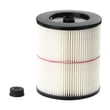
- Check the filter first; a dust-caked filter or a wet filter will choke airflow.
- Remove the hose and look through it for clogs (packed debris, rags, sawdust plugs).
- Inspect the nozzle and extension wands for obstructions.
- Confirm the drum is latched and the lid is seated evenly so it can seal.
Filter issues (most common)
A dry filter is required for dry pickup. If you vacuum dry debris with a wet filter, it clogs fast and suction drops.
If the filter is wet: run the vacuum with the hose removed for about 10 minutes to help dry the filter with clean airflow.
If you pick up liquids:
- Small amounts: the filter can stay installed.
- Large amounts: remove the filter to prevent saturation and exhaust misting.
- After liquid pickup: dry the filter to prevent mildew and filter damage.
Blockage vs. motor problem: a fast way to tell
| Test | What to do | What it means |
|---|---|---|
| Hose-off suction test | Remove hose; turn vacuum on briefly | Strong suction at the inlet points to a clogged hose/nozzle |
| Filter-off airflow check | With correct setup, check airflow with a clean, dry filter | Weak airflow suggests a clogged filter or an air leak at the lid/drum |
Why it matters
Low suction is almost always an airflow problem. A clogged or wet filter, or a blockage, forces the motor to work harder and reduces cleaning performance. Keeping the filter clean and dry maintains peak vacuum performance.
You can look up diagrams and replacement items for your model on the parts list, or search by model number on Sears PartsDirect.
Last updated: February 2026


