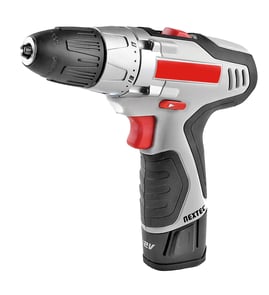

How to attach a driver to a drill?
To attach a driver bit to your Craftsman 31511480 3/8" electric drill, open the chuck, insert the driver bit straight into the jaws, then tighten the chuck firmly so the bit cannot wobble or pull out while driving screws.
Steps to install a driver bit (keyless or keyed chuck)
- Unplug the drill before changing bits.
- Turn the chuck counterclockwise to open the jaws.
- Insert the driver bit (or bit holder) fully and keep it centered.
- Tighten the chuck clockwise until it grips the bit firmly.
- Hand-tighten the chuck again (or tighten with the chuck key) for a secure hold.
- Plug in the drill and test at low speed to confirm the bit runs true.
Bit holder vs. direct-insert driver bit
| Option | Best for | What to watch for |
|---|---|---|
| Driver bit directly in the chuck | Simple setups, occasional screwdriving | Bit can slip if the chuck is not tight enough |
| Bit holder in the chuck (then bit snaps in) | Faster bit changes, repeated driving | Holder adds length; keep it straight to reduce wobble |
Quick checks if the bit slips or wobbles
- Re-seat the bit; it must be straight and fully inserted.
- Tighten the chuck in short bursts, then finish by hand.
- Use a clean, undamaged bit; rounded tips cam-out and feel like slipping.
- Reduce speed and increase steady forward pressure when starting the screw.
- If the chuck jaws look oily or dusty, wipe them clean before tightening.
Why it matters
A properly tightened chuck keeps the driver bit centered, which prevents stripped screw heads, reduces wobble, and helps protect the drill/driver chuck from unnecessary wear.
For more DIY safety basics before working on corded tools, see are diy appliance repairs safe.
Last updated: February 2026
How to change tip on Craftsman drill?
To change the tip (bit) on your Craftsman 31511480 3/8" electric drill, loosen the chuck, insert the new bit fully, then tighten the chuck until the bit is secure and centered. Always unplug the drill first so it cannot start unexpectedly.
Steps to change the drill bit (keyless chuck)
- Unplug the drill.
- Hold the chuck (the front collar) with one hand.
- Rotate the chuck counterclockwise to open the jaws.
- Insert the bit straight into the jaws as far as it will go.
- Rotate the chuck clockwise until it is hand-tight.
- Give it a final snug tighten by gripping the chuck firmly and twisting again.
Quick checks before you drill
- Tug the bit; it should not slide out.
- Spin the chuck by hand; the bit should look centered (not wobbling).
- Set the drill to the correct direction (forward to drill, reverse to remove screws).
- Start at a low speed and increase as needed.
If the chuck is stuck
A chuck can bind from dust, rust, or overtightening.
- Unplug the drill and try opening the chuck while holding the body firmly.
- Tap the chuck lightly with a rubber mallet while turning it open.
- Blow out debris from the jaws; a small brush helps.
| Symptom | Most common cause | What to do |
|---|---|---|
| Bit slips | Chuck not tight enough or bit not seated | Reinsert bit fully; tighten again |
| Bit wobbles | Bit not centered in jaws | Open chuck; reseat bit straight |
| Chuck will not open | Debris or binding | Clean jaws; tap lightly; retry |
Why it matters
A properly tightened, centered bit reduces wobble, improves hole accuracy, and helps prevent stripped screws or a bit coming loose during use.
For more DIY safety basics before working on electrical tools, see are diy appliance repairs safe.
Last updated: February 2026
What are the parts of a drill called?
On a Craftsman 31511480 3/8-inch electric drill (and most corded drills like it), the main parts are the chuck that holds the bit, the motor and gearbox that create torque, and the trigger and cord that supply and control power. Bit parts have their own names, too.
Main parts of a corded drill/driver
These are the names customers most often use when troubleshooting noise, slipping, or power issues:
- Chuck: clamps the drill bit or driver bit
- Chuck jaws: the gripping “teeth” inside the chuck
- Gearcase/gearbox: reduces speed and increases torque
- Motor: spins the armature to drive the chuck
- Trigger switch: turns the drill on and varies speed
- Forward/reverse selector: changes rotation direction
- Power cord and strain relief: supplies power and protects the cord where it enters the housing
Common drill bit part names (bit “nomenclature”)
If you meant the parts of the bit (not the drill), these are the most common terms:
- Shank: the smooth end that goes into the chuck
- Flutes: spiral grooves that carry chips out of the hole
- Lands: the raised edges between flutes that guide the bit
- Body: the main length of the bit between shank and tip
- Point/tip: the cutting end
- Cutting lips/edges: the sharp edges that do the cutting
Quick “what’s what” table
| Item | Where it is | What it does |
|---|---|---|
| Chuck | Front of drill | Holds the bit securely |
| Gearbox | Behind chuck | Trades speed for torque |
| Trigger switch | Handle | Controls on/off and speed |
| Flutes (bit) | Spiral grooves | Clears chips and reduces heat |
Why it matters
Using the right name helps you diagnose faster. For example, a bit that slips points to the chuck/jaws, while a burning smell or intermittent power points to the motor, brushes (if equipped), cord, or trigger switch.
For safe electrical troubleshooting steps, we recommend how to use a multimeter to test electrical parts video.
Last updated: February 2026
How to remove the chuck on a Craftsman drill?
To remove the chuck on your Craftsman 31511480 3/8" electric drill, you typically open the jaws fully, remove the retaining screw (if your chuck has one), then use an Allen wrench and a sharp counterclockwise “break-loose” turn to unthread the chuck from the spindle.
Before you start (safety and setup)
- Unplug the drill from the outlet before any disassembly.
- Remove any bit from the chuck.
- Set the drill to the lowest speed range (if applicable) for better control.
- Wear eye protection; the chuck can release suddenly when it breaks free.
- Work on a stable bench so the tool does not twist out of your hands.
Step-by-step: removing the chuck
- Open the chuck jaws all the way (turn the chuck sleeve until the jaws retract fully).
- Look for a retaining screw inside the chuck (down between the jaws).
- If present, it is commonly a left-hand thread, so you loosen it by turning clockwise.
- Insert a large Allen wrench into the chuck and tighten the chuck firmly on the wrench.
- Break the chuck loose from the spindle:
- Hold the drill securely.
- Strike the long leg of the Allen wrench with a mallet to turn the chuck counterclockwise (standard right-hand thread for the chuck-to-spindle connection on most drills).
- Spin the chuck off by hand once it starts moving.
Quick thread-direction guide
| Fastener location | Most common thread type | “Loosen” direction |
|---|---|---|
| Retaining screw inside chuck (if equipped) | Left-hand thread | Clockwise |
| Chuck on spindle | Right-hand thread | Counterclockwise |
If the chuck will not budge
- Apply a small amount of penetrating oil at the chuck-to-spindle seam and wait 10 to 15 minutes.
- Use a larger Allen wrench for more leverage (without stripping the jaws).
- Use a firmer mallet strike; one decisive hit works better than many light taps.
- If the chuck is damaged or wobbling, plan to replace it after removal.
Why it matters
A properly seated chuck keeps bits centered and reduces wobble, stripped screws, and motor strain. Removing the chuck the right way also prevents damaging the spindle threads, which can turn a simple repair into a bigger one.
For electrical checks while troubleshooting a drill that will not run, use our guide: how to use a multimeter to test electrical parts video.
Last updated: February 2026