 Owner’s manual
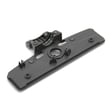
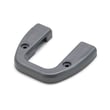
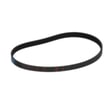
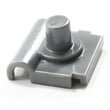

How to change the belt on a Kenmore vacuum?
To change a Kenmore vacuum belt, we unplug the vacuum, remove the floor nozzle base plate, slip the old belt off the motor shaft and brush roll, then install a new belt and reassemble. For model-specific disassembly details, use the owner's manual.
Before you start (safety and setup)
- Unplug the vacuum (never work on the brush area with power connected).
- Work on a flat surface with good lighting.
- Keep a small container for screws so nothing gets lost.
- If the brush roll is packed with hair or string, cut it away before reinstalling.
Belt replacement steps (typical Kenmore brush roll design)
- Remove the nozzle cover or base plate: Turn the nozzle over and remove the screws or latches holding the bottom plate.
- Lift out the brush roll: Note how the end caps and any washers/spacers sit so you can reinstall them the same way.
- Remove the old belt: Slide it off the motor shaft (or belt pulley) and off the brush roll.
- Install the new belt:
- Loop the belt around the motor shaft first.
- Stretch the belt over the brush roll belt path.
- Seat the brush roll back into its supports.
- Reassemble and test: Reinstall the base plate, stand the vacuum upright, then plug in and run briefly to confirm smooth operation.
Quick checks if the brush still will not spin
- Belt is twisted or not seated in the brush roll groove.
- Brush roll is jammed by debris or worn end caps.
- Base plate is pinching the brush roll because an end cap/spacer is out of place.
- Height setting is too low and the brush is binding on thick carpet.
What to expect (normal vs. not normal)
| What you notice | Usually means | What we do |
|---|---|---|
| Burning rubber smell | Belt slipping on a jammed brush | Clean brush roll; verify free spin |
| Loud rattling | End cap/spacer misinstalled | Re-seat brush roll and hardware |
| Weak pickup on carpet | Brush not spinning fast enough | Recheck belt routing and brush roll |
Why it matters
A worn or stretched belt reduces brush roll speed, which lowers carpet agitation and pickup. Replacing the belt and cleaning the brush roll restores cleaning performance and helps prevent belt overheating.
Last updated: February 2026
What model is my Kenmore vacuum?
Your Kenmore vacuum’s model number is printed on the model and serial number plate (often called the rating plate). For Kenmore model 116.58014700 attachments, the model is typically on the vacuum body near the back or bottom, or on the canister housing; confirm the exact number in the owner's manual.
Where to look for the model number
Check these common locations on Kenmore vacuums and PowerMate-style attachments:
- Underside of the vacuum or nozzle head (flip it over and look near the wheels)
- Back of the canister or main body near the cord rewind area
- Behind the dust cup or bag door (inside the compartment)
- Near the hose connection port
- On the original box label or purchase paperwork
How to read the number (Kenmore 116 prefix)
Many Kenmore vacuums use a model format that starts with 116 (sometimes shown as 116.XXXXXXXX). When you record it:
- Write every digit in order (include any dots or dashes if shown)
- Use the full model number, not just “116”
- If there is a separate serial number, record that too for reference
Quick check table
| What you see | What it usually means | What to do |
|---|---|---|
| 116.XXXXXXXX | Kenmore vacuum model number format | Use the full number to match parts and diagrams |
| A shorter label or partial digits | Not the full model number | Keep looking for the complete rating plate |
| Serial number only | Unit identifier, not the model | Find the model number on the same plate or nearby |
Why it matters
Using the exact model number helps us match the correct vacuum cleaner parts, tools, and attachments (like a floor nozzle, wand, hose, or brush assembly) so fit and locking connections line up correctly.
Last updated: February 2026
How to open Kenmore 11658014700 Vacuum?
To open your Kenmore vacuum (model 11658014700) for basic access, we typically start by releasing the bag or dust compartment latch, then lifting off the cover to reach the bag chamber and filters. For the exact latch locations and cover release steps, use the 11658014700 owner's manual.
Common ways this Kenmore canister opens
Most Kenmore canister-style vacuums open in one of these areas:
- Bag chamber door: opens to remove and replace the vacuum bag
- Filter cover: opens to access the pre-motor filter or exhaust filter
- Power nozzle bottom plate (if equipped): opens to clear brush roll clogs and hair
- Hose handle release: opens or releases to remove the hose for blockage checks
Bag chamber: typical steps (bagged canister style)
If your 11658014700 uses a bag chamber door, this is the usual process:
- Unplug the vacuum.
- Locate the bag door release (often a latch or button near the carry handle).
- Open the door to expose the bag mount.
- Pull the cardboard bag tab straight out to release the bag from the mount.
- Remove the bag; then seat the new bag fully on the mount and close the door until it latches.
Quick troubleshooting if it will not open
These checks prevent broken tabs and hinges:
- Make sure the hose is fully seated; some doors bind if the hose collar is misaligned.
- Press the latch while lifting the door gently (do not pry with a screwdriver).
- Check for a bag that shifted and is blocking the door.
- Look for debris around the door seam and latch pocket.
What you should see after opening
| Area you opened | What to inspect | What to do |
|---|---|---|
| Bag chamber | Bag mount, bag tab, seals | Replace bag; reseat bag mount if loose |
| Filter cover | Pre-motor or exhaust filter | Clean or replace filter if clogged |
Why it matters
Opening the correct compartment the right way prevents cracked latches, improves suction, and makes bag and filter service faster, which helps protect the motor from overheating.
Last updated: February 2026
Why won't my Kenmore vacuum brush spin?
If the brush on your Kenmore 11658014700 PowerMate attachment will not spin, the most common causes are a worn or broken belt, a jammed brush roll (hair, string, debris), or a blockage that is preventing the nozzle from turning freely. Use the steps below to pinpoint the failure.
Quick checks that fix most “no spin” problems
- Unplug the vacuum before servicing the PowerMate.
- Flip the nozzle over and clear hair, thread, and debris from the brush roll.
- Check that the brush roll turns by hand; it should rotate with only light resistance.
- Inspect the belt for cracks, glazing, stretching, or a belt that has slipped off.
- Look for a clog in the nozzle air path (packed lint and debris can stall the brush area).
Belt and brush roll inspection (most likely)
A belt issue is the top reason a PowerMate brush stops spinning. Remove the bottom cover, then:
| What you see | What it means | What to do |
|---|---|---|
| Belt snapped or missing | Belt failure | Replace the belt and reassemble |
| Belt loose, shiny, or stretched | Belt slipping | Replace the belt |
| Brush roll packed with hair | Brush roll binding | Clean end caps and brush area, then reinstall |
| Brush roll will not turn by hand | Seized bearings or heavy obstruction | Remove obstruction; replace brush roll if it still binds |
For cover removal details and the correct reassembly order for your attachment, follow the owner's manual.
If the belt and brush roll look good
If the brush roll spins freely by hand and the belt is intact, focus on power and engagement issues:
- Confirm the PowerMate is fully seated and latched to the wand.
- Check the hose and wand connections for looseness or damage.
- Inspect the nozzle wiring path for pinched, cut, or pulled-out wires.
- If your setup has a brush on/off control, cycle it off and on and retest.
If you need to test continuity safely, our how to use a multimeter to test electrical parts video walks through the basics.
Why it matters
Running a PowerMate with a jammed brush roll or slipping belt can overheat the belt, reduce carpet cleaning performance, and accelerate wear on the brush roll and drive components.
Last updated: February 2026