 Owner’s manual








What is the most common problem with LG dryers?
The most common issue we see with LG dryers (including model DLGX7801VE) is long or incomplete drying caused by restricted airflow, usually from lint buildup in the lint filter area or a clogged/too-long exhaust vent run. This can also trigger overheating protection and unexpected shutoffs; see the venting and maintenance guidance in the DLGX7801VE owner’s manual.
Quick checks that solve the most “common” dryer complaints
- Clean the lint screen before every load; wash it with warm water if you see residue from dryer sheets.
- Inspect the lint screen housing for lint buildup and vacuum it out.
- Check the outside vent hood for a strong, steady airflow while the dryer runs.
- Replace crushed foil or plastic venting with 4-inch rigid or semi-rigid metal duct.
- Keep the vent run short with as few elbows as possible.
When it is not airflow: other frequent LG dryer trouble spots
If airflow is good but performance is still poor, these are common next suspects:
- Moisture sensor bars are coated (auto cycles end too soon or run too long); consider the dryer moisture sensor 6500EL3001A.
- Lint screen is torn, warped, or not sealing well; consider the dryer lint screen by LG 5231EL1001C.
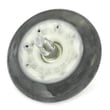
- Noisy operation (squeal, thump, rumble) from wear items such as rollers or the idler pulley.
- Heat shuts off due to temperature-safety components (thermostat issues) or burner ignition problems on gas models.
Symptom-to-cause cheat sheet
| Symptom | Most common cause | What to check first |
|---|---|---|
| Clothes take too long to dry | Restricted venting | Vent hood airflow, duct length/elbows |
| Dryer shuts off mid-cycle | Overheating from poor airflow | Lint screen, vent restriction |
| Auto cycle ends early | Moisture sensor not reading | Clean sensor bars, check harness |
| Squealing or thumping | Drum support wear | Rollers, idler pulley, drum seals |
Why it matters
Airflow problems do more than slow drying; they raise operating temperatures, waste energy, and can cause repeated thermal shutoffs that feel like “random” dryer problems. Keeping the lint filter and venting clean is the single best way to prevent the most common LG dryer complaints.
Last updated: January 2026
Can I fix a D80 error myself?
Yes. On the LG DLGX7801VE dryer, a D80 error usually points to restricted exhaust airflow; you can often fix it yourself by cleaning the lint path and correcting the vent run. Use the steps in the DLGX7801VE owner’s manual to run the duct check and confirm airflow improves.
What to do first (safe DIY checks)
- Turn the dryer off and let it cool.
- Clean the lint filter and the filter housing opening.
- Disconnect the vent from the back of the dryer and remove lint buildup.
- Check the wall cap outside; make sure the damper opens freely.
- Inspect the entire vent run for crushed duct, kinks, or long runs with too many elbows.
- Replace any plastic or thin foil duct with 4-inch rigid or semi-rigid metal duct.
Quick airflow test
Run the dryer for 30 to 60 seconds with the vent disconnected (do not leave it this way for normal use). If airflow at the outlet is strong and the D80 clears, the restriction is in the household ductwork, not the dryer.
Parts that can contribute (when cleaning is not enough)
If the venting is clear but the dryer still reports poor airflow, a damaged lint screen or poor seal at the lint area can let lint bypass into the blower housing and ducts.
- Consider inspecting the dryer lint screen by LG 5231EL1001C for tears, warping, or a loose fit.
- If you hear unusual rattling or airflow seems weak even with the vent off, the blower area may need inspection (lint buildup or a damaged blower wheel).
Why it matters
Restricted venting makes drying times longer and can cause overheating and repeated shutdowns. Fixing airflow issues also helps protect components like thermostats and sensors.
| Symptom | Most likely cause | Best DIY fix |
|---|---|---|
| D80 appears quickly after start | Severe vent restriction | Clean/shorten vent, clear wall cap |
| Long dry times, clothes still damp | Partial restriction or crushed duct | Replace duct with rigid metal |
| D80 persists even with vent off | Internal airflow issue | Inspect lint path, blower area, seals |
Related help: LG dryer error codes.
Last updated: January 2026
Is the DLGX7801VE a gas or electric dryer?
The LG DLGX7801VE dryer is a gas dryer. In the model’s documentation, LG lists both gas and electric versions in this series, and the DLGX prefix identifies the gas configuration for DLGX7801VE.
How we confirm it for this model
We verify fuel type using the model’s documentation and the way LG labels connection points.
- The manual for this model family includes a dedicated section for “Connecting Gas Dryers”
- The product overview calls out “gas connection location (gas models)”
- The same manual also covers electric versions (DLEX models), so the model prefix matters
For more model-specific details, see the DLGX7801VE manual.
Quick comparison: gas vs electric dryer basics
| Feature | Gas dryer (DLGX7801VE) | Electric dryer (typical DLEX version) |
|---|---|---|
| Heat source | Gas burner | Electric heating element |
| Hookups needed | Gas supply + 120V outlet | 240V electrical circuit |
| Common no-heat suspects | Igniter, gas valve, radiant sensor | Heating element, thermal fuse, thermostat |
Why it matters
Knowing whether your LG DLGX7801VE is gas or electric helps you buy the correct replacement parts and follow the right installation and troubleshooting steps (especially for heating and venting).
Related parts you may see on gas models
If you are diagnosing a no-heat issue on a gas dryer, these are common gas-heat components (only replace parts after proper testing):
Last updated: January 2026
How do I reset my LG dryer flow sensor?
On the LG DLGX7801VE, the Flow Sense (duct blockage) indicator typically clears after you remove the airflow restriction and then power-cycle the dryer; there is not a separate “flow sensor reset” button used for normal operation. Start by cleaning the lint filter and the entire vent run, then unplug the dryer for about 5 minutes and run a cycle.
Reset steps we recommend (DLGX7801VE)
- Turn the dryer off and let the drum stop completely.
- Clean the lint filter and confirm it seats fully.
- Inspect and clean the exhaust path: lint screen housing, blower area access (if applicable), transition duct behind the dryer, wall duct, and exterior vent hood.
- Unplug the dryer (or switch the breaker off) for about 5 minutes, then restore power.
- Run a timed dry cycle for 5 to 10 minutes and recheck the Flow Sense indicator.
For venting limits and the built-in installation test guidance, follow the venting and duct-check sections in the DLGX7801VE manual.
If the warning comes back after cleaning
Flow Sense is designed to alert you to restricted airflow, so the light can return if the vent is still partially blocked or crushed.
Common causes we see:
- Kinked or crushed transition duct behind the dryer
- Too many elbows or an overly long duct run
- Lint buildup at the exterior vent hood flap
- Lint buildup inside the blower housing or ductwork
- Heavy loads or mixed fabrics that restrict tumbling and airflow
Quick check table
| What you see | What it usually means | What to do next |
|---|---|---|
| Flow Sense clears after cleaning | Airflow restriction was removed | Keep vent maintenance routine |
| Flow Sense returns quickly | Vent still restricted or duct design issue | Rework/shorten duct, reduce elbows |
| Long dry times plus Flow Sense | Airflow is still low | Clean vent run end-to-end |
When a part may be involved
If airflow is confirmed good but drying performance is still inconsistent, a failed airflow-related component can contribute to symptoms. For example, a damaged blower wheel can reduce air movement; see the dryer blower wheel 5835EL1002A if you need a model-matched replacement.
Why it matters
Restricted exhaust airflow can cause long dry times, overheating, and repeated Flow Sense alerts. Keeping the lint filter and vent system clean helps your LG dryer run efficiently and protects internal components like thermostats and the control board.
Last updated: January 2026







