Error Codes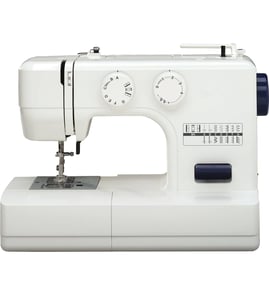
How can I find out how much my sewing machine is worth?
The value of a Brother XL-3022 mechanical sewing machine depends on whether it sews smoothly, its cosmetic condition, and whether key accessories are included (foot pedal, power cord, presser feet, bobbins, case). Most working, common household machines sell for modest amounts; clean, fully tested machines with accessories bring more.
Quick steps to estimate value
- Confirm the exact model number on the rating plate: XL-3022.
- Test basic functions: power on, foot pedal response, forward and reverse stitching, zigzag, and bobbin winding.
- Inspect wear items: needle condition, feed dogs, presser foot pressure, and tension behavior.
- Check for missing accessories: pedal, cord, bobbins, presser feet, and any storage case.
- Clean out lint in the bobbin area and under the needle plate; heavy lint can make a good machine look “broken.”
What typically changes the price the most
| Factor | Higher value when… | Lower value when… |
|---|---|---|
| Working condition | Stitches evenly at multiple lengths/widths | Skips stitches, jams, or will not run |
| Completeness | Includes pedal/cord and common feet | Missing pedal/cord or key accessories |
| Cosmetic condition | Clean, minimal scratches, intact decals | Cracks, heavy corrosion, missing covers |
| Service history | Recently cleaned and adjusted | No maintenance, noisy or sluggish |
Where to get a realistic number
Use “sold” or “completed” listings (not asking prices) and compare machines that match your condition and included accessories. If you plan to repair before selling, compare the likely repair cost to the price difference between “as-is” and “tested working.”
Why it matters
Sewing machines often look similar across years, but small differences in condition and included accessories can change what buyers will pay more than the brand name alone. A quick functional test and accurate description usually increases buyer confidence and resale value.
For repair and troubleshooting help while you test the machine, use our sewing machine DIY resources such as sewing machine repair-guides landing page.
Last updated: February 2026
What are the common problems with Brother sewing machines?
Common problems on the Brother XL-3022 mechanical sewing machine include thread bunching (bird nesting), skipped stitches, thread breaking, fabric not feeding, and a machine that locks up or runs noisy. Most issues come from threading, needle condition, lint buildup, or tension and bobbin setup.
Most common symptoms and what usually causes them
- Thread bunching under fabric: upper thread not seated in the tension path, presser foot up while threading, bobbin not inserted correctly
- Skipped stitches: bent/dull needle, wrong needle type/size for fabric, needle installed backward or not fully seated
- Thread breaking (top or bobbin): tension too tight, burrs on needle plate/bobbin area, old or poor-quality thread
- Fabric not feeding: feed dogs lowered, presser foot pressure too light, lint packed around feed dogs
- Knocking/clicking: thread jam in hook area, loose needle, timing stress after a hard jam
Quick fixes we recommend first (in order)
- Rethread the top thread with the presser foot up, then sew with it down.
- Replace the needle (a fresh needle fixes a large share of stitch problems).
- Remove the bobbin and clean lint from the bobbin case/hook race and under the needle plate.
- Reinstall the bobbin so it unwinds in the correct direction and pulls smoothly.
- Reset tension to a middle setting, then test on scrap fabric and adjust gradually.
Symptom-to-check table
| Problem you see | First thing to check | Next step if it persists |
|---|---|---|
| Bird nesting | Rethread with presser foot up | Clean bobbin area; reset tension |
| Skipped stitches | New needle; correct installation | Match needle type/size to fabric |
| Bobbin thread breaks | Bobbin winding and insertion | Clean hook area; reduce tension |
| Machine locks up | Thread jam in hook area | Inspect for tangled thread; clean |
| Knocking noise | Loose needle or jam | Clear jam; check for damage |
Why it matters
On a mechanical model like the XL-3022, small setup issues (needle, threading, lint) quickly turn into jams, broken thread, and noisy operation. Fixing the basics first prevents hook damage and keeps stitch quality consistent.
Related troubleshooting guides
- For stitch and thread issues: sewing machine skipping stitches and sewing machine bobbin thread breaks
- For jams and noise: sewing machine locks up and sewing machine knocks when running
Last updated: February 2026
What does the word XL-3022 mean?
On the Brother XL-3022 sewing machine, XL-3022 is the model number, not a descriptive word. We use it to identify the exact machine version so you can match the correct diagrams, troubleshooting info, and replacement parts for your Brother sewing machine.
What each part of the model number usually indicates
Model numbers are manufacturer identifiers. For Brother machines like the XL-3022, the characters typically work like this:
- XL: a series or family name used by Brother for certain mechanical sewing machines
- 3022: the specific model within that XL series
- XL-3022 (with the hyphen): the full model identifier you should use when searching parts and repair help
Why “XL” here is not “extra large”
In clothing, “XL” often means “extra large,” and in Roman numerals “XL” can mean 40. On a sewing machine label, XL is a product series code, so it does not describe the machine’s size.
Quick comparison
| Where you see it | What “XL” usually means | Example |
|---|---|---|
| Sewing machine model label | Series/family code | Brother XL-3022 |
| Clothing sizes | Extra large | XL shirt |
| Roman numerals | 40 | XL = 40 |
Why it matters when ordering parts or troubleshooting
Using the exact model number prevents mismatches, especially for common wear items like needles, bobbin case components, belts, and electrical parts (power cord, foot control, switch).
- Match the exact model number: XL-3022
- Compare the part shape and mounting points to your original
- If the machine has symptoms (won’t run, needle won’t move, knocking), troubleshoot first to avoid replacing the wrong part
For repair and troubleshooting help, start with our sewing machine DIY resources such as sewing machine repair-guides landing page.
Last updated: February 2026
What is the most trouble-free sewing machine?
The most trouble-free sewing machine is usually a simple, well-maintained mechanical model with solid build quality and easy-to-find parts. For many sewists, reliable choices come from Brother, Janome, Juki, and Bernina; fewer electronics typically means fewer failure points.
What “trouble-free” means in real use
A sewing machine has fewer problems when it:
- Holds consistent thread tension without frequent rethreading
- Feeds fabric smoothly (even on thicker seams)
- Keeps timing stable (needle and hook stay synchronized)
- Runs quietly without knocking, binding, or overheating
- Has common wear parts that are straightforward to replace (belt, motor brushes, foot control)
Best bet by user type
| User need | What to buy | Why it’s low-hassle |
|---|---|---|
| Beginner and casual sewing | Mechanical machine from a major brand | Simple controls, fewer electronic boards to fail |
| Heavy fabrics and frequent use | “Heavy duty” style mechanical machine | Stronger drive system, better torque |
| Quilting and precision work | Higher-end brand with strong service ecosystem | Better tolerances, smoother stitch formation |
How this applies to Brother XL-3022
Your Brother XL-3022 is a mechanical sewing machine, which is the same style we recommend for low-hassle ownership. Keeping it “trouble-free” comes down to setup and maintenance more than features.
Quick reliability checklist (XL-3022 and similar machines)
- Use the correct needle type and size for the fabric; replace the needle after 6 to 8 hours of sewing
- Rethread the upper thread with the presser foot up (helps the thread seat in the tension discs)
- Clean lint from the bobbin area and feed dogs regularly
- Use quality thread; old or fuzzy thread causes breaks and tension issues
- If it starts to bind or knock, stop immediately and clear thread jams before continuing
Why it matters
Most “problem machines” are actually normal wear, lint buildup, incorrect threading, or a bent needle. Choosing a straightforward mechanical model and following a basic care routine prevents the most common issues: skipped stitches, thread breaks, and lockups.
Helpful troubleshooting resources
- For unusual behavior like binding, sluggish running, or stitch issues, use our sewing machine repair-guides landing page.
- If you own a Brother model with a display and it shows a code, use Brother electronic error codes.
Last updated: February 2026