Owner’s manual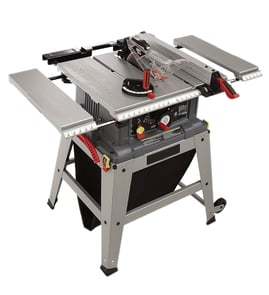

What size blade is a Craftsman 141218331 table saw?
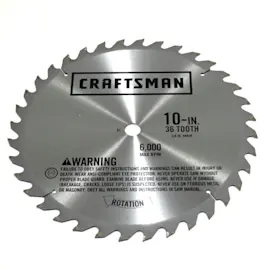
The Craftsman 141218331 table saw is designed for a 10-inch blade. Using the correct blade diameter helps the riving knife, blade guard, and arbor hardware fit properly and keeps your depth-of-cut and tilt adjustments working as intended (see the owner's manual).
Blade size and key specs to match
When you’re buying or swapping blades, match these common fit points:
- Blade diameter: 10 inches
- Arbor size: 5/8 inch (the center hole in the blade)
- Max tilt: 45° (left tilt)
- Dado capacity (max): 13/16 inch (stack width)
Quick fit check before you install a blade
Use this checklist to avoid vibration, rubbing, or poor cuts:
- Unplug the saw before touching the blade area.
- Confirm the blade is labeled 10 in. and has a 5/8 in. arbor.
- Make sure the teeth face down at the front of the table when installed.
- Reinstall the table insert, then reinstall the blade guard and anti-kickback parts.
- Spin the blade by hand (with power disconnected) to confirm it clears the insert and guard.
Blade selection guide (what to use for common cuts)
| Cut type | Typical blade style | Why it matters |
|---|---|---|
| Ripping solid wood | Rip blade (fewer teeth) | Clears chips faster; reduces burning and stalling |
| Crosscutting plywood | Crosscut or combo blade (more teeth) | Cleaner edges; less tear-out |
| General purpose | Combination blade | Good balance for mixed work |
Why it matters
A 10-inch table saw like the Craftsman 141218331 is engineered around that blade diameter. Oversized or incorrect-arbor blades can cause unsafe guard fitment, inaccurate cutting, excess vibration, and binding.
Last updated: February 2026
Can you use an 8 inch blade on a 10 inch table saw?
Yes, on the Craftsman 141218331 table saw you can use an 8-inch dado blade set (not an 8-inch standard saw blade). This saw is designed for a 10-inch blade for through-cuts, and it supports an 8-inch dado set for non-through dadoing when set up correctly.
What’s allowed on model 141218331
- Through-cuts (rip, crosscut, miter, bevel): use a 10-inch blade
- Dadoing (non-through cuts): use an 8-inch dado set
- Use the correct arbor hole size and keep the blade rated for the saw’s RPM
Key setup and safety steps (important)
- Disconnect power before changing blades.
- Use the correct insert for dadoing; this saw requires a dado insert (a special part not supplied with the saw).
- Remove the blade guard for dadoing, then reinstall the standard blade, blade guard, and standard insert immediately when finished.
- Use push sticks and featherboards as needed; never freehand a cut.
10-inch blade vs 8-inch dado set (what changes)
| Item | Typical use | What you’ll notice |
|---|---|---|
| 10-inch saw blade | Through-cuts | Full cutting height and normal guarding |
| 8-inch dado set | Dado/rabbet grooves | Less max depth than a 10-inch blade; guard removed during dadoing |
Why it matters
Using an 8-inch standard blade on a 10-inch saw often creates fit and guarding issues and reduces cutting capacity. On this model, the 8-inch size is intended specifically for a dado set, along with the correct insert and proper guarding practices.
For the exact blade and dado specifications and the required dado insert details, follow the 141218331 owner's manual.
Last updated: February 2026
Are craftsman table saws any good?
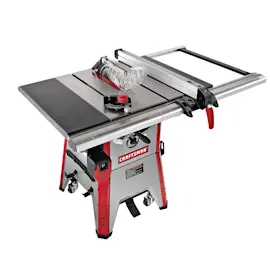
Craftsman table saws are a solid choice for many DIYers and serious hobbyists because they typically deliver good cutting power and durability for the price. For the Craftsman 141218331 contractor table saw, the manual describes a rugged, professional-duty design with a cast iron table, riving knife, and anti-kickback blade guard. See the owner's manual for the exact features and setup details for your saw.
What “good” means for this model
This Craftsman 141218331 is a 10-inch contractor-style table saw intended for continuous service, with features aimed at accuracy and safer operation.
Key strengths called out in the manual:
- 10-inch blade capacity (recommended 10-inch blade)
- Extra large cast iron table for stability
- Riving knife plus clear blade guard with anti-kickback feature
- Heavy-gauge welded steel enclosed cabinet
- 4-inch dust port for vacuum hookup
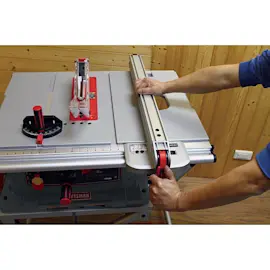
- Rip fence with calibrated front rail and magnified window
Where performance usually depends on setup
Most “mixed reviews” on table saws come down to alignment, blade condition, and technique, not just the brand name.
Focus on these items first:
- Blade selection and sharpness (dull blades cause burning and rough cuts)
- Fence parallel to the blade (prevents binding and kickback)
- Miter gauge squareness for crosscuts
- Table insert and blade guard installed correctly after blade changes
- Stable stand and level floor to reduce vibration
Quick comparison: who this saw fits best
| User type | Fit | Why |
|---|---|---|
| DIY homeowner | Very good | Strong capability for common rip and crosscuts |
| Hobby woodworker | Very good | Cast iron table and fence scale support repeatable cuts |
| Jobsite, daily production | Good | Rugged design, but accuracy still depends on calibration and blade choice |
Why it matters
A “good” table saw is one that cuts straight, repeats settings, and runs safely. On a contractor saw like the Craftsman 141218331, keeping the blade sharp, using the rip fence or miter gauge (never freehand), and maintaining the guard and riving knife directly improves cut quality and reduces kickback risk.
If you are chasing accuracy issues, our DIY symptom guide on table saw bad angle cuts is a practical next step.
Last updated: February 2026
What not to do with a table saw?
For the Craftsman table saw model 141218331, do not cut freehand, reach over or behind the blade, stand in line with a potential kickback, or make adjustments while the blade is rotating. We also never recommend leaving the saw running unattended; shut it off and disconnect power before changes.
Top “don’ts” that prevent kickback and blade contact
- Do not perform any operation freehand; always guide the work with the rip fence or miter gauge.
- Do not use the rip fence for crosscuts or the miter gauge for ripping.
- Do not reach behind the cutting tool to support the workpiece or remove scraps.
- Do not remove small cutoffs by hand; push them off the table with a long stick after the blade stops.
- Do not stand directly in line with the cut; stand to either side of the blade.
- Do not do layout, assembly, or setup on the table while the cutting tool is rotating.
Safe shutdown and “hands-off” rules
Before you change a blade, remove the insert, adjust the guard, or clear a jam:
- Turn the saw OFF.
- Disconnect power.
- Wait for the blade to come to a complete stop.
For model-specific safety steps (including switch operation and locking the switch), follow the 141218331 owner's manual.
Quick guide: correct vs incorrect setups
| Task | Do this | Not this |
|---|---|---|
| Ripping | Use rip fence; keep work supported | Use miter gauge for ripping |
| Crosscutting | Use miter gauge/sled | Use rip fence as a length stop |
| Clearing scraps | Use a long stick after stop | Reach near/behind blade while spinning |
| Body position | Stand to the side | Stand in line with kickback path |
Why it matters
Most serious table saw incidents come from kickback (workpiece thrown back) or hand contact with the blade. Using the correct guide (fence or miter gauge), keeping hands out of the blade path, and shutting off power before adjustments directly reduces those risks.
Last updated: February 2026
Where is the reset button on a Craftsman table saw?
On the Craftsman table saw model 141218331, there is not a dedicated, front-mounted “reset button” described for normal operation. If the saw stops, the first place to check is the ON/OFF switch under the front rail on the left side; then address common overload causes and follow the reset and safety guidance in the 141218331 owner's manual.
Where to look on model 141218331
The manual calls out the primary control location:
- ON/OFF switch location: under the front rail, left side
- OFF control: large red OFF paddle
- Lockout: switch can be locked to prevent unauthorized use (after unplugging)
Safe steps to take before attempting any reset
- Unplug the saw before inspecting the switch, motor area, or wiring.
- Let the motor cool down if it stopped during a cut.
- Confirm the blade turns freely by hand (saw unplugged).
- Check the power source (outlet and breaker) and avoid long, undersized extension cords.
- Reduce load: raise the blade only as high as needed and slow the feed rate.
If it stopped during a cut: common causes and fixes
A “reset” event is usually triggered by overload or drag. Fixing the cause prevents repeat shutdowns.
| What you notice | Likely cause | What we recommend |
|---|---|---|
| Stops mid-cut | Feed rate too fast, dull blade | Slow feed; clean or replace blade |
| Hums but won’t start | Blade binding, low voltage | Free the blade; use a proper circuit |
| Trips repeatedly | Dust buildup, poor airflow | Clean saw and motor vents; clear packed sawdust |
| Struggles in thick stock | Wrong blade for the cut | Use the correct blade type; make multiple passes |
Why it matters
Repeatedly forcing the saw back on after an overload can overheat the motor and damage electrical components. Correcting blade condition, alignment, and power supply keeps the saw cutting safely and consistently.
Related DIY help
Last updated: February 2026