


How to reset Jenn-Air wall oven?
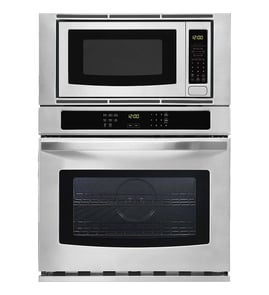
To reset a Jenn-Air wall oven/microwave combo model JMW3430DP02, we recommend doing a power reset at the breaker for 1 to 5 minutes, then restoring power and setting the clock. This clears many control glitches and temporary error conditions.
Quick reset steps (most common)
- Turn the oven OFF.
- At your home electrical panel, switch the oven’s circuit breaker OFF (or remove the fuse).
- Wait 1 to 5 minutes.
- Turn the breaker ON.
- Set the clock and test Bake and Microwave functions.
If the display is blank or the oven seems dead
A reset will not help if the unit is not getting power or a safety device is open. Check these common causes:
- House breaker is tripped (reset it fully OFF, then ON).
- Loose power connection at the junction box (have an electrician check).
- A blown internal fuse such as fuse mda 20a W11188752.
- Overheat protection tripped, sometimes tied to range high-limit thermostat WP4449751.
- Control not powering up due to a failed electronic control board WPW10260060.
| Symptom after reset | Most likely area to check | Typical next step |
|---|---|---|
| Display returns, works normally | Temporary control glitch | Monitor for repeat issues |
| Display returns, then errors again | Heat, sensor, or control issue | Note the code, then troubleshoot |
| Display stays blank | Power supply, fuse, control | Verify power, then test components |
Why the reset matters
A breaker reset fully removes power from the electronic control, which can clear a “locked up” touch panel, restore normal keypad response, and reinitialize the oven and microwave controls after a power surge.
When to stop and get service
- The breaker trips again immediately.
- You smell burning or see arcing.
- The microwave runs with the door open or the door will not latch.
Last updated: January 2026
Is Jenn-Air considered high end?
Yes. Jenn-Air is widely considered a high-end (premium) appliance brand, especially for built-in cooking products like the JMW3430DP02 wall oven/microwave combo; it typically competes on design, features, and price with other premium kitchen brands.
What “high end” usually means for a wall oven/microwave combo
High-end brands typically focus on a mix of performance, aesthetics, and feature sets that go beyond basic cooking.
Common premium indicators include:
- Built-in, integrated designs (wall oven and microwave combo configurations)
- Advanced cooking modes (convection, sensor cooking, multi-stage programs)
- Higher-grade finishes and tighter fit-and-finish expectations
- More complex electronics (touch controls, control boards, sensors)
- Higher parts and service costs compared to entry-level brands
How this affects parts and repairs
Because premium units often use more specialized components, correct model matching matters when ordering parts for JMW3430DP02.
Here are examples of parts you may see on this model:
- Electronic control board WPW10260060 (controls key oven and microwave functions)
- Inverter W10217711 (helps drive microwave power output)
- Microwave door switch W10211972 (door interlock safety switching)
| What you’re comparing | Typical “value” brand | Typical premium brand (like Jenn-Air) |
|---|---|---|
| Feature depth | Basic modes | More cooking modes and automation |
| Controls | Simpler | More electronic controls |
| Parts pricing | Lower | Often higher |
| Fit and finish | Good | Typically more refined |
Why it matters
Knowing Jenn-Air is premium helps set expectations: parts like an electronic control board, inverter, or door interlock components can cost more, and accurate troubleshooting is important before replacing anything.
Last updated: January 2026
How long do Jenn-Air wall ovens last?
Most Jenn-Air wall ovens last about 13 to 15 years with normal household use and basic maintenance. For a wall oven/microwave combo like model JMW3430DP02, heavy use, heat buildup, and power surges can shorten lifespan, while good ventilation and prompt repairs can extend it.
Typical lifespan (what to expect)
Here are realistic ranges we see for built-in wall ovens and combo units:
| Appliance type | Typical lifespan | What usually ends the run |
|---|---|---|
| Wall oven (electric) | 13 to 15 years | Control issues, heating circuit failures |
| Wall oven/microwave combo | 10 to 15 years | Microwave high-voltage parts, electronics |
| Microwave section (built-in) | 7 to 10 years | Magnetron, inverter, door switch problems |
Signs your wall oven is nearing end-of-life
- Preheats slowly or struggles to hold temperature
- Uneven baking or frequent temperature swings
- Display resets, beeps randomly, or loses settings
- Fan runs abnormally loud or runs long after cooking
- Repeated breaker trips or burning smell (stop using and have it checked)
Parts that commonly affect longevity
Replacing a failed component often restores reliable operation, especially when the cavity and door are still in good shape.
- Oven not heating well: range bake element W11545804
- Cooling or airflow problems: cooling fan W11344874
- Random shutdowns or dead display: electronic control board WPW10260060
- Microwave not heating: microwave magnetron W11346197 or inverter W10217711
- Microwave won’t start or acts like the door is open: microwave door switch W10211972
Why it matters
A built-in Jenn-Air combo unit is a major installation; knowing the typical 13 to 15 year wall-oven lifespan helps you decide whether a repair (like a bake element or control board) is a smart investment versus planning a replacement.
Last updated: January 2026
What are common problems with Jenn-Air stoves?
Jenn-Air cooking appliances commonly have issues with heating performance, controls, door/lock operation, and cooling or convection airflow. For the Jenn-Air JMW3430DP02 wall oven/microwave combo, the most frequent symptoms we see are uneven baking, no-heat conditions, microwave not heating, and intermittent power or display problems.
Common problems and what they usually look like
- Oven not heating or heats inconsistently: long preheat times, underbaked food, or temperature swings.
- Bake element failure: visible blistering, cracks, or no glow during bake.
- Control or keypad issues: dead display, random beeps, unresponsive touch inputs.
- Cooling or convection airflow problems: loud fan noise, overheating shutdowns, weak convection performance.
- Microwave won’t start or stops when the door moves: door switch or latch alignment symptoms.
- Microwave runs but doesn’t heat: high-voltage system symptoms (magnetron or inverter related).
Quick checks we recommend before replacing parts
- Confirm power: a wall oven/microwave combo typically needs a dedicated circuit; reset the breaker fully (OFF then ON).
- Check settings: verify you are in BAKE (not DELAY, SABBATH, or KEEP WARM modes).
- Look for obvious heat-source damage: inspect the bake element for cracks or burn spots.
- Listen for fans: cooling fan and convection fan behavior often points to airflow or overheating issues.
- For microwave symptoms: if the door feels loose or the unit only runs when you press on the door, focus on door interlock components.
Parts that commonly relate to these symptoms (JMW3430DP02)
| Symptom | Commonly involved part | What it affects |
|---|---|---|
| Oven won’t bake or bakes unevenly | Range bake element W11545804 | Primary bake heat source |
| Dead display or erratic operation | Electronic control board WPW10260060 | User interface and oven control logic |
| Microwave won’t start reliably | Microwave door switch W10211972 | Door interlock safety circuit |
| Microwave runs but doesn’t heat | Inverter W10217711 | Power delivery to high-voltage system |
| Overheating or loud fan behavior | Cooling fan W11344874 | Removes heat from controls and cavity |
Why it matters
Heating and control problems can cascade: a weak bake element can cause long cook times, and poor cooling airflow can trigger shutdowns that look like “random” control failures. Matching the symptom to the right system (heat, control, airflow, or door interlock) prevents repeat repairs.
Last updated: January 2026