 Owner’s manual



What is the life expectancy of a GE washing machine?
Most GE washing machines, including the GE GTW840CPN1DG top-load washer, last 10 to 14 years with normal household use. Consistent care (proper loading, good water supply hoses, and routine cleaning) is what most often separates a 10-year washer from a 14-year washer.
Here are the biggest factors that affect how long a washer lasts:
- Load size and frequency: frequent heavy loads shorten motor, clutch, and suspension life
- Water quality: hard water can increase detergent buildup and odor issues
- Drain performance: slow draining strains the drain pump and can leave standing water
- Leveling and vibration: an unlevel washer increases wear on the drive system
- Preventive maintenance: small habits prevent big failures
We recommend these practical steps for the GTW840CPN1DG:
- Replace fill hoses about every 5 years (helps prevent leaks and flow problems)
- Keep the washer level; adjust leveling legs if it rocks or squeaks
- Avoid overloading; leave space for clothes to tumble and rinse
- Run periodic cleaning cycles and wipe the lid and tub ring area dry
- If the washer pauses or is left open, understand the automatic drain behavior and restart steps in the GTW840CPN1DG owner’s manual
| What you notice | Most common cause | What to check first |
|---|---|---|
| Won’t drain or drains slowly | Drain restriction or failing pump | Drain hose routing, pump noise |
| Won’t fill or fills slowly | Water supply or inlet valve issue | Screens in hoses, faucet fully open |
| Won’t start, lid-related messages | Lid lock or lid not opened between cycles | Lid closes firmly, lock engages |
| Excess vibration or squeaking | Washer not level | Leveling legs and floor stability |
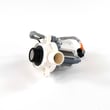
If draining problems are part of the issue, the model-specific replacement part is the GE washer drain pump assembly WH23X28418.
A washer that is level, drains quickly, and has healthy fill hoses runs cooler and with less strain. That reduces wear on high-cost components like the motor, control board, and drive system, which is the most direct path to reaching the 10 to 14 year lifespan.
Last updated: January 2026
What is the most common problem with GE washers?
The most common GE washer problem is a no-drain or no-spin condition. On the GE GTW840CPN1DG top-load washer, this is usually tied to a drain restriction (hose or pump), a lid lock issue, or a load that the washer cannot balance well enough to complete spin.
- Washer won’t drain: drain hose kinked/clogged, pump obstruction, or a failed pump.
- Washer won’t spin: lid not locking, out-of-balance load, or a drive/control issue.
- Stops mid-cycle or shows a message: the washer may enter a lock-out period after certain stops.
- Fills slowly or not at all: inlet screens clogged, low water pressure, or a valve problem.
- Spin seems to start then pause: normal load sensing and speed adjustments can look like a “problem.”
- Unplug the washer for safety.
- Confirm the lid closes fully and latches; if the display shows lid-related behavior, follow the steps in the GTW840CPN1DG owner’s manual.
- Check the drain hose for kinks, clogs, or an over-tight standpipe fit.
- Run a small test load (3 to 5 items) to rule out an out-of-balance condition.
- Use the correct amount of HE detergent; oversudsing can cause poor draining and poor spin results.
| Symptom | Common fix | Example part for GTW840CPN1DG |
|---|---|---|
| Won’t drain, water left in tub | Replace drain pump | GE washer drain pump assembly WH23X28418 |
| Won’t start or won’t spin with lid issues | Replace lid lock | GE washer lid lock assembly WH08X37938 |
| Won’t fill or fills incorrectly | Replace inlet valve | Washer water inlet valve assembly WH13X26637 |
If your washer is showing an error code or repeating a message, use the GE gtw top load washer error codes guide to match the code to the most likely cause (lid lock, drain, sensing, control, etc.).
Drain and spin problems are the most disruptive because they leave clothes wet and can stop the cycle entirely. Catching a simple restriction (hose, pump debris, oversudsing) early often prevents unnecessary control board or motor-related repairs.
Last updated: January 2026
How do I put my washer in diagnostic mode?
For the GE GTW840CPN1DG washer, diagnostic mode is accessed through the service procedures in the GTW840CPN1DG owner's manual. If you are trying to troubleshoot a specific symptom, we recommend checking the model’s error-code list first, then running the related tests.
- Empty the washer and close the lid.
- Press Power to wake the display (Power does not disconnect electricity).
- If the controls do not respond, turn Control Lock off (hold the correct button pair for 3 seconds, depending on your panel).
- If water is sitting in the tub, run Drain + Spin first.
- If the washer is paused with water inside, avoid leaving it paused too long; the washer can auto-cancel and drain.
| What you see | Most likely cause | What to do |
|---|---|---|
| Buttons won’t change settings | Control Lock is on | Hold the Control Lock button combo for 3 seconds (varies by model) |
| Lid won’t unlock | Cycle is active or water is present | Press Pause; if needed run Drain + Spin |
| Washer drains unexpectedly | Lid left open or unit left paused | Close lid; restart a new cycle and try again |
| No fill or weak fill during tests | Clogged inlet screens or low pressure | Clean screens; confirm at least 20 psi supply pressure |
GE top-load diagnostics usually point you to an error code first, then a targeted test (fill, drain, lid lock, motor, etc.). Use our GE gtw top load washer error codes guide to match the code to the most likely failure area.
If diagnostics or error codes point to a specific system, these parts are common on this model:
- Draining issues: GE washer drain pump assembly WH23X28418
- No fill or slow fill: washer water inlet valve assembly WH13X26637
- Lid won’t lock or unlock: GE washer lid lock assembly WH08X37938
Running the correct diagnostic sequence prevents unnecessary part replacement and helps you focus on the right system first (lid lock, drain, fill, or drive). That saves time and avoids repeat breakdowns.
Last updated: January 2026


