



Does GE dehumidifier have a filter?
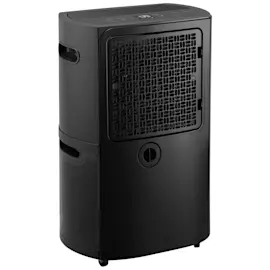
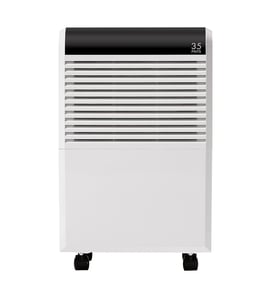
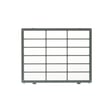
Yes. The GE dehumidifier model APHL50LBQ1 uses an air intake filter to catch dust and lint before air moves across the coils. Keeping that filter clean helps airflow, improves moisture removal, and can reduce icing and noise. See the correct replacement as the filter WK85X29214.
Where the filter is and what it does
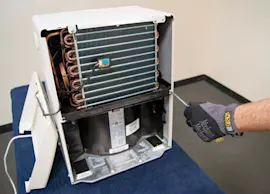
On most GE portable dehumidifiers like APHL50LBQ1, the filter sits behind the rear intake grille (the side where room air is pulled in). It protects the evaporator coil from buildup that can restrict airflow.
What a clean filter helps prevent:
- Weak airflow and poor dehumidifying performance
- Frost or ice forming on the coil
- Longer run times and higher energy use
- Musty odors from trapped debris
- Overheating or nuisance shutoffs
How to clean the filter (quick steps)
- Turn the dehumidifier off and unplug it.
- Remove the water bucket and set it aside.
- Slide the filter out from the intake area.
- Vacuum the filter gently; if it is very dirty, rinse with warm water.
- Let it dry completely, then reinstall the filter and bucket.
When to replace instead of clean
Replace the filter if it is damaged, won’t come clean, or no longer fits snugly.
| Condition | Clean it | Replace it |
|---|---|---|
| Light dust buildup | Yes | No |
| Heavy lint, sticky grime, or odor | Maybe | Often |
| Tears, warped frame, loose fit | No | Yes |
Why it matters
A dehumidifier is basically a small refrigeration system; restricted airflow from a clogged filter reduces heat transfer at the coil, so the unit removes less moisture and is more likely to ice up.
Last updated: February 2026
Is the GE 50-pint dehumidifier with pump any good?
Yes. The GE APHL50LBQ1 50-pint dehumidifier with pump is a strong choice for basements and damp rooms because it removes moisture quickly and the built-in pump can automatically move collected water to a drain, reducing bucket-emptying.
What “good” looks like in real use
- Humidity drops steadily when the room is reasonably sealed (doors/windows closed).
- The pump feature is most valuable when you cannot gravity-drain to a floor drain.
- Performance is best when the air filter is clean and airflow is not blocked.
- Like most 50-pint units, it runs more often in hot, humid weather and less in cooler seasons.
Quick checks to keep performance high
- Clean or replace the air filter on schedule; a clogged filter reduces airflow and moisture removal.
- Confirm the bucket seats fully; many units stop collecting if the bucket switch is not engaged.
- Keep clearance around the intake and exhaust (avoid pushing it tight against a wall).
- If using the pump, route the hose without kinks and keep the discharge line as short as practical.
| Feature | Why it matters | What to watch for |
|---|---|---|
| Built-in pump | Less manual emptying | Kinked hose, blocked discharge |
| 50-pint class capacity | Faster drying in damp spaces | Needs good airflow to perform |
| Removable bucket | Backup if pump is off | Must be seated correctly |
Parts that most often affect day-to-day results
If your unit seems weaker than it used to, these are the first items we check on this model:
- Filter WK85X29214: restricted airflow can make the dehumidifier feel “underpowered.”
- Pump hose WK53X33373: a kink or blockage can cause poor draining when using the pump.
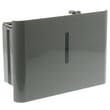
- Water bucket WK10X29215: cracks or a poor fit can lead to leaks or shutoff issues.
Why it matters
A dehumidifier is only “good” if it matches your space and can run consistently without interruptions. Clean airflow (filter) and reliable water handling (pump hose and bucket) are the biggest factors that determine comfort, odor control, and how often the unit shuts off.
Last updated: February 2026
How much does it cost to run a dehumidifier 24 hours a day?
Running a GE APHL50LBQ1 dehumidifier 24 hours a day typically costs about $1 to $4 per day (roughly $30 to $120 per month), depending on the unit’s wattage, your electric rate (cents per kWh), and how often the compressor actually runs versus cycling off.
Quick cost calculator (use your numbers)
Use this formula:
- Daily cost = (Watts ÷ 1000) × 24 × (your $/kWh)
Typical home dehumidifiers often draw 300 to 700 watts while running.
| Example running watts | Electric rate ($/kWh) | Estimated cost per day | Estimated cost per 30 days |
|---|---|---|---|
| 300 W | $0.15 | $1.08 | $32.40 |
| 500 W | $0.20 | $2.40 | $72.00 |
| 700 W | $0.25 | $4.20 | $126.00 |
What changes the cost the most
These factors usually matter more than the model name:
- Humidity level and temperature (hot, damp basements cost more)
- Set humidity target (lower target = longer run time)
- Airflow restrictions (a dirty filter makes the unit work harder)
- Drain method (bucket fills and stops vs continuous drain/pump)
- Room size and air leaks (open doors/windows increase run time)
Ways to lower your running cost
We recommend these practical steps first because they reduce compressor run time:
- Clean or replace the filter WK85X29214 on schedule to keep airflow strong.
- Set a realistic target (many homes do well around 45% to 55% RH).
- Keep doors/windows closed; seal obvious air leaks.
- Place the unit with clearance around the intake and exhaust.
- If you use the bucket, empty it before it reaches the shutoff point; if you use a drain, keep the hose routed downhill with no kinks.
Why it matters
A dehumidifier’s cost is mostly “run time.” Improving airflow (filter), drainage, and room sealing can cut cycling time significantly, which lowers your electric bill and helps prevent coil frost and water leaks.
For related troubleshooting and maintenance, see how to clean a dehumidifier and dehumidifier doesn't remove moisture.
Last updated: February 2026
Can a GE dehumidifier be repaired?
Yes, a GE dehumidifier like model APHL50LBQ1 can be repaired in many common failure situations by cleaning and maintenance, correcting drainage or airflow problems, and replacing worn parts such as the air filter or water bucket when needed.
What we check first (fast DIY triage)
- Confirm the unit powers on and the display responds; try a different outlet.
- Empty and reseat the bucket fully; many units will not run if the bucket switch is not made.
- Clean the air intake and filter area; restricted airflow reduces moisture removal.
- Verify room conditions; most dehumidifiers perform best in warmer rooms with higher humidity.
- Check for kinks or clogs if you use a drain hose or pump setup.
Parts that are commonly replaced on APHL50LBQ1
If your symptoms point to a worn or damaged component, these model-matched parts are typical repair items:
| Symptom | Likely part to inspect/replace | What it affects |
|---|---|---|
| Weak airflow, poor drying | Filter WK85X29214 | Airflow across the coil and overall performance |
| Bucket missing, cracked, or won’t seat | Water bucket WK10X29215 | Collection and bucket-full shutoff |
| Hard to roll, unit tips or drags | Caster WK02X22283 | Mobility and stability |
| Not draining with pump setup | Pump hose WK53X33373 | Water routing to drain |
Why it matters
A repair is often worth it because airflow and drainage issues can mimic major failures. Restoring proper airflow (filter and coil area) and reliable water handling (bucket, hose) typically brings moisture removal back to normal without replacing the whole dehumidifier.
When to stop and schedule service
- The unit trips a breaker repeatedly.
- You smell burning or see melted wiring.
- The fan runs but the unit never removes moisture after cleaning and basic checks.
For step-by-step troubleshooting, we use guides like dehumidifier doesn't remove moisture and dehumidifier not running to pinpoint the most likely cause before ordering parts.
Last updated: February 2026
How long is the warranty on a GE dehumidifier?
GE dehumidifiers typically include a one-year limited warranty from the original purchase date, covering failures caused by defects in materials or workmanship. For your GE APHL50LBQ1 dehumidifier, keep your receipt and record the model and serial information for any warranty claim.
What the one-year limited warranty generally covers
- Defects in materials or workmanship during normal household use
- A replacement unit provided by the manufacturer (commonly new or refurbished)
- Coverage that starts on the original purchase date (not the first day of use)
What to do before you request warranty service
- Confirm the purchase date (receipt, invoice, or credit card statement)
- Write down the model number APHL50LBQ1 and the unit’s serial number
- Check basic operating items first (these often look like “failures” but are not)
- Clean the air filter
- Empty and reseat the bucket fully
- Verify the humidity setting is below room humidity
If you need a maintenance part while troubleshooting, the correct air filter for this model is the filter WK85X29214.
Warranty vs. maintenance items (quick guide)
| Item | Usually considered | Why it matters |
|---|---|---|
| Sealed system or internal electrical defect | Warranty-type issue | Indicates a true component failure |
| Dirty filter, full bucket, blocked airflow | Maintenance/usage | Can stop water collection and mimic a breakdown |
| Bucket not seated, drain setup issue | Setup/installation | Can trigger shutoff and prevent operation |
Why it matters
Knowing the warranty length helps you decide whether to pursue manufacturer coverage first or move straight to repair. It also prevents paying out of pocket for a fix that is still covered.
Last updated: February 2026