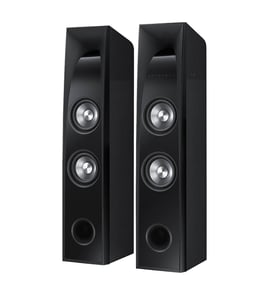

How do I reset my Sony SA-WCT150?
To reset a Sony SA-WCT150 subwoofer, we recommend doing a power reset first (unplug, wait, reconnect). If your system includes a paired Sony soundbar, a factory reset is typically done from the soundbar controls, then you re-pair the wireless subwoofer.
A power reset clears temporary glitches that can cause no sound, dropouts, or pairing issues.
- Turn the soundbar/subwoofer system off.
- Unplug the soundbar and the SA-WCT150 from power.
- Wait 60 seconds.
- Plug them back in (wall outlet, not a switched power strip).
- Turn the system on and test audio.
On many Sony soundbar systems that use a wireless subwoofer like the SA-WCT150, the factory reset is performed on the soundbar (not on the subwoofer). After the reset, the subwoofer usually needs to link again.
Typical next steps after a factory reset:
- Put the soundbar on the correct input (TV/HDMI/OPT).
- Confirm the TV audio output is set correctly (ARC/eARC or optical).
- Wait 1 to 3 minutes for the wireless link to re-establish.
- If the subwoofer has a LINK/PAIR button, press it only after the soundbar is fully powered on.
These indicators vary by system, but this is the most common pattern:
| Subwoofer status | What it usually indicates | What to do |
|---|---|---|
| Solid light | Linked to the soundbar | Test audio and volume |
| Blinking light | Not linked or link is unstable | Power reset, then re-pair |
| No light | No power | Try a different outlet, check cord |
A reset helps separate a simple control or wireless-link glitch from a true hardware problem (like a failed power supply, damaged cord, or internal amplifier issue). If the SA-WCT150 still will not power on or link after a reset, testing power and wiring is the fastest next step.
- Inspect the power cord for cuts, kinks, or a loose fit.
- Try a known-good wall outlet.
- Keep the subwoofer within typical wireless range of the soundbar (same room is best).
- Reduce interference (move away from Wi-Fi routers, cordless phone bases, and metal cabinets).
- If you are comfortable testing electrical components, use a meter to confirm power.
For safe testing basics, use our guides: how to tell if a fuse is blown and how to use a multimeter to test electrical parts video.
Last updated: January 2026
How do I pair my Sony subwoofer?
The Sony SA-WCT150 subwoofer does not use wireless or Bluetooth pairing. It connects to the matching Sony soundbar/main unit using a wired subwoofer (speaker) cable; once the cable is firmly connected and the system is set to the correct input, bass output works automatically.
- Power off the soundbar/main unit before connecting cables.
- Locate the subwoofer output jack/terminal on the soundbar/main unit.
- Connect the subwoofer cable from the soundbar/main unit to the SA-WCT150 subwoofer input.
- Push connectors in fully; a loose connection is the most common cause of no bass.
- Power the system back on and play audio with steady bass (music or a movie scene).
- Adjust bass/sub level on the soundbar/main unit if that control is available.
- Confirm you are using the correct cable and the correct jack (subwoofer out to subwoofer in).
- Reseat both ends of the cable; then test again.
- Try a different audio source and input (TV, Bluetooth on the soundbar, etc.) to rule out a source issue.
- Inspect the cable for cuts, pinched spots, or bent pins.
- If the subwoofer is powered separately, verify the outlet works.
| Symptom | Most likely cause | What to do |
|---|---|---|
| No bass at all | Loose/wrong connection | Reseat cable; verify correct ports |
| Bass cuts in and out | Damaged cable or intermittent connection | Inspect cable; avoid tight bends |
| Soundbar plays, sub silent | Sub level turned down | Increase bass/sub level on main unit |
Because SA-WCT150 is a wired subwoofer, the cable connection is the “link.” If that connection is loose or damaged, the soundbar can play normally while the subwoofer produces little to no low-frequency sound.
- Use how to repair broken or damaged wires video if the subwoofer cable has visible damage.
- Use how to use a multimeter to test electrical parts video to confirm the wall outlet has power if any part of the system will not turn on.
Last updated: January 2026
How many watts is the Sony SA-WCT150?
The Sony SA-WCT150 subwoofer is rated at 75 watts of output power. This is the subwoofer channel rating used with its matching Sony sound bar system; it is different from the system total wattage and from electrical power consumption.
- 75W is the subwoofer amplifier output rating, not a “peak” marketing number.
- It describes audio output capability, not how much electricity the unit draws.
- It applies to the SA-WCT150 subwoofer, not the sound bar speakers.
- Total system wattage (if listed) is separate and combines multiple channels.
| Spec on a label or listing | What it measures | Use it for |
|---|---|---|
| Output power (W) | Audio amplifier output | Comparing loudness capability |
| RMS/continuous | Sustained audio output | Best apples-to-apples comparisons |
| Peak/max | Short burst output | Not useful for real comparisons |
| Power consumption (W) | Electrical draw from the outlet | Energy use, power troubleshooting |
If you want to match the rating to your specific SA-WCT150 (or you are checking for a mismatch), use the rating label.
- Unplug the subwoofer before inspecting the label
- Find the model number SA-WCT150 on the back or bottom
- Look for output power and power consumption as separate lines
Using the correct watt spec prevents confusion between audio output (performance) and power consumption (electrical draw), especially when troubleshooting power issues or comparing Sony audio equipment.
For safe electrical checks, follow how to use a multimeter to test electrical parts video.
Last updated: January 2026