 Owner’s manual
 Error Codes




How do I reset the error code on my GE oven?
To reset an error code on your GE JRS04BW5BB electric wall oven, press CLEAR/OFF to stop the alarm and clear the code. If the code returns, shut off power at the breaker for at least 30 seconds, then restore power and try the oven again.
- Press CLEAR/OFF once.
- Let the oven cool for about 1 hour if it was hot.
- Set the clock if the display is flashing after a power interruption.
- Start a simple test cycle (for example, BAKE at 350°F for 10 minutes).
- If the code comes back, turn the oven circuit OFF at the breaker for 30 seconds, then turn it back on.
Repeated “F” codes usually point to a control, sensor, wiring, or overheat protection issue. These checks help narrow it down before replacing parts:
- Confirm the oven is on a dedicated, properly sized circuit and the breaker is not weak or tripping.
- Check for loose or damaged wiring at the terminal block and control area (power off first).
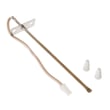
- If the oven overheated or went dead, test the thermal fuse.
- If temperatures are erratic or the oven won’t regulate heat, the oven sensor is a common suspect.
| What you see | What it often means | What to do next |
|---|---|---|
| “F” plus a number/letter flashing | Function error detected | Clear with CLEAR/OFF, cool 1 hour, then power reset |
| Display blank | Power issue or blown fuse/breaker | Reset breaker, verify supply |
| Clock flashing | Power failure/surge | Reset the clock and re-enter cooking settings |
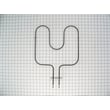
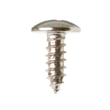
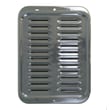
If troubleshooting points to a failed component, these model-matched parts are commonly involved:
Clearing the code gets you cooking again, but a repeating error code is the oven telling you a fault is still present. Resetting power can restore normal operation after a surge, but recurring codes help prevent overheating, inaccurate baking, or control damage.
For control-specific steps and special feature modes, use the JRS04BW5BB owner’s manual.
Last updated: January 2026
How much are electric wall ovens?
Most electric wall ovens sell for about $500 to $5,000+ today, depending on size (single vs. double), features (convection, self-clean), and installation needs. GE JRS04BW5BB is an older model, so these prices apply to current replacement wall ovens, not a new JRS04BW5BB unit.
- Basic single wall oven: $500 to $1,500
- Mid-range single wall oven: $1,500 to $3,000
- Premium single or double wall oven: $3,000 to $5,000+
- Installation and electrical work: commonly adds $200 to $2,000+ depending on the job
| Cost driver | Lower cost | Higher cost |
|---|---|---|
| Configuration | Single | Double |
| Cooking features | Standard bake/broil | Convection, advanced controls |
| Cleaning | Manual clean | Self-clean |
| Fit and install | Same cutout and wiring | Cabinet or electrical changes |
- Cutout size and trim fit: matching the existing cabinet opening avoids carpentry costs.
- Electrical requirements: confirm voltage and amperage so the circuit and breaker are correct.
- Ventilation and clearance: built-in ovens need proper airflow to prevent overheating.
- Feature priorities: decide if convection or self-clean is worth the upgrade.
For model-specific use and care details (helpful when deciding whether to repair vs. replace), use the JRS04BW5BB owner’s manual.
If the oven heats unevenly or will not bake, a repair can be cost-effective when the issue is limited to a common service part such as the GE range bake element WB44K5013. If multiple major components are failing, replacement usually makes more sense.
Wall ovens are built-in; the appliance price is only part of the total. The best value comes from choosing a replacement that matches your existing cabinet cutout and electrical supply, or repairing your current GE oven when the fix is straightforward.
Last updated: January 2026
How to disable control lock on GE wall oven?
On the GE JRS04BW5BB electric wall oven, control lock is turned off by using the oven control’s lock/unlock key sequence. Use the steps in the JRS04BW5BB owner's manual to exit the locked mode and restore normal keypad operation.
- Make sure the display is showing the time of day (not an active bake or broil cycle).
- Press and hold the Control Lock pad (or the lock/unlock pad) for about 3 seconds.
- Wait for the lock indicator to turn off (or for the display to return to normal).
- Test a basic function like BAKE to confirm the keypad responds.
- If the oven is in a special feature mode, press CLEAR/OFF to exit and try again.
A “locked” keypad is sometimes caused by a control glitch or a power interruption rather than the lock feature itself.
- Press CLEAR/OFF once and retry the lock/unlock step.
- Turn off the circuit breaker for 30 seconds, then restore power and retry.
- If the display is blank or flashing, reset the clock and then retry.
- If an “F” code appears, press CLEAR/OFF, let the oven cool, and restore power if needed.
| What you see | What it usually means | What to do |
|---|---|---|
| Lock indicator stays on | Control lock still enabled | Hold Control Lock about 3 seconds |
| Display flashing | Power failure occurred | Reset clock, then retry |
| “F” and a number/letter | Function error code | CLEAR/OFF; power reset if it repeats |
Control lock prevents accidental keypad presses during cleaning or cooking. Turning it off restores normal operation so you can set bake temperature, broil HI/LO, and timed cooking features correctly.
Last updated: January 2026





