 Installation guide
 Owner’s manual




How do I reset my Hotpoint dishwasher?
To reset your Hotpoint dishwasher model HDA2100H70BB, press the START/RESET pad to cancel the current cycle; on electronic models, pressing it a second time pumps out the water and turns the dishwasher off. Use the steps in the HDA2100H70BB owner’s manual to match your exact control style.
- Press START/RESET once to cancel and begin the reset/drain.
- Wait while the dishwasher drains and the controls reset.
- If you want to fully stop the cycle, press START/RESET a second time (electronic models) to pump out and turn off.
- Do not press START/RESET repeatedly unless you intend to end the cycle.
- Restart your wash cycle by selecting the cycle and pressing START/RESET.
Some HDA2100H70BB versions use a dial instead of electronic pads.
- Unlatch the door.
- Rotate the dial to OFF.
- Relatch the door.
| Control type | What “reset” looks like | What you should see/hear |
|---|---|---|
| Electronic pads | Press START/RESET (then again to fully stop) | Draining, then the unit turns off/reset completes |
| Cycle dial (timer) | Unlatch door, turn dial to OFF | Cycle stops; you can select a new cycle |
A reset helps when the dishwasher is stuck mid-cycle, you need to cancel a selection, or the START/RESET light is flashing and the unit needs time to drain and clear the command.
- Press START/RESET to silence the beeper.
- Let the dishwasher attempt to reset.
- If it continues, turn off power at the breaker for 30 seconds, restore power, and try again.
Resetting correctly prevents incomplete draining, avoids restarting with the wrong cycle memory, and helps protect the pump and motor from repeated stop-start commands.
Last updated: January 2026
Why is my dishwasher only doing half cycle?
If your Hotpoint HDA2100H70BB dishwasher stops around halfway through a cycle, the most common causes are a door that is not fully latched, a drain problem that forces the unit to pause, or an accidental START/RESET press that ends the cycle early. Use the steps in the HDA2100H70BB owner's manual to confirm the correct start and reset behavior.
- Confirm the door is closed and latched firmly; a loose latch can interrupt operation.
- Avoid pressing START/RESET more than once; on electronic models, a second press pumps out and turns the dishwasher off.
- Wait through the initial delay; some models have a short delay between start-up and water fill, so wash action is not immediate.
- Check that the water supply valve under the sink is fully open.
- If the unit is beeping during the cycle, close the door completely; some models beep every 30 seconds when left open.
A dishwasher that cannot drain or circulate water properly may stall or appear to “quit” mid-cycle.
- Look for kinks, clogs, or a high loop problem in the drain line.
- Clear debris from the sump area (food, labels, broken glass).
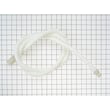
- If you suspect a restricted drain hose, inspect or replace the dishwasher drain hose WD24X10014.
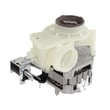
- If the dishwasher hums but does not move water well, the wash pump components may be worn; the g.e. dishwasher pump and motor assembly WD26X10051 is a common fix when circulation is failing.
| What you notice | Most likely area to check | What to do next |
|---|---|---|
| Stops after you hit Start, then drains | START/RESET pressed twice | Restart and press START/RESET once only |
| Beeps during cycle | Door not latched | Close and latch door firmly |
| Water left in tub, slow drain | Drain path restriction | Check hose routing, clogs, and drain components |
| Runs but cleaning is poor, then seems to stall | Weak circulation | Check spray arms and pump performance |
When a cycle ends early, detergent may not dissolve fully and dishes can come out dirty or wet. Fixing latch, drain, or pump issues restores normal wash time and prevents repeat interruptions.
Last updated: January 2026
How to unclog a Hotpoint dishwasher drain?
To unclog the drain on your Hotpoint HDA2100H70BB dishwasher, we clear the drain path from the tub to the sink connection: remove standing water, check the air gap or high drain loop setup, then inspect and clear the drain hose for kinks or blockages and test a drain.
- Turn off power at the breaker before accessing wiring or components.
- Shut off the water supply if you will pull the dishwasher out.
- Use gloves; debris and broken glass can collect in the sump area.
- Check the sink connection first: If the drain hose connects to a garbage disposer, make sure the disposer inlet knockout plug was removed. A plug left in place causes a no-drain condition.
- Check the air gap (if installed): Remove the cap and clear debris.
- Verify the drain routing: Confirm you have either an air gap or a properly secured high drain loop (fastened up under the countertop) as shown in the installation guide.
- Inspect the drain hose: Look for kinks, crushing, or a low spot holding water. Pull excess hose through the cabinet opening so it cannot kink behind the dishwasher.
- Clear the clog: Disconnect the hose at the sink end and run water through it; use a plumber’s snake if needed.
- Test drain: Reconnect, add a small amount of water to the tub, restore power, and start a cycle; most models drain a few minutes after the first fill.
| What you see | Most likely cause | What we do next |
|---|---|---|
| Hums but no water leaves | Hose kink or blockage | Straighten hose; flush/snake hose |
| No drain only after disposer install | Disposer plug still installed | Remove disposer knockout plug |
| Slow drain, occasional backups | Air gap clogged or poor high loop | Clean air gap; secure high loop |
If the drain path is clear but the dishwasher still will not drain, a failed drain actuator or motor circuit can be involved.
- Dishwasher drain hose WD24X10014 (replace if split, soft, or permanently kinked)
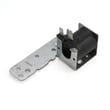
- G.e. dishwasher drain solenoid assembly WD21X10268 (can prevent the drain valve from opening)
A restricted drain can leave dirty water in the tub, cause odors, and reduce cleaning performance. Correct drain routing (air gap or high loop) also helps prevent sink water from siphoning back into the dishwasher.
Last updated: January 2026





