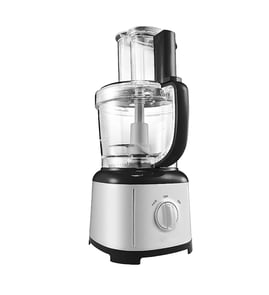

What is the life expectancy of a food processor?
A KitchenAid food processor like model KFP0919CU0 typically lasts 7 to 10 years with normal home use. With consistent cleaning, careful loading, and replacing worn accessories (like a cracked bowl or lid), many units run 10 to 15 years.
Food processor life depends most on motor load and how often it runs.
- Light use (1 to 2 times/week): 10 to 15 years
- Moderate use (3 to 5 times/week): 7 to 10 years
- Heavy use (daily, dense doughs, large batches): 5 to 8 years
| What wears out first | Common symptom | What you can do |
|---|---|---|
| Bowl or lid | Leaks, cracks, won’t lock | Replace the bowl W11319172 or food processor bowl lid W11551396 |
| Blade/discs | Poor chopping/slicing, uneven results | Replace the food processor multi-purpose blade W11239491 |
| Drive/fit parts | Disc wobbles, won’t seat correctly | Inspect and replace the food processor disc shaft adapter W11675849 |
These issues usually show up after years of use or repeated overloads.
- Motor slows down noticeably under normal loads
- Burning smell or excessive heat from the base
- Intermittent power (cuts out while running)
- Bowl or lid no longer locks securely
- Excess vibration with the blade installed
Small habits reduce strain on the motor and prevent cracked plastic.
- Cut food into smaller chunks before processing
- Avoid running long continuous cycles; pulse and rest the motor
- Do not force dense dough beyond what the dough blade can handle
- Hand-wash and fully dry the bowl and lid to protect seals and fit
- Store blades and discs so they do not bang against the bowl
A food processor usually fails from overload stress or worn, misfitting accessories. Replacing a worn bowl, lid, blade, or shaft adapter often restores performance and prevents motor strain.
Last updated: January 2026
What not to put in a food processor?
For the KitchenAid KFP0919CU0 food processor, avoid items that can overheat the motor, crack the bowl, or damage cutting edges. In general, skip hot liquids, very hard items, and tasks that require a blender or grinder instead of a food processor.
- Hot liquids or hot soups: heat and steam can force liquid up through the lid and create a messy, unsafe overflow.
- Large hard items (whole bones, hard pits, big chunks of rock-hard cheese): these can chip or dull the blade and stress the drive.
- Fully frozen solid foods (solid blocks of meat, frozen fruit bricks): thaw slightly and cut into smaller pieces first.
- Excessive liquid for smoothies: food processors do not circulate liquids like blenders; results turn watery and uneven.
- Very tough grinding jobs (whole spices, coffee beans, very hard nuts without pulsing control): use a spice grinder or mortar and pestle.
- Sticky doughs beyond “mixing”: overly stiff dough can stall the blade and strain the motor.
- Unplug the unit and check for cracks in the bowl and lid.
- Inspect the cutting edge for nicks; replace if damaged (the food processor multi-purpose blade W11239491 is the correct blade option listed for this model).
- If the lid no longer locks or seals well, inspect the food processor bowl lid W11551396 for warped tabs or damage.
- Let the motor cool for 20 to 30 minutes before trying again.
| Food/task | Food processor OK? | Better tool |
|---|---|---|
| Chopping onions, herbs | Yes | Food processor |
| Smoothies, milkshakes | No | Blender |
| Grinding coffee/whole spices | No | Grinder |
| Shredding cheese (chilled, cubed) | Yes | Food processor |
Hard, hot, or overly dense loads can stall the blade, dull cutting edges, and stress the bowl and lid locking surfaces. Keeping within typical food-processor use helps protect the motor and keeps results consistent.
Last updated: January 2026
Can you replace food processor blades?
Yes. On the KitchenAid KFP0919CU0 food processor, you can replace blades when they get dull, nicked, bent, or develop rust spots; replacing the blade restores cutting performance and helps prevent the motor from straining during chopping and mixing.
Common replaceable cutting tools for this model include:
- Food processor multi-purpose blade W11239491 for chopping, mixing, and pureeing
- Blade, dough W11319166 for kneading dough (when equipped)
- Disc, slicing W11319164 for slicing tasks
- Disc, reversible W11319167 for reversible disc functions (varies by setup)
Sharpening is inconsistent on many food processor blades and can create balance and safety issues. Replace the blade if you notice:
- Dull results (food tears or smears instead of cutting cleanly)
- Visible chips, bends, or cracks
- Excess vibration or rattling during use
- Rust, pitting, or staining that will not clean off
- The blade no longer seats securely on the hub/shaft
Use this checklist to match the correct KitchenAid part to your KFP0919CU0:
| What to match | What to look for | Why it matters |
|---|---|---|
| Model number | KFP0919CU0 | Prevents ordering a similar-looking blade that will not fit |
| Part type | Blade vs disc | Blades and discs mount differently |
| Mounting/fit | Seats fully, no wobble | Reduces vibration and protects the bowl and lid |
A sharp, undamaged blade cuts faster and more evenly, which reduces run time, improves texture, and helps protect the bowl, lid, and drive components from unnecessary stress.
Last updated: January 2026