Installation guide
 Owner’s manual



How to know if the KitchenAid wall oven thermostat is bad?
If your KitchenAid KEMC378KSS0 wall oven temperature is consistently too hot or too cool even after you recalibrate settings, a failed temperature-control component is likely. The most common confirmation is comparing the displayed/set temperature to an accurate oven thermometer and checking the temperature sensor circuit.
Common signs the temperature control is failing
- Food routinely overbrowns or undercooks at normal recipe temperatures
- Oven temperature swings widely during baking (large overshoot and undershoot)
- Preheat takes much longer than normal or never seems to stabilize
- You see repeated “Oven Status” error messages that point to an internal fault (service needed)
- Broil or bake performance is inconsistent even after basic cleaning and reset steps
What we recommend checking first (most likely causes)
On this model, temperature problems are more often tied to the sensor or wiring than a separate “thermostat” you can easily adjust.
- Confirm the symptom: Place an oven thermometer in the center and run at 350°F; record readings every 5 to 10 minutes after preheat.
- Try calibration: Follow the calibration steps in the KEMC378KSS0 owner’s manual.
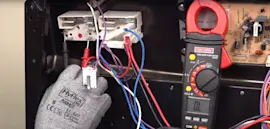
- Inspect the sensor and harness (power off): Look for loose connectors, pinched wires, or heat damage.
- Test the sensor with a multimeter: A bad reading (open/short or far out of typical range) points to replacement.
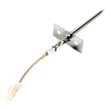
If the sensor tests bad, the correct replacement for this model is the wall oven temperature sensor WPW10131825.
Quick decision guide
| What you observe | Most likely issue | What to do next |
|---|---|---|
| Temp is off by a small, consistent amount | Calibration needed | Calibrate in the manual, then re-test |
| Temp is off by a lot or swings wildly | Sensor or wiring | Inspect wiring; ohm-test sensor |
| Oven overheats and shuts down | High-limit protection event | Check airflow, cooling fan operation, and thermostat circuit |
| “Oven Status” error appears | Control detected a fault | Follow manual guidance; schedule service |
Why it matters
Accurate temperature control protects baking results and prevents overheating that can stress the bake element, broiler element, and control components over time.
Last updated: January 2026
What is the life expectancy of a KitchenAid wall oven?
A KitchenAid wall oven typically lasts 13 to 15 years in normal household use. For your KitchenAid KEMC378KSS0 wall oven with microwave, consistent cleaning, good ventilation, and avoiding unnecessary high-heat cycles help you reach the upper end of that range.
Typical lifespan and what affects it
Most built-in electric wall ovens (including combo units) land in a similar window, but these factors move the needle:
- Heat exposure: frequent high-temp baking/broiling accelerates wear on elements and controls
- Self-clean frequency: repeated extreme-heat cycles can stress wiring, thermostats, and door components
- Cooling airflow: blocked vents or a weak cooling fan can shorten control and component life
- Power quality: low or unstable voltage can cause performance issues and premature failures
- Maintenance habits: prompt spill cleanup reduces corrosion and odor issues
What “end of life” usually looks like
If the oven is aging, these are the most common patterns we see:
- Oven temperature becomes inconsistent (overheats or underheats)
- Longer preheat times than normal
- Error messages or intermittent operation
- Door not sealing well, heat escaping around the gasket area
- Repeated part failures in a short period (elements, sensors, thermostats)
Parts that commonly impact performance
When performance drops, these parts are often involved on electric wall ovens:
| Symptom | Common part to check | Example part for KEMC378KSS0 |
|---|---|---|
| Oven won’t hold temp | Temperature sensor | Wall oven temperature sensor WPW10131825 |
| No bake heat | Bake element | Bake element 4451175 |
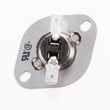
| Overheating or shuts down | High-limit thermostat | Range high-limit thermostat WP9759243 |
Why it matters
Knowing the typical life expectancy helps you decide whether to troubleshoot and replace a single component (often cost-effective) or plan for replacement if multiple major parts are failing close together.
For model-specific operating and care guidance, follow the maintenance and use recommendations in the KEMC378KSS0 owner's manual.
Last updated: January 2026
How to reset a KitchenAid wall oven?
To reset your KitchenAid wall oven/microwave combo model KEMC378KSS0, we recommend doing a power reset: turn the unit off, cut power at the breaker for about 1 minute, then restore power and cancel any active cycle. This clears many control glitches.
Quick reset steps (power reset)
- Touch CANCEL/OFF to stop any cooking cycle.
- Turn OFF the circuit breaker (or remove power at the fuse panel).
- Wait 60 seconds.
- Turn the breaker ON.
- If the display comes back on, press CANCEL/OFF again to ensure the oven is idle.
If the microwave side is the issue
The microwave section can often be cleared without a full power reset.
- Touch MICROWAVE OVEN CANCEL to clear the display and stop reminder tones.
- If a cook cycle was interrupted by opening the door, close the door and press EASY MINUTE START to resume (for microwave convection cooking modes that require restart).
- If the display counts down but nothing heats, confirm you did not start the Timer function.
What to do if an error code appears
If you see an “Oven Status” screen with a letter/number code and instructions to inform KitchenAid, the unit has detected an internal problem and needs service.
What you can try first
- Do the power reset above.
- Confirm the oven is not in Timer mode.
- Verify the door is fully closed and latched.
Common reset methods compared
| Reset method | What it does | Best for |
|---|---|---|
| Cancel/Off reset | Stops the current cycle and clears many prompts | Minor keypad or cycle issues |
| Power reset at breaker | Reboots the electronic control | Frozen display, odd behavior, after power surge |
| Service diagnosis | Addresses internal fault codes | “Oven Status” code shown |
Why it matters
A reset restores normal control operation after a brief power interruption, stuck key behavior, or a canceled cycle. It is also a safe first step before testing parts like a fuse or thermostat.
For control locations and model-specific operating details, use the KEMC378KSS0 owner's manual.
Last updated: January 2026
Are KitchenAid wall ovens good?
Yes. KitchenAid wall ovens are a solid choice for most kitchens because they typically deliver consistent baking performance, useful cooking modes (like convection), and durable fit-and-finish. For the KitchenAid KEMC378KSS0 wall oven with microwave, following the setup and operating guidance in the KEMC378KSS0 owner's manual helps you get the best results and avoid common usability complaints.
What “good” usually means for a wall oven
When customers say a wall oven is “good,” they usually care about performance, features, and long-term dependability.
- Even heating and predictable results for baking and roasting
- Convection performance that reduces cook time and improves browning
- Control usability (clear display, responsive keypad/knobs)
- Noise level (cooling fan, beeps/tones)
- Serviceability (parts availability and straightforward diagnostics)
Common pros and cons (what we see most often)
These are typical strengths and pain points across many KitchenAid wall ovens and combo units.
| Area | What’s typically good | What can be frustrating |
|---|---|---|
| Cooking performance | Strong baking and convection results | Preheat can feel slow on some installs |
| Features | Multiple modes, helpful presets | More features can mean more settings to learn |
| Controls | Modern display and options | Tones may be too quiet or turned off |
| Reliability | Generally durable build | Sensors, fuses, or control issues can cause error codes |
If you’re judging “good” by reliability
For the KEMC378KSS0 combo, a few components commonly tied to “it stopped working” or “it’s acting weird” symptoms are:
- Wall oven temperature sensor WPW10131825 (temperature accuracy, overheating/underheating symptoms)
- Fuse (black) WP4375321 (dead display or no heat symptoms after an electrical event)
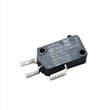
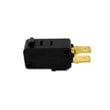
- Microwave door interlock switch W10211972 (microwave won’t run when the door is closed)
Quick checks that improve performance and satisfaction
These steps address the most common “this oven isn’t as good as I expected” complaints.
- Confirm the unit is installed and vented per the KEMC378KSS0 installation guide
- Verify household power is correct; low voltage can cause long cook times
- Make sure the Timer is not running when you expect cooking to start
- Check whether tones are turned off if you cannot hear beeps
- Keep racks and accessories positioned as recommended for convection cooking
Why it matters
A wall oven can seem “bad” when the real issue is installation, power supply, or a single failing part (like a sensor or fuse). Getting those basics right helps the KEMC378KSS0 cook evenly, preheat normally, and run more consistently.
Last updated: January 2026