Owner’s manual
 Error Codes




How do you reset the bottom ice maker?
On the LG LFXC22526D, the model-specific information we have does not confirm a dedicated reset/test button for the freezer (bottom) ice maker. The most reliable reset is to turn the ice maker off, clear the bin, then restore operation and allow the freezer to reach 15 °F (–9 °C) or colder.
Reset steps that apply to this model family
- Turn the freezer ice maker OFF (use the ice maker power switch or shut-off arm, depending on your version).
- Remove the ice bin and discard any clumped or jammed ice.
- Close the freezer drawer fully so the door switch is engaged.
- Unplug the refrigerator (or switch off the breaker) for 5 minutes.
- Restore power, turn the ice maker ON, then wait for a harvest and refill.
For operating details and ice maker basics, refer to the LFXC22526D owner's manual.
What to check if it still won’t make ice
These issues commonly look like a “needs reset” problem:
- Freezer temperature: Ice makers typically won’t run until the freezer is at or below 15 °F (–9 °C).
- Water supply: Confirm the shutoff valve is open and the supply line is not kinked.
- Ice bin seating: Make sure the bin is fully installed and not blocking the mechanism.
- Filter restriction: A clogged filter can reduce fill volume.
Quick reference
| Item | Target/normal | If not met |
|---|---|---|
| Freezer temp | 0 °F setpoint (typical) | Allow 24 hours to stabilize after changes |
| Ice maker start temp | 15 °F (–9 °C) or colder | Improve cooling, check door seal |
| Water pressure (spec) | 20 to 120 psi | Correct supply issue before troubleshooting further |
Parts that may be involved
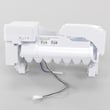
If the ice maker won’t cycle or repeatedly jams after the reset and checks above, the ice maker itself may need service or replacement. A compatible option listed for this model is the LG refrigerator ice maker AEQ73110217.
Why it matters
A power reset clears minor control glitches, but ice production depends on two fundamentals: freezer temperature cold enough to run the ice maker and steady water flow to fill the mold correctly.
Last updated: January 2026
What is the life expectancy of an LG refrigerator?
An LG refrigerator like model LFXC22526D typically lasts 13 years with normal household use. Consistent maintenance (cleaning, correct temperatures, good door sealing, and timely filter changes) is what most often determines whether you reach or exceed that lifespan; see the LFXC22526D owner's manual.
What affects how long your LFXC22526D lasts
The sealed system (compressor and refrigerant loop) is built for long service, but day-to-day conditions can shorten life.
- Keeping the refrigerator at stable temps (avoid frequent warm-ups)
- Cleaning condenser areas so heat can dissipate
- Replacing filters on schedule to reduce strain on airflow and water systems
- Preventing door seal leaks (warm air causes longer run times)
- Avoiding overloading shelves and bins (reduces wear and breakage)
Maintenance schedule that supports full lifespan
Your owner’s manual calls out routine items like water filter and fresh air filter replacement intervals.
| Task | Recommended interval | Why it helps |
|---|---|---|
| Replace water filter | Every 6 months | Protects water flow and ice maker performance |
| Replace fresh air filter | About every 6 months | Helps control odors and keeps airflow effective |
| Verify door seals are sealing | Monthly quick check | Reduces run time and frost/moisture issues |
| Clean condenser area | 2 times per year | Improves cooling efficiency and reduces compressor load |
If you need the correct replacement filter for this model, use the LG lt1000p refrigerator water filter ADQ74793501 and follow the steps in how to change the water filter in an LG refrigerator.
Why it matters
A refrigerator that runs longer than necessary (dirty condenser, weak door gasket, clogged filter) cycles more often and stays hotter internally, which increases wear on key components like the compressor, condenser fan motor, and evaporator fan motor.
Last updated: January 2026
What is the problem with the LG bottom freezer refrigerator?
On the LG LFXC22526D, a very common complaint is a cooling imbalance: the refrigerator section runs warm while the freezer stays cold. That pattern usually points to restricted airflow, frost buildup on the evaporator, or a temperature-sensing/control problem.
Quick checks we recommend first (no parts)
- Confirm the set temps are near the defaults (37 °F refrigerator, 0 °F freezer).
- Make sure food packages are not blocking interior air vents.
- Verify both French doors and the freezer drawer close fully.
- Inspect door gaskets for gaps, rips, or areas not sealing.
- Clean dust from the condenser coil area and keep clearance for airflow.
- After changes, allow 24 hours for temperatures to stabilize.
Likely causes when the fridge is warm but the freezer is cold
| What you notice | Most likely area | What to do next |
|---|---|---|
| Fridge warm, freezer normal/cold | Airflow from freezer to fridge is restricted | Check for blocked vents; listen for fan operation; look for frost behind rear panel |
| Temps swing up and down | Temperature sensing/control issue | Check for error codes; verify settings; consider sensor testing |
| Frost buildup behind panels | Defrost system issue | Manually defrost and monitor; electrical testing may be needed |
Parts that commonly relate to uneven cooling on this model
If the basic checks do not help, these model-compatible parts are often involved:
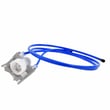
- LG refrigerator ice room fan motor assembly ABA74248415: moves air through the ice room and helps support proper airflow in the upper cabinet area.
- Refrigerator temperature sensor 6500JB2002E: reports temperature to the control system; a bad sensor can cause incorrect cooling.
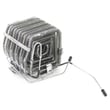
- Refrigerator defrost heater MEE63545708: melts frost on the evaporator; a failed heater can allow ice buildup that blocks airflow.
Why it matters
When the freezer stays cold but the refrigerator warms up, fresh food can rise into unsafe temperatures quickly. Fixing airflow and defrost issues early also helps prevent long compressor run times and excessive energy use.
For model-specific temperature settings, error-code checks, and troubleshooting steps, use the LFXC22526D owner's manual.
Last updated: January 2026