
How much PSI to run a framing gun?
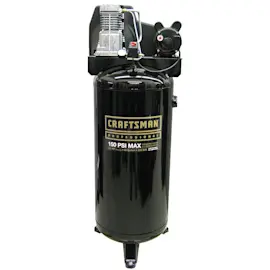
Most framing nailers run best at 100 to 130 PSI at the tool, and we recommend starting around 100 PSI and increasing only until the nails drive flush in your lumber when using your Craftsman 106153540 twin-cylinder tank-type paint sprayer/air compressor setup.
Recommended PSI settings (quick guide)
Use the lowest pressure that consistently sets nails correctly; higher PSI increases recoil and wear.
- Start point: 100 PSI
- Typical working range: 100 to 130 PSI
- Adjust in small steps: 5 PSI at a time
- Re-check after hose changes: longer hoses and small couplers can drop pressure
- Keep the compressor regulated: set the regulator, not the tank pressure
| What you see at the nailer | What it usually means | What to do |
|---|---|---|
| Nails sit proud | Pressure too low or airflow restricted | Increase 5 to 10 PSI; check hose/couplers |
| Nails overdrive or wood dents | Pressure too high | Reduce 5 to 10 PSI |
| Inconsistent depth | Pressure drop under load | Use a larger hose, shorter run, or let the tank recover |
Setup tips that prevent pressure problems
- Use a 3/8-inch ID air hose for framing work when possible.
- Drain moisture from the tank regularly; water in the line can affect tool performance.
- Add pneumatic tool oil to the nailer (per the nailer maker’s instructions) to reduce sticking.
- If the compressor struggles to keep up, pause to let it rebuild pressure rather than cranking PSI higher.
Why it matters
Correct PSI helps your framing gun drive nails to consistent depth without damaging lumber, and it reduces stress on seals, O-rings, and the regulator on your Craftsman 106153540 air supply.
Parts and help
If you need replacement items for your Craftsman 106153540, we recommend using the model parts list first; you can also search by model number on Sears PartsDirect.
Last updated: February 2026
How to find air compressor model number?
For a Craftsman air compressor like model 106153540, the model number is stamped on the unit’s identification label (often a metal or foil placard). We use that exact model number to match the correct parts list and diagrams on Sears PartsDirect.
Where to look on the compressor
Check these common label locations on twin-cylinder, tank-type units:
- On the tank near the drain valve or along the side seam
- Near the motor/pump assembly on the frame
- By the pressure switch or regulator/gauge panel
- On the rear of the tank near the handle or wheels
- Under a shroud/cover (unplug first, then remove the cover if needed)
What to write down (and why)
Copy the information exactly as shown on the label. Even one wrong character can pull the wrong parts.
| Label item | What it’s used for | Tip |
|---|---|---|
| Model number | Finds the correct parts diagrams | Use all digits/letters, no spaces added |
| Serial number | Identifies production run | Helpful when parts changed mid-run |
| Type/HP/SCFM (if listed) | Confirms compressor size class | Use for troubleshooting comparisons |
Quick tips if the label is hard to read
- Wipe the placard with a damp cloth; dry it and re-check.
- Use a flashlight at an angle to see stamped characters.
- Take a close-up photo and zoom in to confirm each digit.
- If paint overspray is covering it, clean gently so you do not remove the printing.
Why it matters
Air compressor parts like the pressure switch, regulator, check valve, safety valve, and pump components are model-specific. Using the exact model number helps prevent ordering the wrong part and reduces downtime.
Last updated: February 2026
How to tell if an air compressor pressure switch is bad?
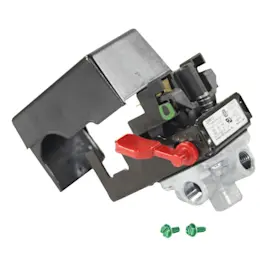
A bad pressure switch on your Craftsman 106153540 air compressor shows up as incorrect cut-in or cut-out behavior: it will not start at low tank pressure, it runs nonstop, or it short-cycles. Because the switch controls motor power based on tank pressure, failures look like on/off control problems.
Common symptoms
- Compressor will not start with the tank empty or low
- Runs continuously and will not shut off
- Short-cycles (rapid on and off)
- Clicking at the switch but the motor does not run
- Air leaking from the switch area or unloader line after shutoff
- Burnt smell or visibly pitted/burned contacts (after power is disconnected)
Quick checks before replacing the switch
- Verify power: outlet, cord, breaker/reset, and tight wire terminals at the switch
- Start from 0 PSI: drain the tank fully; a healthy unit should start cleanly
- Listen at shutoff: a brief hiss is normal; a constant leak often points to the unloader or tank check valve
- Check for stuck mechanism: with power off, the switch lever should move smoothly
What the symptoms usually mean
| What you observe | Most likely cause | What it affects |
|---|---|---|
| Won’t start at low pressure but power is present | Switch not closing at cut-in | No motor power |
| Runs past normal shutoff | Switch not opening at cut-out | Over-pressurizing risk |
| Starts only after bleeding air | Unloader issue (sometimes part of switch) | Hard starting |
| Breaker trips at startup | Motor/wiring issue | High electrical load |
Why it matters
A pressure switch that does not regulate cut-in and cut-out can overwork the motor, cause repeated hard starts, and allow unsafe pressure conditions.
Parts and next steps
Match the correct replacement by model number and switch features (voltage, port size, unloader configuration). Start with the model parts list; for broader searching by model number, use Sears PartsDirect. For safe electrical testing steps, use how to use a multimeter to test electrical parts video.
Last updated: February 2026