Owner’s manual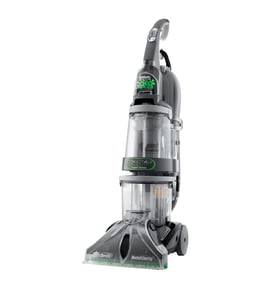

How can I find Hoover replacement parts?
For your Hoover H3000 Floormate floor scrubber, the most reliable way to find compatible replacement parts is to match parts to the exact model number (H3000) and use the parts list for that model; our owner's manual also reminds you to identify the cleaner by the complete model number when ordering parts.
Best ways to find the right part for H3000
- Confirm the model number on the cleaner’s ID label (the manual notes it’s on the bottom of the back of the cleaner body).
- Use the model-specific parts list for Hoover H3000 so you are not guessing by appearance.
- Compare your original part to photos and descriptions (tanks, brushes, nozzles, and hoses can look similar across models).
- If you are replacing a wear item, check for related items you may want to replace at the same time (for example, brush block plus squeegee/nozzle pieces).
- Keep your serial information and any notes about symptoms (no suction, no solution flow, brushes stalling) to narrow the correct section of the parts diagram.
What you typically replace on a floor scrubber
| Part type | Common reason to replace | What you’ll notice |
|---|---|---|
| Brush/brush block | Debris buildup, worn bristles | Poor scrubbing, streaks |
| Solution tank/cap/valve | Leaks, cracked plastic, poor feed | Drips, no solution flow |
| Recovery tank seals | Worn seals, odor, leaks | Reduced pickup, leaks |
| Nozzle/squeegee | Wear, clogging | Streaking, weak pickup |
Why it matters
Using the exact H3000 model match prevents ordering a part that fits a different Hoover Floormate variation. That saves time and helps avoid issues like tanks not locking in place or brushes stalling due to mismatched components.
Last updated: February 2026
Why is my Hoover hard floor cleaner brush not spinning?
On the Hoover H3000 FloorMate, the brushes usually stop spinning when the brush control switch is set to WET/DRY PICKUP (brushes off), debris is jammed in the brush area, or the internal brush circuit breaker has tripped. Use the settings and reset steps in the owner's manual.
Quick checks (most common fixes)
- Set the brush control switch to WET SCRUB (brushes on for wet cleaning).
- Confirm you are not in WET/DRY PICKUP mode; in that position the brushes are raised and will not rotate.
- Turn the unit OFF, unplug it, and remove hair, string, and grit from the brush area.
- Clean the nozzle and brush channel so nothing drags on the brush block.
- If the brushes stalled, reset the internal breaker (steps below).
Correct control settings
Use this as a fast reference for the H3000:
| What you want to do | Brush control switch | Wet/dry pedal | What to expect |
|---|---|---|---|
| Dry vacuum debris | WET/DRY PICKUP (UP) | DRY | Brushes off |
| Wet scrub (wash) | WET SCRUB (DOWN) | WET | Brushes spin |
| Wet pickup (squeegee) | WET/DRY PICKUP (UP) | WET | Brushes off |
Reset the brush circuit breaker (after a stall)
If the brushes stopped while scrubbing, the cleaner may have tripped its internal breaker.
- Push the ON/OFF switch completely down to OFF (you may feel resistance).
- Wait 1 minute.
- Repeat step 1 once more.
- Turn the cleaner ON and test in WET SCRUB.
If it trips again, clean the brushes and nozzle thoroughly before trying again.
Why it matters
The H3000 is designed so the brushes only rotate in WET SCRUB. Using the wrong switch position, or letting debris build up around the brushes, can make the brushes stop and can repeatedly trip the breaker.
Last updated: February 2026
Can I use Dawn in my Hoover H3000?
We do not recommend using Dawn dish soap in the Hoover H3000 FloorMate because it can create excessive foam and lead to poor pickup, leaks, or residue left on the floor. For best performance, use a FloorMate-safe cleaning concentrate and follow the mixing directions in the owner's manual.
What the Hoover H3000 is designed for
The H3000 is built to vacuum dry debris and wet-clean hard floors like vinyl, tile, and sealed wood (not carpet or rugs). Using the right solution matters because the machine is designed around low-foam chemistry.
- Use only cleaning concentrates formulated to resist excessive foaming
- Do not use pine-based ingredients
- Do not use solvent-based ingredients
- Use warm water and fill only to the tank fill line
- If cleaning sealed wood, inspect for worn finish, bare wood, or separated joints first
If you already used Dawn
Stop using the soap and flush the system so leftover suds do not keep foaming inside the recovery tank and nozzle.
- Empty and rinse the clean solution tank
- Empty and rinse the recovery tank
- Fill the solution tank with warm water only
- Run the machine briefly on a hard floor to circulate clean water
- Empty tanks again and let them air-dry
Quick comparison: Dawn vs. FloorMate-safe concentrate
| Option | Foaming risk | Pickup performance | Residue risk |
|---|---|---|---|
| Dawn dish soap | High | Often reduced | Higher |
| FloorMate-safe concentrate | Low | Best | Lower |
| Warm water only | Low | Good for light cleaning | Low |
Why it matters
Excess foam can overwhelm the recovery system and reduce suction at the squeegee, which leaves water behind and can make floors look streaky or feel sticky.
Last updated: February 2026
Why is my Hoover H3000 leaking from the bottom?
Bottom leaks on a Hoover H3000 Floormate almost always come from a tank or cap seal that is not seated correctly, a cap that is not fully locked, or a recovery tank condition that lets dirty solution escape. Reseating the tanks and locking the clean-solution cap fixes most leaks.
Quick checks that stop most bottom leaks
- Turn the cleaner off, unplug it, and remove both tanks.
- Inspect the clean solution tank cap; make sure the cap is rotated clockwise until it locks.
- Check the rubber ring (seal) on the clean solution tank cap; reposition it if it has slipped out of place.
- Reinstall the clean solution tank: set the bottom in first, then press the latch and snap the tank fully into place.
- Empty and reinstall the recovery tank; a full tank can trigger shut-off and contribute to messy overflow.
What to inspect (and what it usually means)
| What you see | Most likely cause | What to do |
|---|---|---|
| Clean water/solution dripping soon after filling | Cap not locked or seal (rubber ring) mis-seated | Reseat rubber ring; lock cap firmly |
| Leak starts after a few minutes of use | Tank not snapped in, or recovery tank getting too full | Snap tank in; empty recovery tank |
| Leak happens when you park it upright | Handle raised while motor running can affect pickup and tank behavior | Keep handle down while running; then shut off before parking |
Why it matters
A small leak can quickly turn into poor cleaning performance because the H3000 relies on properly sealed tanks to dispense solution and recover dirty water. A locked cap and correctly seated rubber ring also help prevent air leaks that reduce pickup.
Helpful manual details for this model
The H3000 owner's manual covers correct tank installation, the cap locking position, and the rubber ring placement on the solution tank cap. It also explains the recovery tank automatic shut-off and why it activates.
Last updated: February 2026