 Owner’s manual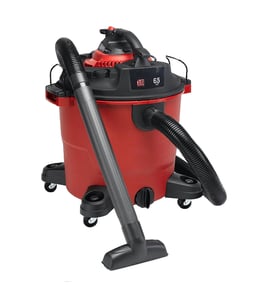

Where is the reset button on a CRAFTSMAN shop vac?
Most Craftsman shop vacs, including model 338179230, do not use a dedicated exterior “reset button” for normal operation. Instead, the motor is protected by an overheat (thermal) shutoff; after the vacuum cools and the issue is cleared, it runs again.
What to do when it shuts off (thermal protection)
If your vacuum stopped suddenly, treat it like an overheat event and reset it by cooling and correcting airflow.
- Turn the power switch OFF.
- Unplug the cord from the outlet.
- Let the motor cool 20 to 30 minutes.
- Empty the tank if it is full; for liquid pickup, remove the drain cap and empty completely.
- Clean or replace the filter (a clogged filter is the most common cause of overheating).
- Check the hose, nozzle, and inlet for clogs or a stuck object.
If it quit during wet pickup (it may be “full”, not overheated)
Your Craftsman 338179230 wet/dry vacuum has an automatic shut-off during liquid pickup. An internal float shuts the vacuum off when the liquid reaches tank capacity; you must empty the tank before it will continue vacuuming.
| Symptom | Most likely cause | Fix |
|---|---|---|
| Stops while picking up water | Float shut-off triggered (tank full) | Empty tank, reinstall drain cap, restart |
| Stops while picking up dust | Overheating from restricted airflow | Clean filter, clear clogs, cool down |
| Runs but suction is weak | Partial clog or dirty filter | Inspect hose/nozzles, service filter |
Why it matters
A “reset button” search usually points to either (1) thermal protection from overheating or (2) float shut-off during wet pickup. Handling the correct cause prevents repeated shutdowns and helps protect the motor.
For model-specific operating and safety details, follow the steps in the owner's manual. For parts and accessories for model 338179230, search by model number on Sears PartsDirect.
Last updated: February 2026
Why is my CRAFTSMAN vacuum not suctioning?
Low or no suction on your Craftsman wet/dry vacuum model 338179230 is usually caused by restricted airflow (a clogged filter, hose, or nozzle) or a wet-pickup float shut-off that has tripped after liquid pickup. Start by unplugging the vacuum, then check the filter and all air paths end to end using the 338179230 owner's manual.
Quick checks that fix most suction problems
- Clean or replace the filter: A dust-caked filter blocks airflow and makes suction drop fast.
- Check the hose for a clog: Look for packed debris, a sock, or a wad of fine dust.
- Inspect the nozzle and wands: Small openings plug easily with wet debris or drywall dust.
- Confirm the lid is sealed: A loose lid or mis-seated gasket lets air leak in.
- Empty the tank: An overfilled tank reduces airflow and can trigger shut-off.
If you were vacuuming liquids: check the automatic shut-off float
This model uses an automatic shut-off during liquid pickup. As the liquid level rises, an internal float shuts the unit off at tank capacity; suction will feel like it suddenly stops until you empty the tank and reset for use.
What to do
- Turn the vacuum off.
- Unplug it from the outlet.
- Drain and empty the tank completely.
- Reinstall the drain cap, reassemble, then test suction again.
Troubleshooting guide (symptom to likely cause)
| What you notice | Most likely cause | What we recommend |
|---|---|---|
| Suction is weak but motor runs | Filter clogged or hose/nozzle restricted | Clean filter; clear hose/nozzle |
| Suction stops after wet pickup | Float shut-off activated at tank capacity | Empty tank; reset and retry |
| Whistling or air leak sound | Lid not sealed or gasket out of place | Reseat lid and seals |
| Fine dust blows back out | Wrong filter setup for dry pickup | Install correct dry filter per manual |
Why it matters
A shop vacuum depends on steady airflow through the filter and sealed tank. Any restriction (dust-caked filter, clog) or a safety shut-off during wet pickup reduces airflow, which directly reduces suction and can strain the motor over time.
For parts lookup by model number and diagrams, use the parts list for model 338179230 or search by model on Sears PartsDirect.
Last updated: February 2026
What is the list of vacuum cleaner parts?
For the Craftsman 338179230 wet/dry shop vacuum, the main parts you’ll typically see are the motor (powerhead), tank (canister), hose, nozzles, filters, and wet pick-up safety components like the float shut-off; your exact configuration and accessory set is shown in the owner's manual.
Common parts you’ll find on a wet/dry shop vacuum
These are the most common vacuum cleaner parts and what they do:
- Motor and motor cover (powerhead): creates suction and houses the electrical components
- Tank (collection canister): holds dry debris or liquid waste
- Hose and hose ends/cuffs: carries airflow and debris between the nozzle and tank
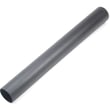
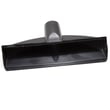
- Wands and floor nozzles: extend reach and adapt the vacuum for floors or tight areas
- Filter and filter cage: traps dust during dry pickup (filters must be installed correctly for dry use)
- Collection bags (optional on many models): help contain fine dust and make emptying easier
- Drain cap (on many wet/dry tanks): lets you empty liquid waste without lifting the tank
- Float shut-off (wet pickup): helps prevent overfilling by shutting the vacuum off at tank capacity
- Cord and cord wraps: power and storage for the electrical cord
Wet pickup vs. dry pickup: what changes
Wet/dry vacuums use many of the same parts, but setup and “must-have” components differ.
| Task | Parts you rely on most | What to watch for |
|---|---|---|
| Dry pickup | Filter, hose, nozzle, tank | Use the correct filter setup before vacuuming dust |
| Wet pickup | Hose, nozzle/squeegee, tank, float shut-off, drain cap | Empty the tank when the unit shuts off at capacity |
Why it matters
Knowing the part names helps you match symptoms to the right area. For example, weak suction often points to the hose/nozzle path or filter, while wet pickup stopping usually relates to the float shut-off or a full tank.
Finding and ordering the right parts
We recommend matching parts by model number 338179230 and the part description from the diagrams/manual.
- Confirm the model number on the vacuum’s nameplate
- Use the part description (hose, filter, drain cap, nozzle) to narrow choices
- Check whether you’re setting up for wet pickup or dry pickup
- Order replacement parts through the model parts list, or search by model on Sears PartsDirect
Last updated: February 2026


