 Installation guide
 Owner’s manual





How many cubic feet is a Kenmore Model 72180042700 microwave?
The Kenmore 72180042700 microwave/hood combo has an oven cavity capacity of 1.6 cubic feet. This capacity is listed in the product specifications in the 72180042700 use and care guide.
Where to confirm the capacity
We recommend checking the specifications section so you are comparing the correct measurement (cavity capacity, not exterior size).
- Look for “Specifications” in the guide
- Find “Capacity of oven cavity”
- Confirm you are using the exact model number 72180042700
- Use capacity when choosing cookware, microwave covers, and venting accessories
Capacity vs. dimensions (quick reference)
Capacity is the usable cooking space; dimensions describe the physical size.
| Spec type | What it tells you | Why you use it |
|---|---|---|
| Capacity (cu. ft.) | Interior cooking volume | Fit of dishes and cooking space |
| Overall dimensions (WxHxD) | Outside size of the unit | Fit in cabinet space and mounting |
| Oven cavity dimensions | Interior measurements | Fit of taller or wider containers |
Why it matters
A 1.6 cu. ft. cavity helps you choose the right size cookware and avoid overcrowding, which improves heating performance and reduces the chance of spills or splatter.
Last updated: January 2026
How big is a Kenmore microwave model 72180042700 in inches?
The Kenmore microwave/hood combo model 72180042700 measures 29 15/16 inches wide x 16 7/16 inches high x 15 11/16 inches deep (overall exterior dimensions). These measurements come from the product specifications in the 72180042700 owner's manual.
How to measure it correctly
Use these tips so your cabinet cutout and venting line up:
- Measure width across the front from left edge to right edge.
- Measure height from the bottom of the microwave to the top of the case.
- Measure depth from the back of the case to the front face (not including any extra clearance you may need).
- If you are replacing an older unit, measure the existing mounting location and compare.
- Plan extra space for the power cord and duct/vent damper area.
Quick size reference
| Measurement | Size (inches) |
|---|---|
| Width | 29 15/16 |
| Height | 16 7/16 |
| Depth | 15 11/16 |
Why it matters
Correct dimensions help prevent installation problems like misaligned mounting holes, cabinet interference, or poor venting performance. For over-the-range units, even a small mismatch can affect the mounting plate position and the vent grille clearance.
Related installation notes
The installation instructions for this model also note that the microwave is heavy and typically requires two people to install. For mounting and venting details, use the 72180042700 installation guide.
Last updated: January 2026
How do I reset my Kenmore microwave?
To reset your Kenmore microwave model 72180042700, unplug it (or turn off the breaker) for about 1 minute, then restore power. If the control panel is unresponsive, use the STOP pad to clear the display and cancel any active program; see the 72180042700 owner's manual for control details.
Quick reset options (from easiest to most involved)
- Clear a wrong entry: Touch STOP once to erase an incorrect command.
- Cancel cooking or a program: Touch STOP to cancel the current cycle.
- Restart after opening the door: Close the door and touch START.
- Power reset: Unplug for about 1 minute (or switch the circuit breaker off, then on).
- If the panel is locked: Press and hold STOP until LOCKED disappears (about 4 seconds).
What you should see after a power reset
After the microwave is plugged back in (or power returns), the display typically prompts you to set the clock.
| Situation | What it means | What to do |
|---|---|---|
| Display shows a time prompt or “:” | Clock is not set after power loss | Touch Clock, enter time, touch START |
| No tones when pressing keys | An incorrect instruction was entered | Touch STOP, then re-enter the steps |
| “LOCKED” shows | Child lock is on | Press and hold STOP about 4 seconds |
Why it matters
A reset clears stuck key sequences and cancels active programs, which is often all it takes to restore normal operation on the 72180042700. If the microwave still will not run after resetting, the issue is usually power supply, door latching, or a failed internal safety component.
Last updated: January 2026
Are Kenmore microwaves good?
Kenmore microwaves are a solid choice for everyday heating and venting, and the Kenmore 72180042700 microwave/hood combo is built for dependable daily use when it is installed correctly and maintained (especially the filters and door sealing surfaces). Overall value is typically strong for basic cooking and defrosting.
What “good” usually means for a microwave/hood combo
A good over-the-range microwave should heat evenly, run quietly, vent steam and smoke effectively, and hold up to frequent door use.
Common strengths customers look for:
- Reliable basic cooking modes (timed cook, add minute, defrost)
- Useful hood features like the exhaust fan and cooktop light
- Easy-to-clean interior surfaces with routine care
- Readily available replacement parts (filters, lights, switches)
Common complaints across many brands (including Kenmore) tend to involve:
- Door switch or latch alignment issues
- Interior arcing from food splatter or damaged waveguide area
- Dim or failed cooktop light
- Reduced heating performance as high-voltage components age
How to keep the 72180042700 performing like a “good” microwave
Your use and maintenance matter as much as the brand. The care section in the 72180042700 use and care guide covers routine cleaning and filter care.
Best practices we recommend:
- Wipe the door and frame contact surfaces so the door seals cleanly
- Clean interior splatter often; steam-clean stubborn soil by heating a cup of water
- Keep the venting system maintained; a clogged grease filter reduces airflow
- Use microwave-safe cookware and avoid metal that can cause arcing
- Replace wear items promptly (filters and lights)
Quick parts that affect day-to-day satisfaction
| Symptom | Often related to | Example part for this model |
|---|---|---|
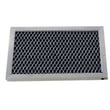
| Poor venting or greasy buildup | Grease filter needs cleaning/replacement | Microwave grease filter 5230W1A012E |
| No heat or weak heat | High-voltage system (diagnosis required) | Microwave magnetron 2B71165R |
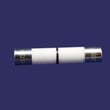
| Microwave dead or intermittent | Fuse or door interlock circuit | Microwave fuse 3B74133Q |
Why it matters
A microwave can seem “bad” when the real issue is maintenance (filters, cleaning) or a common wear part (light, fuse, door switch). Keeping airflow and the door safety circuit in good shape protects performance and helps prevent nuisance failures.
Last updated: January 2026


