 Owner’s manual
 Error Codes




What is the most common problem with GE washers?
The most common GE washer complaint is a cycle that won’t finish correctly because the washer won’t drain or won’t spin, leaving clothes wet. On the GE PTW600BSR0WS, this often traces back to a drain restriction, an out-of-balance load, or a lid/controls condition described in the PTW600BSR0WS owner’s manual.
Quick checks we recommend first
- Make sure the lid is fully closed; if the display shows “Lid”, open and close the lid, then restart.
- If the washer shows “CAnCELEd”, wait out the 4-minute lock-out before trying controls again.
- Reduce the load size and redistribute items (bulky loads can prevent a full-speed spin).
- Confirm the drain hose is not kinked or pushed too far down the standpipe.
- Use HE detergent and avoid over-dosing; oversudsing can reduce spin performance.
Most common causes and what they look like
| Symptom | Most likely cause | What to do next |
|---|---|---|
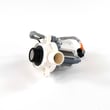
| Tub full of water, won’t drain | Clog in pump or hose; failed pump | Check for blockage; consider replacing the GE washer drain pump assembly WH23X28418 |
| Drains but clothes still wet | Load not balanced; spin speed reduced | Rebalance load; try a different cycle; verify proper detergent amount |
| Starts then stops, controls unresponsive | Normal lock-out after certain stops | Wait 4 minutes; restart per the manual |
| Spins then pauses early in cycle | Normal load sensing | Let it continue; the washer may “sense” and adjust |
Why it matters
Drain and spin problems are the issues customers notice immediately because they affect every load: standing water can cause odors, and poor spin leaves longer dry times and heavier, wetter laundry.
When a part is the likely fix
If you hear the pump humming but water barely moves, or you find debris in the pump area repeatedly, the drain pump is a common repair on top-load washers. For control-related symptoms, follow the display-message guidance in the manual before replacing electronic parts.
Last updated: February 2026
What are the benefits of using PTW600BSR0WS?
The GE PTW600BSR0WS washer’s biggest benefits are better wash customization and easier day-to-day dispensing and care. You can fine-tune temperature, soil (agitation), and spin settings for different loads, and the Flex Dispense drawer helps you use detergent, softener, and pre-wash products correctly for more consistent results.
Key benefits you’ll notice
- More control over cleaning: Temp, Soil, and Spin can be adjusted from minimum to maximum to match the load.
- Better dispensing convenience: The Flex Dispense drawer is designed for softener/conditioner, pre-wash detergent, detergent packets, and main detergent.
- Improved cold-load performance options: For cooler selections, powdered HE detergent can be placed directly on top of the load for better dissolving.
- Clear product-use guidance: The manual calls out what should not go in the drawer (for example, softener crystals and single-dose packets in the detergent compartment).
- Maintenance reminders that protect performance: Water supply hoses should be replaced every 5 years to reduce leak risk and keep fill performance reliable.
How to get the most benefit (best-use tips)
Use these habits to get the best cleaning, rinsing, and spin-out performance:
- Use HE detergent and dose by load size (overfilling can cause early dispensing).
- Put liquid fabric softener/conditioner in the far-left drawer compartment.
- Do not add fabric softener crystals to the dispenser drawer.
- Do not use liquid chlorine bleach and an Oxi pretreatment in the same load.
- Run the recommended cleaning routine (monthly basket cleaning guidance is in the manual).
Quick “what goes where” guide
| Product | Where to add it on PTW600BSR0WS | Common mistake to avoid |
|---|---|---|
| HE detergent | Right side of dispenser drawer | Overfilling or diluting (can dispense too early) |
| Liquid softener/conditioner | Far-left drawer compartment | Adding crystals to the drawer |
| Liquid chlorine bleach | Bleach dispenser (front left corner) | Spilling directly on clothing |
| Oxi pretreatment | With detergent in the washer (per product directions) | Using it in the same load as liquid bleach |
Why it matters
Correct dispensing and the right Temp, Soil, and Spin selections help you get cleaner clothes with fewer re-washes, better rinsing, and shorter dryer time (longer spin typically reduces drying time and total energy use).
For model-specific cycle and dispenser details, use the PTW600BSR0WS owner’s manual.
Last updated: February 2026
Is PTW600BSR0WS energy efficient?
Yes. The GE PTW600BSR0WS is a high-efficiency (HE) top-load washer; using the right cycle and settings (especially higher spin speeds) helps reduce total energy use by removing more water so clothes dry faster. For cycle and option details, follow the PTW600BSR0WS owner's manual.
How to get the best efficiency from this washer
- Use the lowest water temperature that still cleans well (cold or cool for most loads).
- Choose the correct cycle for the load; avoid over-washing lightly soiled items.
- Increase spin speed when fabric care allows; longer spin typically reduces dryer time and energy.
- Measure detergent carefully; too much can cause extra rinsing and longer run time.
- Keep the dispenser drawer clean so detergent and softener dispense correctly.
Settings that impact energy the most
The biggest energy drivers are hot water use and how much moisture remains after spin.
| Setting choice | What it changes | Efficiency impact |
|---|---|---|
| Water temperature | Hot water heating demand | Cold/cool saves the most energy |
| Spin selection | Remaining moisture in clothes | Higher/longer spin reduces dryer energy |
| Soil/agitation level | Cycle time and mechanical action | Higher soil settings can increase time/energy |
| Load size | Water and run time per pound of laundry | Full (not overloaded) loads are most efficient |
Why it matters
Most household laundry energy is tied to heating water and drying clothes. On the PTW600BSR0WS, choosing cooler temps and a higher spin (when appropriate) lowers energy use without sacrificing cleaning performance.
Last updated: February 2026
What would cause a GE washer to not spin?
On the GE PTW600BSR0WS washer, a no-spin problem is most often caused by the lid being open (a safety lockout), an out-of-balance load that the washer cannot correct, or a cycle/spin setting that leaves clothes wetter than expected. Start with the simple checks in the PTW600BSR0WS owner’s manual.
Quick checks that fix most no-spin complaints
- Make sure the lid is fully closed; then press Start to resume.
- If the Spin light is blinking, redistribute the load evenly and run Drain & Spin.
- Confirm you selected a cycle with a spin option (some settings reduce or skip spin).
- Avoid washing single heavy items (blankets, waterproof items) by themselves; they commonly trigger imbalance.
- If the washer paused during spin, let it continue; brief pauses can be normal.
What the washer is “telling” you
The PTW600BSR0WS can detect out-of-balance conditions; it may try to correct the load and still finish the cycle, but it might not reach full spin speed. If clothes are wetter than normal, we recommend redistributing the load and running Drain & Spin.
| Symptom | Most likely cause | Best next step |
|---|---|---|
| Lid opened, cycle stops | Lid safety feature | Close lid and press Start |
| Spin light blinking | Out-of-balance load | Redistribute; run Drain & Spin |
| Washer pauses during spin | Normal operation | Wait for cycle to continue |
| Won’t drain, then won’t spin | Drain restriction or pump issue | Check for standing water; inspect drain path |
When it points to a part problem
If the washer drains poorly or leaves water in the tub, it often will not spin properly. For this model, a common repair item is the GE washer drain pump assembly WH23X28418. If the tub drains but the basket will not ramp up to spin, drive system issues can also be involved (for example, shifting or speed sensing).
Why it matters
Spinning depends on two things: the washer must be allowed to spin (lid closed and cycle running) and it must be able to spin safely (balanced load and proper draining). Fixing those basics prevents repeat wet-load issues and reduces strain on the motor and control.
Last updated: February 2026
Where to find model on GE washer?
On the GE washer model PTW600BSR0WS, the model and serial number label is under the lid. Lift the lid and look along the underside area near the opening; that tag is what you will use to match parts and service information in the PTW600BSR0WS owner's manual.
Where to look (quick checklist)
- Lift the washer lid and look for a sticker or metal tag under the lid area
- Check near the top rim of the cabinet opening (under the lid)
- Write down both the model number and serial number exactly as shown
- Take a clear photo of the tag for ordering parts later
- If the tag is worn, use a flashlight and read it at an angle
What the label looks like and what to record
The tag typically includes the model number, serial number, and sometimes electrical ratings. Record these items exactly:
| Item on label | Example format | Why we need it |
|---|---|---|
| Model number | PTW600BSR0WS | Ensures correct part fit and diagrams |
| Serial number | Letters and numbers | Helps match production version |
| Brand | GE | Confirms manufacturer family |
Why it matters
GE often uses multiple versions of similar-looking washers. Using the exact model number (PTW600BSR0WS) helps us match the right washer parts, such as a drain pump, water inlet valve, or control board, without guesswork.
Last updated: February 2026
How to force GE washer to drain and spin?
To force your GE PTW600BSR0WS washer to drain and spin, select the Drain + Spin cycle and press Start. If the washer is paused with water in the basket, switching to Drain + Spin is the correct way to pump water out and extract it with a spin.
Quick steps (Drain + Spin)
- Press Power to wake the display.
- Close the lid; the washer will not start with the lid open.
- Turn the cycle knob to DRAIN+SPIN.
- Press Start/Pause to begin.
- If you paused the cycle, press Start again to resume after selecting Drain + Spin.
If it still will not drain or spin
These checks solve the most common “won’t drain” and “won’t spin” situations on this style of GE top-load washer:
- Lid not closed: close the lid and press Start.
- Out-of-balance load: redistribute items evenly, then run Drain + Spin again.
- Control needs a reset: unplug the washer for 2 minutes, plug it back in, then select Drain + Spin and press Start.
- No power: verify the outlet works and reset the breaker if needed.
- Drain problem symptoms (humming, gurgling, slow/no water leaving): check for a kinked drain hose or a clog; if the pump is failing, the GE washer drain pump assembly WH23X28418 is the model-matched replacement.
What you should see (normal vs. problem)
| What happens | What it usually means | What to do |
|---|---|---|
| “Lid” scrolls on display | Lid is open | Close lid, press Start |
| Spin light blinks, load is wetter than normal | Out-of-balance detected | Redistribute load, run Drain + Spin |
| Pump hums but water does not leave | Drain restriction or weak pump | Check hose/clogs; consider drain pump |
| Washer pauses during spin | Normal operation | Let it continue |
Why it matters
Running Drain + Spin is the safest way to clear standing water and reduce dripping-wet laundry without restarting a full wash cycle. It also helps after an out-of-balance event so the washer can finish extracting water properly.
For cycle behavior, lid-lock messages, and Start/Pause details, use the PTW600BSR0WS owner's manual.
Last updated: February 2026





