 Owner’s manual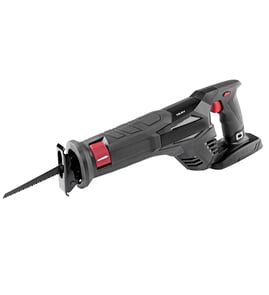

Do you need to oil a reciprocating saw?
For the Craftsman 315171020 reciprocating saw, we do not oil the motor or internal drive as routine maintenance; instead, we keep the tool clean and use lubrication only where the manual calls for it. For exact care steps and safety guidance, follow the 315171020 owner's manual.
- Do not oil the motor housing or vents; oil can attract dust and lead to overheating.
- Do not drip oil into the switch/trigger area; it can contaminate electrical contacts.
- Lightly lubricate only moving contact points you can access (for example, blade clamp contact surfaces) if they feel dry or sticky.
- Use a dry-film lubricant when possible; it reduces sawdust buildup compared to wet oil.
- Wipe off excess immediately; any lubricant that flings off increases mess and vibration.
- Unplug the saw before any cleaning or maintenance.
- Remove the blade and brush out dust around the blade clamp and shoe.
- Check that the blade is fully seated in the clamp and matches the shank capacity.
- Let the saw do the work; excessive force increases heat and vibration.
- Use the right speed for the material (variable speed helps control heat and chatter).
| Situation | What to use | What to avoid |
|---|---|---|
| Dusty cutting (wood, demo) | Dry-film spray (PTFE/silicone) | Heavy oil/grease that traps sawdust |
| Clamp feels sticky | Small drop of light machine oil, then wipe | Soaking the mechanism |
| Electrical/switch area | No lubricant | Any oil or spray |
A reciprocating saw runs at high speed (this model is variable speed up to 0 to 2500 SPM); keeping the blade clamp area clean and using only minimal, targeted lubrication helps maintain cutting performance, reduces vibration, and prevents dust from turning lubricant into abrasive paste.
You can also search for maintenance supplies and repair parts by model number on Sears PartsDirect.
Last updated: February 2026
How to replace reciprocating saw blade craftsman?
To replace the blade on your Craftsman reciprocating saw model 315171020, unplug the saw, loosen the blade clamp screw with the included 5/32-inch Allen wrench, swap the blade, then tighten the clamp screw securely. For the exact clamp and blade orientation details, use the owner's manual.
- Unplug the saw before touching the blade or clamp.
- Use the 5/32-inch Allen wrench to loosen the blade clamp screw.
- Slide the old blade out of the clamp.
- Insert the new blade shank fully; blades can be installed with teeth facing up or down depending on your cut.
- Tighten the blade clamp screw securely.
- Store the Allen wrench back in its holder.
Sometimes the blade clamp sticks to the saw bar.
- Loosen the blade clamp screw with the Allen wrench.
- Tap lightly on the end of the Allen wrench with a mallet to free the clamp.
- Remove the blade, then reinstall and tighten as normal.
| Blade type | What it’s used for | What changes during install |
|---|---|---|
| Regular reciprocating saw blade | General cutting | Installs into the clamp normally |
| Flush cutting blade | Close cuts near walls | Clamp must be in full rear position; base assembly is turned 90° before tightening |
A fully seated blade and a securely tightened clamp screw reduce blade wobble, improve cut control (SPM performance), and help prevent the blade from slipping during a cut.
You can also search by model number 315171020 to find diagrams and replacement parts on Sears PartsDirect.
Last updated: February 2026
What should you not do with a reciprocating saw?
You should not force a reciprocating saw through the cut, use the lock-on feature when you may need to stop suddenly, or operate without eye protection. With the Craftsman 315171020 (120V, variable speed), safe control and the right setup prevent binding, kickback, and loss of control; see the 315171020 owner's manual.
- Don’t push hard; let the blade do the cutting and keep the shoe/base against the work.
- Don’t use the lock-on button for heavy cuts or any situation where you might need to stop fast.
- Don’t cut with the workpiece loose; clamp it so the material cannot shift.
- Don’t start cutting without checking for hidden wiring, nails, or pipes in the cut path.
- Don’t reach under or behind the material while the blade is moving.
- Don’t set the saw down until the blade fully stops.
This model is designed for 120V AC household current and has variable speed control. Use these basics every time:
| What to do | Why it helps |
|---|---|
| Wear safety goggles or safety glasses with side shields | Reduces risk from flying debris |
| Verify the trigger is not locked on before plugging in | Prevents accidental start-up |
| Match blade type to material (wood, metal, demo) | Reduces binding and overheating |
| Use variable speed instead of full speed by default | Improves control and blade life |
- Confirm the plug fits properly; do not modify a polarized plug.
- Keep two hands on the tool when possible; maintain a stable stance.
- Keep the cord clear of the cutting area.
- If the saw bogs down, back off and reduce speed; do not “muscle through.”
Most reciprocating saw problems start with loss of control: forcing the cut, using the wrong blade, or relying on lock-on when conditions change. Good control protects you, the motor, and the blade clamp assembly.
If you need to identify the correct replacement parts for your Craftsman 315171020, start with the model-based parts list, or search by model on Sears PartsDirect.
Last updated: February 2026
Why did my reciprocating saw stop working?
If your Craftsman reciprocating saw model 315171020 stopped working, start with the basics: confirm you have a good 120V AC power source, then check the trigger/lock-on operation and look for common wear items like motor brushes or a failing switch. Use the 315171020 owner's manual for safety and control details.
- Try a different known-good outlet; this saw is designed for 120 volts, 60 Hz, AC only.
- If you use an extension cord, remove it and test again; voltage drop can cause low power or overheating.
- Make sure the trigger is working smoothly and not sticking.
- If the saw has been unplugged while locked on, disengage lock-on immediately, then retest.
- Inspect the cord and plug for cuts, loose prongs, or burn marks.
This model uses a trigger switch, a lock-on button for continuous running, and a variable speed control selector. A worn switch or a lock-on mechanism that is partially engaged can make the saw seem dead or intermittent.
| Symptom | Most likely area to check | What to do next |
|---|---|---|
| No response at all | Outlet, cord, trigger switch | Verify power, inspect cord, then test switch continuity |
| Runs only sometimes | Switch, brushes, cord strain relief | Check for intermittent power and brush wear |
| Runs but lacks power | Low voltage, extension cord, speed selector | Remove extension cord, increase speed setting |
If power and controls check out, the most common internal causes are:
- Worn motor brushes (tool may stop suddenly or run intermittently)
- Failing trigger switch (often a first-to-fail electrical part)
- Damaged wiring connections inside the handle
- Worn gears or reciprocating mechanism components (motor may run but blade action is weak or noisy)
For electrical testing and safe troubleshooting steps, we use a multimeter and follow the wiring and safety guidance in the 315171020 owner's manual.
A reciprocating saw draws significant current under load; low voltage, a failing switch, or worn brushes can quickly turn into overheating, arcing, or repeated shutdowns. Catching the root cause early helps protect the motor and drive mechanism.
To look up diagrams and replacement parts by model number, search on Sears PartsDirect.
Last updated: February 2026